3DS and hosted checkout
Handle 3DS redirects and browser info in the direct API. Create and reuse hosted checkout sessions, register redirect URLs and fulfill from server-side status.
Last updated 2026-10-20 · API contract v1.0.0
What to expect from 3DS
- Successful authentication doesn't mean the charge succeeded. Authentication only proves that the payer is the cardholder. The issuer can still decline the charge, so rely on the payment's
status. - The platform can't guarantee that payers never see an authentication challenge. Authentication may need no interaction, or the payer may have to complete a challenge on the bank's page. The issuer and the provider decide.
- You can't bypass the provider's or the issuer's authentication requirements through merchant configuration.
When authentication is required
| Scenario | What the platform does | What you see | What to do |
|---|---|---|---|
| Authentication needs no interaction | Continues processing the payment | A status that reflects the actual charge result (there may be no payment.requires_action event) | Handle the status |
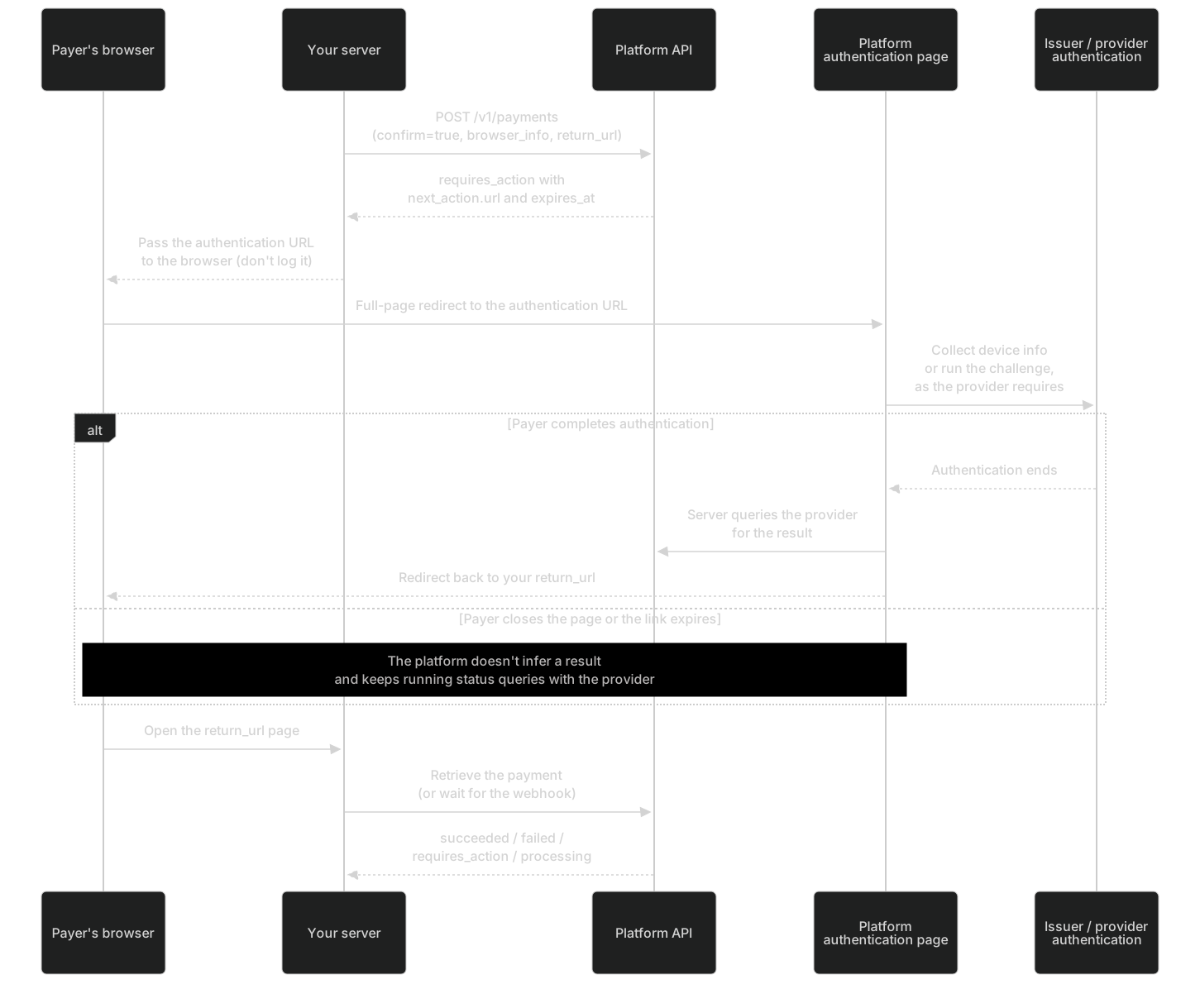
| A challenge is required | Creates an authentication session | requires_action + next_action | Do a full-page redirect to the authentication URL |
| Authentication completes and the charge succeeds | Queries the provider for the payment outcome, posts it to the ledger and notifies you | succeeded | Fulfill the order |
| Authentication succeeds but the charge is declined | Records two separate results: authentication succeeded and the payment failed | failed + a sanitized failure reason | Ask the payer to use another card. Don't treat a successful authentication as a successful payment |
| The payer closes the page | Doesn't infer success or failure, and queries the provider for the status | Stays requires_action or processing | Show "Confirming". Within the validity period, you can prompt the payer to authenticate again |
| The authentication link has expired | Blocks the old session from being used again, runs a status query on the original attempt first, and creates a new authentication session when it's safe to continue | The actual current payment status | Retrieve the payment and handle the latest next_action or status |
| A forged authentication return in the browser | Only triggers a server-side status query and doesn't record a success | No change to the funds outcome | On your page, likewise trust only server-side queries |
In the test environment, use the 3DS test cards to simulate outcomes such as no interaction needed, a successful challenge, a failed challenge and a successful authentication followed by a declined charge.
Handle next_action.redirect_to_url
The action the payer's browser needs to complete. url points to the platform's authentication page and carries a short-lived credential that can only view and continue this one authentication; its validity period doesn't exceed that of the provider session. You must take the payer's browser to this URL: your server can't complete the authentication on the cardholder's behalf. Don't write the URL to analytics logs or leak it through the Referer header. After the authentication URL expires, retrieve the payment to get the latest next_action; don't cache the old URL.
| Name | Type | Required | Description |
|---|---|---|---|
type | string | Required | The initial release of the public API exposes only redirect_to_url. Clients must tolerate types that are added in the future.
Example: |
authentication_session_id | string | Required | Authentication session ID, linked to a specific payment attempt. Example: |
url | string(uri) | Required | The URL of the platform's authentication page. Example: |
expires_at | string(date-time) | Required | The time the authentication access expires (10 minutes at most). Example: |
See next_action in the API reference.
- Full-page redirect: Return
next_action.urlfrom your server to the payer's browser and redirect the whole page. Don't put it in an iframe (the authentication page can't be embedded in third-party pages). In an app, open it in the system browser or an in-app browser tab. - The issuer challenge always completes inside the platform's authentication page, which shows the issuer's page in an embedded frame or through a full-page redirect, depending on the provider's requirements. You don't need to integrate the provider's 3DS SDK on your page, and you can't.
- Validity period: At most 10 minutes, as set by
next_action.expires_at(the shorter of the platform's cap and the provider session's validity period). - Security: The authentication URL carries a short-lived credential that is bound to this one authentication only, so it can't be used for other orders. Don't write it to logs, analytics tools or error reporting. Don't put it in the URL of your own page (query parameter or hash), or it can leak through the Referer header or analytics scripts.
- Don't collect issuer passwords or SMS verification codes on your page. The payer enters challenge information only in the authentication flow that the issuer or the provider supplies.
- Authentication that needs interaction can't be completed by your server on behalf of the cardholder: the payer must be present when you start the payment.
- For now,
typehas only one value,redirect_to_url. If you get a type you don't recognize, treat the payment as "not completed" and query it. Don't treat it as success.
Caution: Authentication URL expired
Don't call confirm again. Retrieve the payment (GET/v1/payments/{payment_id}) to get the latest next_action or status. The platform first runs a status query on the original attempt and creates a new authentication session when it's safe to continue.
After authentication
After the payer completes authentication, the browser returns to the return_url you provided when you created or confirmed the payment.
| Actual outcome | Status from a server-side query | What to do |
|---|---|---|
| Authentication succeeds and the charge succeeds | succeeded, followed by a payment.succeeded event | Fulfill the order |
| Authentication succeeds but the issuer declines the charge | failed, with a failure.code such as card_declined. authentication_status shows that authentication passed | Ask the payer to use another card. Don't fulfill the order just because authentication succeeded |
| Authentication fails | failed (for example, authentication_failed) | Ask the payer to use another card or try again |
| The payer doesn't finish or closes the page | requires_action or processing | Show "Confirming your payment". Within the validity period, you can prompt the payer to continue authenticating |
| Still being confirmed | processing | Wait for the webhook, or query at the recommended polling frequency |
You can reproduce each outcome above in the test environment with the 3DS test cards.
Collect browser information
browser_info is used for 3DS risk assessment and must come from the payer's real browser. Whether a field is required depends on the provider's current capabilities. If a required field is missing, the API returns 400 before it submits anything to the provider and names the field in error.field. We recommend always providing every field.
The payer's real browser context, used for 3DS. It must come from the payer's browser and can't be replaced with merchant server information. Whether it's required depends on the capabilities of the current provider adapter; if required information is missing, a clear error is returned before anything is submitted to the provider.
| Name | Type | Required | Description |
|---|---|---|---|
user_agent | string | No | The payer's browser User-Agent. Constraints: Example: |
accept_header | string | No | The Accept request header of the payer's browser. Constraints: Example: |
language | string | No | Browser language (BCP 47). Constraints: Example: |
screen_width | integer(int32) | No | Constraints: Example: |
screen_height | integer(int32) | No | Constraints: Example: |
color_depth | integer(int32) | No | Constraints: Example: |
timezone_offset_minutes | integer(int32) | No | Time zone offset in minutes, following the sign convention of JavaScript's getTimezoneOffset(). For example, UTC+8 is -480. Constraints: Example: |
javascript_enabled | boolean | No | Example: |
ip_address | string | No | The payer's IPv4 or IPv6 address. Resolve it through a trusted proxy chain, and don't use the merchant server's IP address in its place. Constraints: Example: |
See browser_info in the API reference.
| Field | Source | Notes |
|---|---|---|
user_agent | The payer's browser navigator.userAgent, or the User-Agent header of the payer's request | Don't use the user agent of your server's HTTP client |
accept_header | The Accept header of the page navigation request when the payer opens the payment page (recorded on your server) | Not the Accept header of an XHR request, which is usually application/json |
language | navigator.language | For example, en-US |
screen_width / screen_height / color_depth | window.screen | — |
timezone_offset_minutes | new Date().getTimezoneOffset() | See the table below for the sign convention |
javascript_enabled | true whenever the collection script runs | — |
ip_address | The payer's IP address, resolved by your server through a trusted proxy chain | Don't use your server's IP address. Don't trust an X-Forwarded-For header sent by the client as is |
// Collect this in the payer's browser and submit it to your server together with the card details
export function collectBrowserInfo() {
  return {
    user_agent: navigator.userAgent,
    language: navigator.language,
    screen_width: window.screen.width,
    screen_height: window.screen.height,
    color_depth: window.screen.colorDepth,
    timezone_offset_minutes: new Date().getTimezoneOffset(), // UTC+8 is -480
    javascript_enabled: true
  };
}
timezone_offset_minutes follows the sign convention of JavaScript's getTimezoneOffset(), which is the opposite of how "UTC+8" is written:
| Payer's time zone | timezone_offset_minutes |
|---|---|
| UTC+8 (Beijing, Singapore) | -480 |
| UTC+9 (Tokyo) | -540 |
| UTC+5:30 (India) | -330 |
| UTC±0 | 0 |
| UTC−5 (US Eastern Standard Time) | 300 |
| UTC+14 / UTC−12 (the two ends of the range) | -840 / 720 |
The value for the same region changes during daylight saving time, so collect it live when the payer pays and never hard-code it. 203.0.113.x in the examples is a reserved documentation address. Don't use it in the live environment.
How hosted checkout works
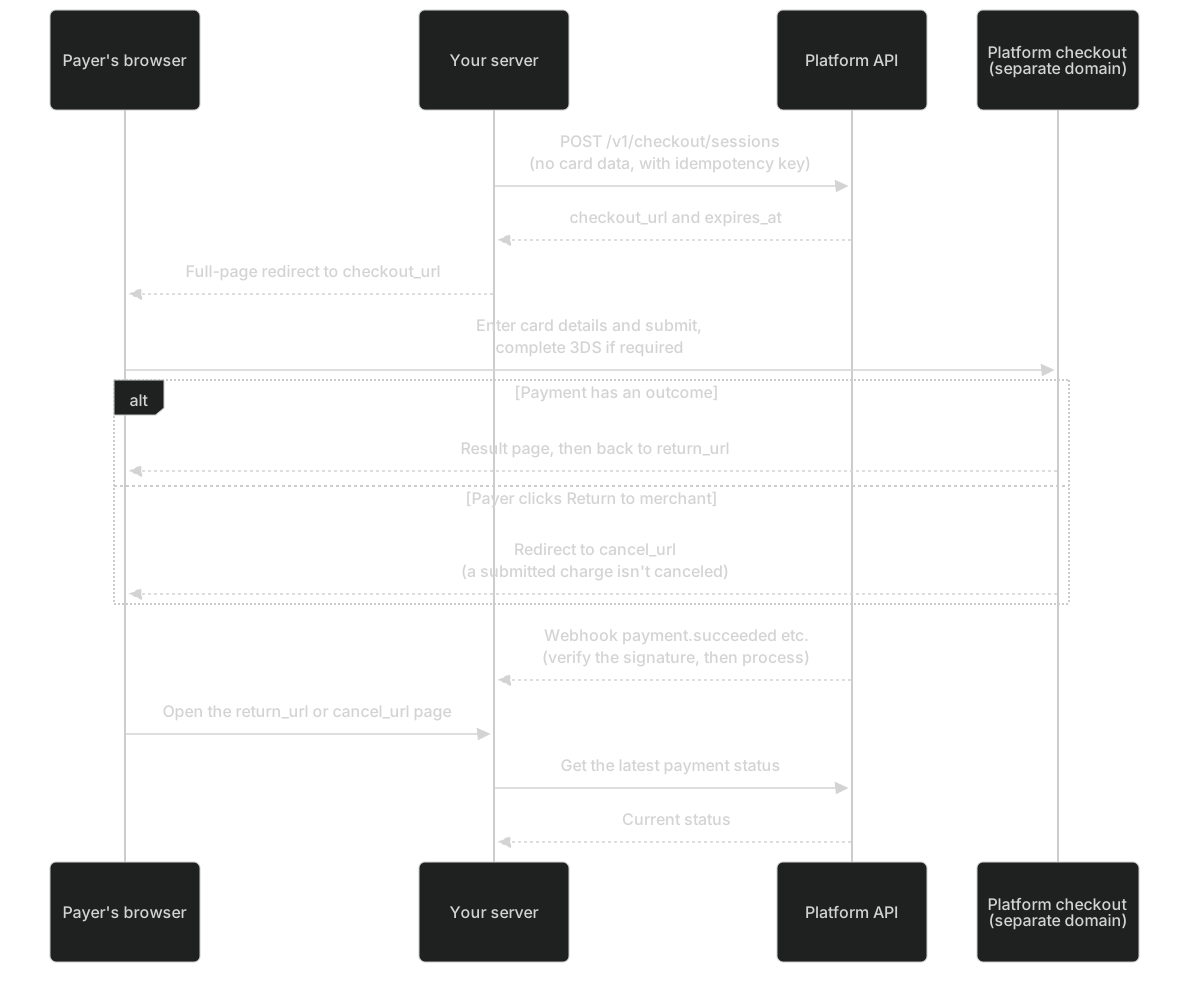
- Checkout runs on a separate platform domain. Card details are received inside checkout by an isolated collection component: either a provider-hosted component or an isolated iframe on a separate platform subdomain. The platform chooses based on the provider's capabilities, and it makes no difference to your integration. Neither your page nor your server touches card data, and the create request contains none either.
- Checkout shows the merchant display name, the order summary (
description), the amount and the currency. It never shows your server-side key.
Two ways to create a checkout session
| Method | Request fields | Use when | Rules |
|---|---|---|---|
A: pass payment_id | payment_id + return_url (required) + optional cancel_url, locale, description | You've already created a payment through the API (for example, with confirm=false) and now hand it to checkout | Don't also pass merchant_order_no, amount or currency |
| B: pass the order, amount and currency (most common) | merchant_order_no + amount + currency + return_url (required) + optional fields | You create a checkout session directly for an order | The platform creates the order's payment or reuses the existing one. When it reuses one, the amount and currency must match |
Both methods require an Idempotency-Key. For an example of method B, see the Quickstart. Method A:
# Method A: create a checkout session for an existing payment (for example, one created with confirm=false)
curl https://api.payhub.example/v1/checkout/sessions \
  -H "Authorization: Bearer <TEST_SERVER_API_KEY>" \
  -H "Idempotency-Key: order-demo-008-session-v1" \
  -H "Content-Type: application/json" \
  -d '{
    "payment_id": "<PAYMENT_ID>",
    "return_url": "https://merchant.example/payment/return",
    "cancel_url": "https://merchant.example/payment/cancel",
    "locale": "en"
  }'
Placeholders to replace
<TEST_SERVER_API_KEY>: Test-environment server API key, created on the "API Key" page of the merchant portal<PAYMENT_ID>: The id returned when you create a payment (starts with pay_)
The API returns these errors: 400 invalid_request if you pass both groups of parameters or neither, 403 capability_disabled if the currency isn't enabled in the current environment (this check runs before the amount check), 422 order_amount_mismatch if the amount or currency doesn't match the existing order, 422 url_not_allowed if the redirect URL isn't registered, and 409 if the order can't be paid. For all fields and response examples, see POST/v1/checkout/sessions.
Warning
checkout_url contains a checkout token (the token stays in the URL so that the payer can refresh, go back and reopen the page). Use it only for a full-page redirect of the payer's browser. Don't write it to logs, analytics tools or error reporting, and don't share or forward it. Changing the parameters of checkout_url can't change the amount, the currency or the merchant that receives the payment.
Session reuse and validity period
| Situation | What the platform does |
|---|---|
| You create another session for the same order and the order can still be paid | Reuses the same payment and generates a new short-lived session. The amount doesn't change |
| The linked payment has already succeeded | Returns 200 and a read-only session with status=completed. It doesn't create a new entry point for charging |
| The order can't be paid (expired, canceled, out of attempts, and so on) | Returns 409 |
| The amount or currency doesn't match the existing order | Returns 422 |
| The payer submits in two tabs at the same time | Only one in-flight attempt is created |
| The session expires | It only means the session no longer accepts new submissions. It doesn't mean the payment failed, and any in-flight payment keeps being checked with status queries. During the read-only period after expiry (24 hours by default, which is also the maximum), the payer can still open the original link to see the session and the payment result (read-only). After that, the link stops working |
| Session validity period | At most 30 minutes, and never longer than the time the order has left to be paid |
| The payer refreshes, goes back or reopens the link after a successful payment | No second charge happens |
| The payer's payment fails | Within the attempt limit and the validity period, the payer can enter card details again in checkout and retry |
Checkout language
locale uses BCP 47. A value that starts with zh shows Chinese and a value that starts with en shows English. For any other value, or if you don't pass one, checkout uses the merchant's default language. Payers can also switch the language in the checkout footer.
Redirect URL allowlist
return_urlandcancel_url(andreturn_urlin the direct API) must match a rule you registered in advance (Register redirect URLs (opens the merchant portal in a new tab) (Test environment; Requires Owner, Admin or Developer)). Otherwise the API returns 422url_not_allowed.- Rules are registered per environment. Each rule consists of a scheme + a host (an exact host, or a one-level wildcard such as
*.example.com) + an optional port + an optional path prefix. - Path prefixes match by path segment:
/paymatches/pay/returnbut not/payment. The query string and the fragment aren't part of the match. - The live environment allows only
https. In the test environment, you can also register local addresses such ashttp://localhost. - When the platform redirects the payer back, it uses the URL you provided exactly as is and appends no parameters.
Returning to the merchant doesn't cancel the charge
When the payer clicks "Return to merchant" (cancel_url), that doesn't cancel a charge that was already submitted. Your cancel_url page must retrieve the payment first. If the payment is still in flight, show "Confirming". If you've confirmed that no charge is in flight and you need to close the order, call POST/v1/payments/{payment_id}/cancel and rely on status=canceled.
Fulfill based on server-side status
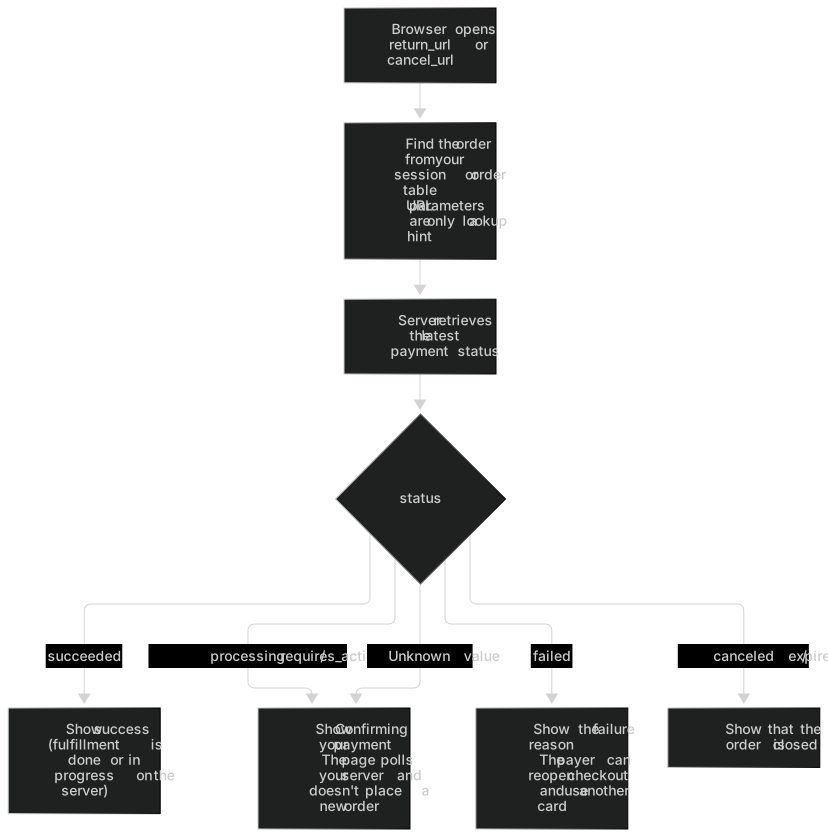
- The browser returning to
return_urlis for the payer experience only. - The only valid basis for fulfillment is
status=succeededfrom a server-side query, or apayment.succeededevent whose signature you've verified (for the verification method, see Verify webhook signatures). - URL parameters (including an order ID you added yourself) are never a result. Treat them only as a hint about which payment to look up.
- Authentication and checkout credentials are bound to a single object: the credential for order A can't act on order B. Don't reuse these URLs across orders in your own system either.
// return_url / cancel_url page: display only. The server-side query decides the outcome; URL parameters are only a hint for finding the order
app.get('/payment/return', async (req, res) => {
  const order = await findOrderForSession(req.session.userId); // Find the order from your session or order table
  const payment = await getPayment(order.paymentId); // Retrieve the latest status on the server
  switch (payment.status) {
    case 'succeeded':
      return res.render('paid', { order }); // A webhook or a server-side query triggers fulfillment; the page only displays the result
    case 'failed':
      return res.render('failed', { order, message: payment.failure?.message }); // The payer can reopen checkout and use another card
    case 'canceled':
    case 'expired':
      return res.render('closed', { order });
    default:
      return res.render('confirming', { order }); // processing / requires_action / unknown: show "Confirming"
  }
});