Webhook events and signatures
How the platform sends events and when, plus signature checks, deduplication, ordering, retries, secret rotation, test events and backfilling missed events.
Last updated 2026-10-19 · API contract v1.0.0
Overview
- You configure one primary endpoint per environment (test and live) and choose the events to subscribe to: Configure webhooks (opens the merchant portal in a new tab) (Test environment; Requires Owner, Admin or Developer).
- The platform sends the event JSON to your endpoint with an HTTPS POST and signs it with the signing secret. The signing secret and the API key are independent of each other.
- Events notify you of facts. They don't promise to cover every internal state: for example, a payment that succeeds without any interaction may have no
payment.requires_actionevent.
Delivery semantics
- The same event can arrive more than once.
- Events can arrive out of order.
- Deduplicate by event ID, using persistent storage.
- Process events by
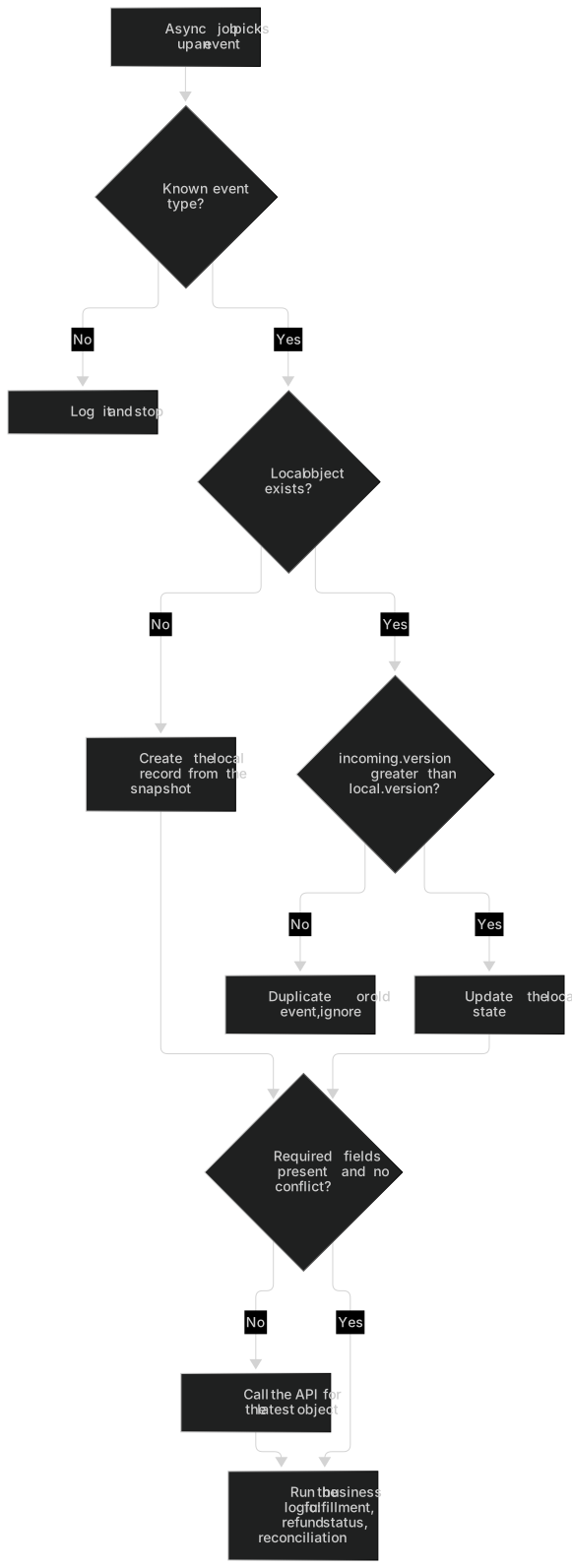
data.object.version: an older version must never overwrite a newer state, and on a conflict, call the API to get the latest state.
Caution
Don't order events by status name. After failed, the payer can retry with another card and succeed, so payment.failed can arrive after payment.succeeded.
Event types
| Event | Trigger condition | Typical action | Scope required for GET /v1/events |
|---|---|---|---|
| payment.requires_action | The payment enters the pending-authentication state; may not be generated if the payment succeeds directly without interaction | Usually nothing to do (the synchronous response already includes next_action); useful for monitoring | payments:read |
| payment.succeeded | The payment is confirmed as successful for the first time | Fulfill idempotently by payment ID | payments:read |
| payment.failed | An attempt clearly failed; the payload contains the failed attempt ID and the current Payment version | Don't close the order right away: the payer may retry with another card; process events by version | payments:read |
| payment.canceled | The payment was canceled safely | Close the order | payments:read |
| payment.expired | The payment expired and closed with no attempt in flight | Close the order; collecting payment again needs a new merchant order ID | payments:read |
| payment.corrected | An abnormal historical state was corrected using trusted evidence and a controlled process (for example, a payment that had expired locally was verified as a real successful charge) | Query the latest payment status and act on it (for example, fulfill the order late, or refund as your business requires); manual review of these orders is recommended | payments:read |
| refund.pending_review | The refund was accepted and is waiting for review | Record the event | refunds:read |
| refund.processing | The refund entered processing at the provider | Record the event | refunds:read |
| refund.succeeded | Provider confirmed the refund succeeded | Update the order's refund status | refunds:read |
| refund.failed | The refund clearly did not succeed | Notify support; to refund again, submit a request with a new merchant refund ID | refunds:read |
| refund.rejected | Rejected in review and not submitted to the provider | Check failure.message and resubmit if needed | refunds:read |
| refund.canceled | Canceled by the platform before submission to the provider | Record the event | refunds:read |
| refund.returned | The funds of a refund that had succeeded came back | Check returned_amount; don't refund again automatically. First confirm whether the payer received the refund, then handle it as a new refund request | refunds:read |
| dispute.created | A dispute case was opened | Prepare and upload evidence on the Disputes page of the merchant portal, and watch the evidence due date | payments:read |
| dispute.updated | The case information or status changed | Review what changed | payments:read |
| dispute.closed | The case was closed | The funds impact is determined by the actual funds events in settlements and balance transactions | payments:read |
| settlement.created | The settlement was generated and funds were reserved | Reconcile | finance:read |
| settlement.paid | The settlement payout succeeded | Reconcile and verify the bank deposit | finance:read |
| settlement.failed | The settlement payout clearly failed | The platform regenerates and approves a new settlement; watch for a later settlement.created | finance:read |
| settlement.returned | A payout return by the bank was confirmed | Check your payout account details; the platform doesn't automatically pay out again to the old account | finance:read |
The platform may add event types in the future. When you receive a type you don't recognize, return 2xx and ignore it.
- Platform exception refunds (the platform returns a duplicate charge, or an overcharge caused by an amount mismatch, to the cardholder's original payment method) don't send
refund.*events and don't appear in the refund endpoints. The platform notifies you separately with an in-app notification and an email. These returns don't affect your balance or your refundable amount. - The API has no dispute resource. You can see disputes only through
dispute.*events,GET /v1/events/{event_id}(requirespayments:read) and the merchant portal. Thedata.objectof adispute.*event is a snapshot of the dispute:
| Name | Type | Required | Description |
|---|---|---|---|
id | string | Required | Dispute ID (dsp_ prefix). Example: |
payment_id | string | Required | The related payment ID. Example: |
merchant_order_no | string | Required | The related merchant order ID. Example: |
reason | string | Required | Dispute reason (platform reason category): fraudulent, product_not_received, product_unacceptable, duplicate, credit_not_processed, general. Receivers must tolerate new values. Example: |
amount | integer(int64) | Required | Disputed amount, in the smallest currency unit. Constraints: Example: |
currency | string | Required | Uppercase three-letter currency code. Constraints: Example: |
status | string | Required | Case status.
Example: |
funds_impact | string | Required | Funds impact.
Example: |
evidence_due_by | string(date-time)Nullable | Required | Evidence due time; can be null. Example: |
created_at | string(date-time) | Required | The time the case was opened. Example: |
closed_at | string(date-time)Nullable | Required | The time the case was closed; null if it hasn't been closed. Example: |
version | integer(int64) | Required | Increases with every effective change; used to discard older events. Constraints: Example: |
Event object
{
  "id": "evt_demo_001",
  "type": "payment.succeeded",
  "api_version": "v1",
  "created_at": "2026-09-23T09:05:00Z",
  "environment": "test",
  "merchant_id": "mer_demo_001",
  "data": {
    "object": {
      "id": "pay_demo_001",
      "merchant_order_no": "ORDER-DEMO-001",
      "amount": 10000,
      "currency": "USD",
      "status": "succeeded",
      "latest_attempt_id": "pat_demo_001",
      "version": 4
    }
  }
}| Name | Type | Required | Description |
|---|---|---|---|
id | string | Required | Event ID, the same as X-Pay-Event-Id. Example: |
type | string | Required | Event type. Events notify you of facts and don't promise to cover every internal state; receivers must tolerate types that are added in the future.
Example: |
api_version | string | Required | The API version of the payload. Example: |
created_at | string(date-time) | Required | The time the event was created (business time). Don't use it in place of the signature time. Example: |
environment | string | Required | Environment: test is the test environment and live is the live environment. Receivers must check the environment.
Example: |
merchant_id | string | Required | Merchant ID. Example: |
data | EventData | Required | The event payload. |
object | object | Required | A snapshot of the business object (Payment, Refund, Dispute or Settlement) at the time of the event. Its fields match the corresponding resource in the merchant API, and it contains at least id and version. Example: |
- The event ID is the same as the
X-Pay-Event-Idrequest header, and it's the deduplication key. created_atis the business time. Don't use it in place of the signature time to decide whether a delivery is still within the allowed time window.- The receiver must check that
environmentandmerchant_idbelong to it. - When the same event is retried, the event ID and the request body bytes stay the same. Events carry only the minimum necessary data and never contain full card numbers, CVCs, keys or authentication secrets.
- Amount fields in
data.object(such asamountandreturned_amount) are integers in the smallest currency unit and always appear together withcurrency.
Warning: Amounts are integers in the smallest currency unit
USD 10000 means 100.00 US dollars and JPY 10000 means 10,000 Japanese yen, so don't divide every amount by 100. Never add amounts in different currencies. See Data formats.
Request headers
| Request headers | Example | Description |
|---|---|---|
| X-Pay-Event-Id | evt_demo_001 | Event ID, the same as the id in the payload. Receivers use it to deduplicate events with persistent storage. |
| X-Pay-Delivery-Id | del_demo_001 | ID of this delivery; it's different for every delivery of the same event. |
| X-Pay-Test-Event | true | Appears only on deliveries produced by "Send test event" in the merchant portal, and its value is always true. The object ID in a test event is the ID prefix followed by 26 zeros and doesn't correspond to any real object. Receivers must not fulfill anything based on it. They can skip business processing, but should still verify the signature and return 2xx. |
| X-Pay-Signature | t=1790154300,v1=0867b244eee91cdcd27eb83756e1f133889a7faec94648c80d1a0298474e3b77 | The signature time and the HMAC-SHA256 signature. During the overlap period of a secret rotation, it can contain multiple v1 values. |
X-Pay-Delivery-Id is different on every delivery. Use it only for troubleshooting, and don't use it to deduplicate. When you receive X-Pay-Test-Event: true, only log the event and don't fulfill anything.
Signature scheme
signed_payload = ASCII(t) + "." + raw HTTP request body bytes
v1 = hex(HMAC-SHA256(webhook_secret, signed_payload)) // lowercase hex, 64 characterstis the signature time of this delivery (UNIX seconds). It's regenerated on every retry, so a legitimate resend of an old event isn't rejected because its business time is far in the past.- Check that
|current time − t| ≤ 300 seconds. Both servers need to keep their clocks synchronized (NTP). - Compare signatures in constant time (Node.js
crypto.timingSafeEqual, Pythonhmac.compare_digest, Gohmac.Equal, JavaMessageDigest.isEqual). - When the header has more than one
v1, the signature is valid if any one of them matches (during the overlap period of a secret rotation). - Compute the signature over the raw request body bytes: verify the signature first, then parse the JSON. Don't parse the JSON and re-serialize it.
- The HMAC key is the UTF-8 bytes of the full signing secret string, including the
whsec_prefix. Don't Base64-decode it and don't strip the prefix.
Signature verification steps and sample code
- Read the raw request body bytes (turn off your framework's automatic JSON parsing for the webhook route, or keep the raw body).
- Parse
X-Pay-Signatureand extracttand all thev1values. Reject the request if the format is invalid. - Check that
tis within 300 seconds of your local time, to prevent replay attacks. - Compute the expected signature with the signing secret that is currently valid (two secrets, new and old, during a rotation).
- Compare it with each
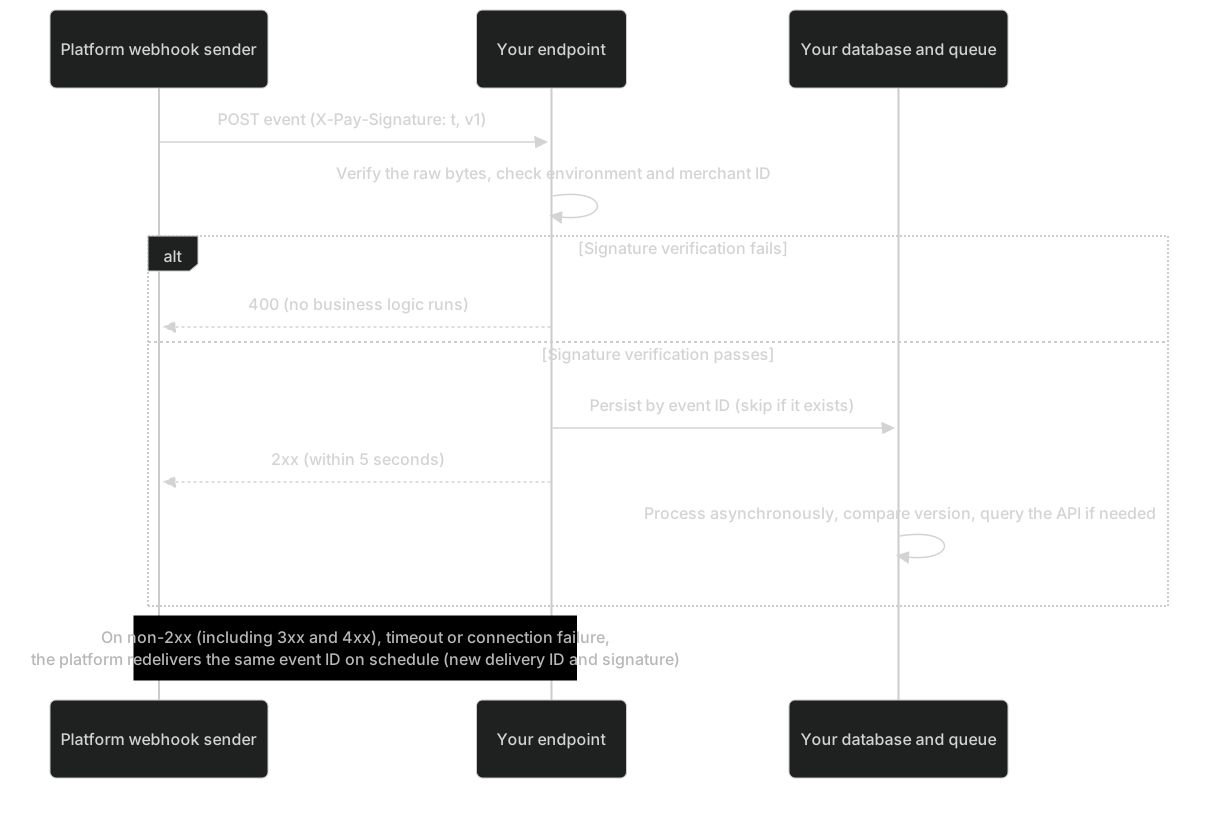
v1in constant time. If any one matches, the signature is valid. If none matches, return 400 and run no business logic. - Parse the JSON.
- Check that
environmentandmerchant_idbelong to you (a test endpoint accepts onlytest). - Persist a receipt record keyed by event ID (for example,
INSERT … ON CONFLICT (event_id) DO NOTHING). If it already exists, the delivery is a duplicate. - Once the record is persisted, return 2xx as soon as possible (within 5 seconds). If persisting fails, return 5xx so that the platform retries later.
- Process the business logic in an asynchronous job: compare
data.object.versionand call the API for the latest state when needed.
The verification function:
import crypto from 'node:crypto';

const TOLERANCE_SECONDS = 300;

// rawBody: Buffer (raw request body bytes); secrets: array of the currently valid signing secrets (new and old during a rotation)
// Each secret is the full signing secret string (including the whsec_ prefix); its UTF-8 bytes are the HMAC key, with no Base64 decoding
export function verifySignature(
  rawBody,
  header,
  secrets,
  nowSeconds = Math.floor(Date.now() / 1000)
) {
  if (typeof header !== 'string' || !Buffer.isBuffer(rawBody)) return false;
  let timestamp = null;
  const signatures = [];
  for (const part of header.split(',')) {
    const i = part.indexOf('=');
    if (i <= 0) continue;
    const key = part.slice(0, i).trim();
    const value = part.slice(i + 1).trim();
    if (key === 't') timestamp = value;
    else if (key === 'v1') signatures.push(value);
  }
  if (!timestamp || !/^\d+$/.test(timestamp) || signatures.length === 0) return false;
  if (Math.abs(nowSeconds - Number(timestamp)) > TOLERANCE_SECONDS) return false;
  const signedPayload = Buffer.concat([Buffer.from(`${timestamp}.`, 'ascii'), rawBody]);
  for (const secret of secrets) {
    const expected = crypto.createHmac('sha256', secret).update(signedPayload).digest();
    for (const sig of signatures) {
      if (!/^[0-9a-f]{64}$/.test(sig)) continue; // timingSafeEqual throws when the lengths differ, so check the format first
      if (crypto.timingSafeEqual(expected, Buffer.from(sig, 'hex'))) return true;
    }
  }
  return false;
}
The receiver:
import express from 'express';
import { verifySignature } from './verify.mjs';

const app = express();

// Use raw parsing on the webhook route only, to get the original bytes; don't mount express.json() globally before it
app.post(
  '/webhooks/payhub',
  express.raw({ type: 'application/json', limit: '1mb' }),
  async (req, res) => {
    const secrets = [
      process.env.PAYHUB_WEBHOOK_SECRET,
      process.env.PAYHUB_WEBHOOK_SECRET_PREVIOUS
    ].filter(Boolean);
    if (!verifySignature(req.body, req.get('X-Pay-Signature'), secrets)) {
      return res.status(400).send('invalid signature'); // Run no business logic
    }
    const event = JSON.parse(req.body.toString('utf8'));
    if (
      event.environment !== process.env.PAYHUB_ENVIRONMENT ||
      event.merchant_id !== process.env.PAYHUB_MERCHANT_ID
    ) {
      return res.status(400).send('unexpected environment or merchant');
    }
    if (req.get('X-Pay-Test-Event') === 'true') {
      await recordTestEvent(event.id); // Only log a test event; don't fulfill it
      return res.status(200).end();
    }
    let isNew;
    try {
      isNew = await saveEventIfAbsent(event.id, req.body); // INSERT ... ON CONFLICT (event_id) DO NOTHING
    } catch {
      return res.status(500).end(); // Couldn't persist: return a non-2xx status so the platform retries later
    }
    res.status(200).end(); // Respond as soon as the event is persisted
    if (isNew) enqueue(event.id).catch(() => {}); // If enqueueing fails, a scheduled job picks up "received but not processed" events
  }
);

app.listen(Number(process.env.PORT ?? 8080));
Implementations in other languages must meet the same requirements: read the complete raw bytes before decoding the JSON, compare in constant time, support multiple v1 values and the 300-second tolerance, and pass the test vector below.
Test vector
Use the inputs below to check your signature verification (the values are computed when the docs are built):
| Demo secret (for checking your implementation only; not a real secret in any environment; includes the whsec_ prefix) | whsec_demo_webhook_secret_for_docs_only |
| t | 1790154300 (2026-09-23T09:05:00Z) |
| Raw request body (330 bytes, single line, no extra spaces, no trailing newline) | {"id":"evt_demo_001","type":"payment.succeeded","api_version":"v1","created_at":"2026-09-23T09:05:00Z","environment":"test","merchant_id":"mer_demo_001","data":{"object":{"id":"pay_demo_001","merchant_order_no":"ORDER-DEMO-001","amount":10000,"currency":"USD","status":"succeeded","latest_attempt_id":"pat_demo_001","version":4}}} |
| Expected v1 | 0867b244eee91cdcd27eb83756e1f133889a7faec94648c80d1a0298474e3b77 |
| Rotation demo: old secret whsec_demo_webhook_secret_previous_docs_only signature | 44a4429c71945a5c66e80b0a64196b84cade4adeafb454a11839c4afa34fb9f2 |
| Computed without the whsec_ prefix (differs from the expected value; verification must fail) | 825c83c31826be26c5e4b84f0e9f21c08b83acec8ac616a852531dd8b70a6bab |
Your implementation should produce these results (with the "current time" fixed near 1790154300):
- Correct signature: Pass
- Two v1 values during rotation, only the new secret configured: Pass
- Request body altered (amount 10000 → 1000): Fail
- Request body reformatted as multi-line JSON: Fail
- Computed without the whsec_ prefix: Fail
- Beyond the 300-second tolerance: Fail
To check locally with a command:
# body.json holds the raw request body of the test vector (without a trailing newline)
{ printf '%s.' "1790154300"; cat body.json; } | openssl dgst -sha256 -hmac "whsec_demo_webhook_secret_for_docs_only"
# The output should end with 0867b244eee91cdcd27eb83756e1f133889a7faec94648c80d1a0298474e3b77
Caution
When you check the test vector, pin the "current time" to a moment near t (the nowSeconds / now parameter of the sample functions). Otherwise verification fails because the time difference exceeds the 300-second tolerance.
Receiver best practices
- Keep this order: verify the signature → check the environment and merchant ID → persist and deduplicate by event ID → return 2xx as soon as possible → process the business logic asynchronously.
- Make your business logic idempotent. Even if you deduplicate, your 2xx may not reach the platform, and the platform then redelivers the same event.
- Don't depend on event order: compare
version, and when versions conflict or are missing, call the API for the latest state. - For an event type you don't recognize, return 2xx and log it. Don't return an error (otherwise the platform keeps retrying for 48 hours).
- Respond within 5 seconds, and put slow work in a queue.
- Don't return 3xx. An
http→httpsredirect, a trailing-slash redirect or a sign-in redirect all count as failures. - Skip sign-in and CSRF checks on the webhook route and authenticate by signature. Let the route through your WAF.
- Use separate endpoints and signing secrets for the test and live environments, and configure them per environment in your code.
- You can log the event ID, the delivery ID and the event type. Never log the signing secret.
- Monitor: check the delivery records in the merchant portal (Event deliveries (opens the merchant portal in a new tab) (Requires Owner, Admin or Developer)). When a delivery fails for good, technical contacts and Developers receive an hourly summary email.
Out-of-order events and version comparison
| Business order | Event | data.object.version | Actual arrival order | Correct handling |
|---|---|---|---|---|
| 1 | payment.failed (attempt 1 is declined by the issuer) | 3 | Arrives 2nd | The local record is already v5 and 3 < 5, so ignore it |
| 2 | The payer retries with another card and attempt 2 succeeds: payment.succeeded | 5 | Arrives 1st | There's no local record, or the local version is lower, so apply it and fulfill the order |
// Process out-of-order events by version (pseudocode; adapt it to your database)
export async function applyPaymentEvent(db, event) {
  const incoming = event.data.object;
  await db.transaction(async (tx) => {
    const local = await tx.findPaymentForUpdate(incoming.id); // Lock the local record
    if (local && local.version >= incoming.version) return; // Duplicate or old event: ignore it
    await tx.savePayment({ id: incoming.id, status: incoming.status, version: incoming.version });
    if (incoming.status === 'succeeded') await tx.enqueueFulfillment(incoming.id); // Fulfillment is idempotent by payment ID
  });
}
What an asynchronous job does once it picks up an event:
Retry schedule
| Attempt | Time (after the event is first queued) |
|---|---|
| 1 | Immediately |
| 2 | 1 minute |
| 3 | 5 minutes |
| 4 | 15 minutes |
| 5 | 1 hour |
| 6 | 6 hours |
| 7 | 24 hours |
| 8 | 48 hours |
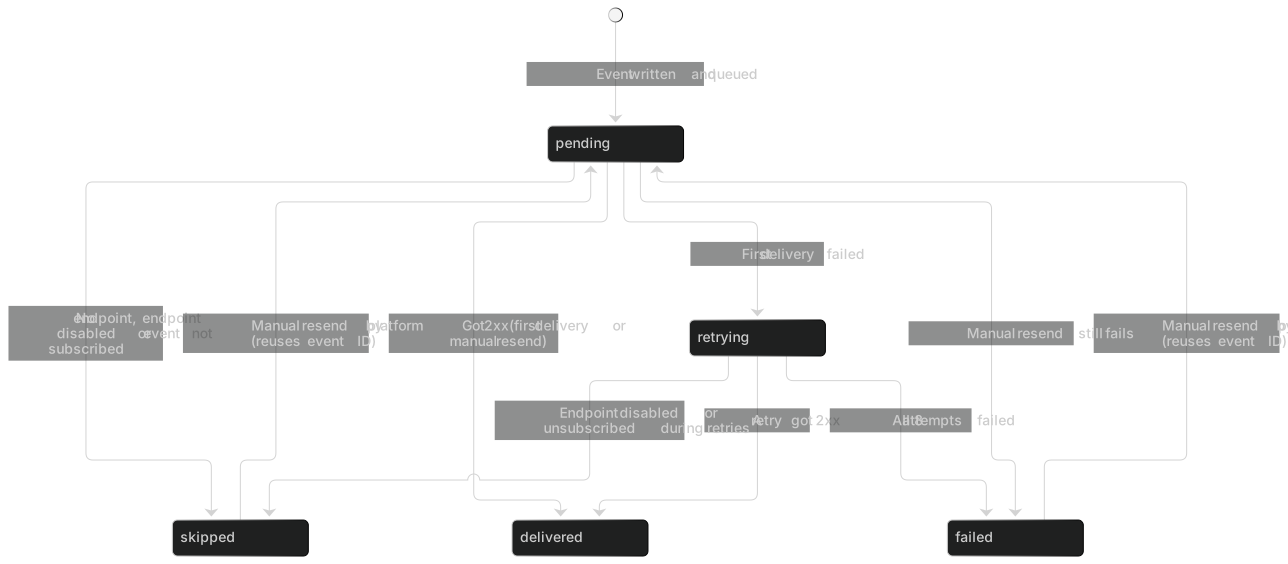
- Success condition: the platform receives an HTTP 2xx within 5 seconds. A timeout counts as a failed delivery, and it doesn't mean the business operation failed.
- Any non-2xx response counts as a failed delivery and is retried on schedule, including 4xx. For example, if your WAF returns 401 / 403, the platform keeps retrying.
- The sender doesn't follow 3xx: returning a redirect counts as a failure.
- If all 8 attempts (including the first) fail, the event moves to the failed list and triggers an alert. The platform can then resend it manually: the resend reuses the event ID and generates a new delivery ID and signature, and it doesn't redo the payment or post to the ledger again.
X-Pay-Delivery-Id,tand the signature are different on every delivery. The event ID and the request body don't change.
Summary statuses in the delivery records (Event deliveries (opens the merchant portal in a new tab) (Requires Owner, Admin or Developer)):
- Events are written inside the business transaction: once a status change is committed, the notification is still sent even if the platform service crashes afterward. So when "the payment succeeded but I got no notification", check the delivery records first, then follow Backfill missed events.
- A given business fact has only one event ID. Multiple deliveries don't produce the business effect more than once.
Endpoint URL requirements
| Requirement | Details |
|---|---|
| HTTPS | Required. The certificate must be issued by a public CA and be within its validity period (self-signed or expired certificates count as delivery failures) |
| Publicly reachable | The URL can't point to an internal network, loopback, link-local, cloud metadata or other restricted address. The platform checks IPv4, IPv6, the DNS resolution result and the address it actually connects to, which prevents DNS rebinding. A restricted address is blocked when you configure the endpoint or when the platform sends the request |
| Port | Only the default 443, or 1024–65535. Other ports are rejected when you configure the endpoint |
| No redirects | The sender doesn't follow 3xx |
| No custom proxy or secret request headers | The only way to verify where a request came from is the signature |
| One primary endpoint per environment | One for test and one for live. Set it up in Webhook settings (opens the merchant portal in a new tab) (Requires Owner, Admin or Developer) and choose the events to subscribe to |
| Changing the endpoint | Requires step-up verification and is recorded in the audit log. Owners, Admins and technical contacts are notified of the change |
Signing secret and rotation
- The signing secret is shown only once, when you create the endpoint or rotate the secret in Webhook settings (opens the merchant portal in a new tab) (Requires Owner, Admin or Developer), and you can't view it again afterward. Store it in your secrets manager right away. If you lose it, the only option is to rotate it. The secret is unrelated to your API keys, so rotating an API key doesn't affect webhooks.
- When you start a rotation (step-up verification required), the new secret is shown only once and an overlap period begins: the platform signs with both the new and the old secret, and
X-Pay-Signaturecarries twov1values. - Add the new secret to your configuration (in the examples, the
secretsarray holds both the new and the old secret) and deploy. - When the overlap period ends, the old secret is disabled and only the new signature remains. Remove the old secret from your configuration.
- The overlap period lasts at most 24 hours (24 hours by default). When you start the rotation, you can choose to disable the old secret earlier, and you can also disable it immediately during the overlap period. If you suspect a leak, rotate immediately and disable the old secret as soon as possible.
Send test events and debug locally
- In the merchant portal, choose an event type and use "Send test event" to send it to the endpoint of the current environment (Webhook settings (opens the merchant portal in a new tab) (Test environment; Requires Owner, Admin or Developer)). A test delivery doesn't create a real payment, refund or ledger entry.
- A test event carries the request header
X-Pay-Test-Event: trueand is signed normally with the current signing secret (with both signatures during an overlap period as well). It's delivered only once, isn't automatically retried, and has a "Test" tag in the delivery records. - The object ID in a test event doesn't correspond to a real object on the platform, so retrieving it returns 404. When you receive an event with
X-Pay-Test-Event: true, only log it and don't fulfill anything. - Local development: the platform never connects to internal-network or local addresses. Expose your local service as a public HTTPS URL through a public test endpoint or a controlled tunnel.
- After you send, check the result (HTTP status, duration, error summary) in Event deliveries (opens the merchant portal in a new tab) (Test environment; Requires Owner, Admin or Developer). For the full test steps, see the Testing guide.
Backfill missed events
- Find the ID of the failed event in Event deliveries (opens the merchant portal in a new tab) (Requires Owner, Admin or Developer), then call GET/v1/events/{event_id} to get its payload (identical to what was delivered, with the same event ID). The permission you need depends on the business area the event belongs to. Events are never purged automatically, so you can retrieve any past event. An event that doesn't belong to the current merchant or environment returns 404.
- Or query the latest state of the object directly (for example,
GET /v1/payments/{payment_id}, or list objects bystatus,created_gteandcreated_lt) to reconcile. - To have an event redelivered, contact support (a manual resend reuses the event ID).
Troubleshooting
| Symptom | Possible cause | Fix |
|---|---|---|
| The signature never matches | Your framework parses the JSON and then re-serializes it. You're using the wrong secret (test and live mixed up, or the old secret after a rotation). A gateway or middleware rewrites the request body (decompression, charset conversion, whitespace stripping). You treat t as milliseconds | Read the raw bytes. Check the environment and the secret. Make sure your ingress layer doesn't rewrite the request body. t is in seconds |
| The timestamp is outside the tolerance | Your server's clock is out of sync | Enable NTP |
| The delivery record shows a 3xx response | An http → https redirect, a trailing-slash redirect or a sign-in redirect | Configure the final URL. Don't redirect on the webhook route |
| The delivery record shows a timeout | You process the business logic synchronously inside the request | Persist first, then return 2xx, and process the business logic asynchronously |
| The delivery record shows the address was blocked | The URL points to an internal or restricted address, or the domain resolves to a private address | Use a public address |
| The same event is processed twice | You don't deduplicate by event ID, or your 2xx didn't reach the platform and caused a redelivery | Deduplicate by event ID with persistent storage and make your business logic idempotent |
| An old event overwrites the order status | You process events in arrival order | Compare version |
| Your WAF returns 401 / 403 | The WAF blocks the platform's requests | Allow the webhook route through, and authenticate by signature |