Quickstart
Run your first test payment with a test key, using the direct API (with 3DS) or hosted checkout, then verify webhooks, retrieve the payment and refund it.
Last updated 2026-10-20 · API contract v1.0.0
Before you begin
- A merchant portal account. The platform opens accounts by invitation, and there is no public self-service sign-up. Your role must be Owner, Admin or Developer.
- A server that can make HTTPS requests. The examples use the built-in
fetchin Node.js 18+ (no SDK required) and also come in Python. - Test and live use the same API address,
https://api.payhub.example, and your API key determines the environment: a test key can't access live objects, and a live key can't send transactions to the test provider. - No real funds move in the test environment, and only the provider's sandbox test cards work. The merchant portal shows test card values only after you sign in (View test cards (opens the merchant portal in a new tab) (Test environment; Requires Owner, Admin or Developer)). For the expected result of each scenario, see the Testing guide.
Choose an integration method
| Direct API payments | Hosted checkout | |
|---|---|---|
| What you handle | Collect card details on your own payment page, call the API from your server to create and confirm the payment, and handle the 3DS redirect | Create a checkout session on your server and send the payer to the platform's checkout page |
| What the platform handles | Risk checks, submission to the provider, the 3DS authentication page, status queries and notifications | The checkout page, card data collection, 3DS, risk checks, submission to the provider, status queries and notifications |
| Do card details pass through your server? | Yes (forwarded in memory only, never stored or logged) | No |
| Does the platform need to enable "direct card"? | Yes | No |
| How 3DS is presented | The browser redirects the full page to the platform's authentication page | The checkout page redirects to the platform's authentication page, and the payer returns to the checkout page when done |
How to choose: if you don't have your own payment page or you don't want to handle card data, use hosted checkout. If you already have your own payment page and the platform has enabled direct card for you, use the direct API.
Both methods share the same payments, statuses, billing, accounting and notifications: with either one, you can retrieve, refund and reconcile a payment by the same merchant order ID.
Get a test API key
- Sign in to the merchant portal and switch to "Test" in the top bar.
- Open Developers › API Key and click Create key: Manage API keys (opens the merchant portal in a new tab) (Test environment; Requires Owner, Admin or Developer).
- Enter a name, choose the scopes and create the key.
- Copy and save the key right away. The portal shows the full key only once.
To complete every step on this page, the key needs payments:read, payments:write, refunds:read and refunds:write. By default, the Developer role can't grant refunds:write, so an Owner or Admin has to create the key, or change the scopes you can grant.
Caution
Keep the key in a server-side environment variable or a secrets manager. Never put it in front-end code, an app, a code repository or logs. If you suspect a leak, revoke the key in the merchant portal right away. Revocation takes effect within 60 seconds.
Method A: Direct API payments
The platform must enable the "direct card" capability for you. If it hasn't, the API returns 403 capability_disabled (use hosted checkout instead, or contact platform Operations). Forward the card number, expiry date and CVC in your server's memory only. Don't write them to a database, logs, queues or error reporting.
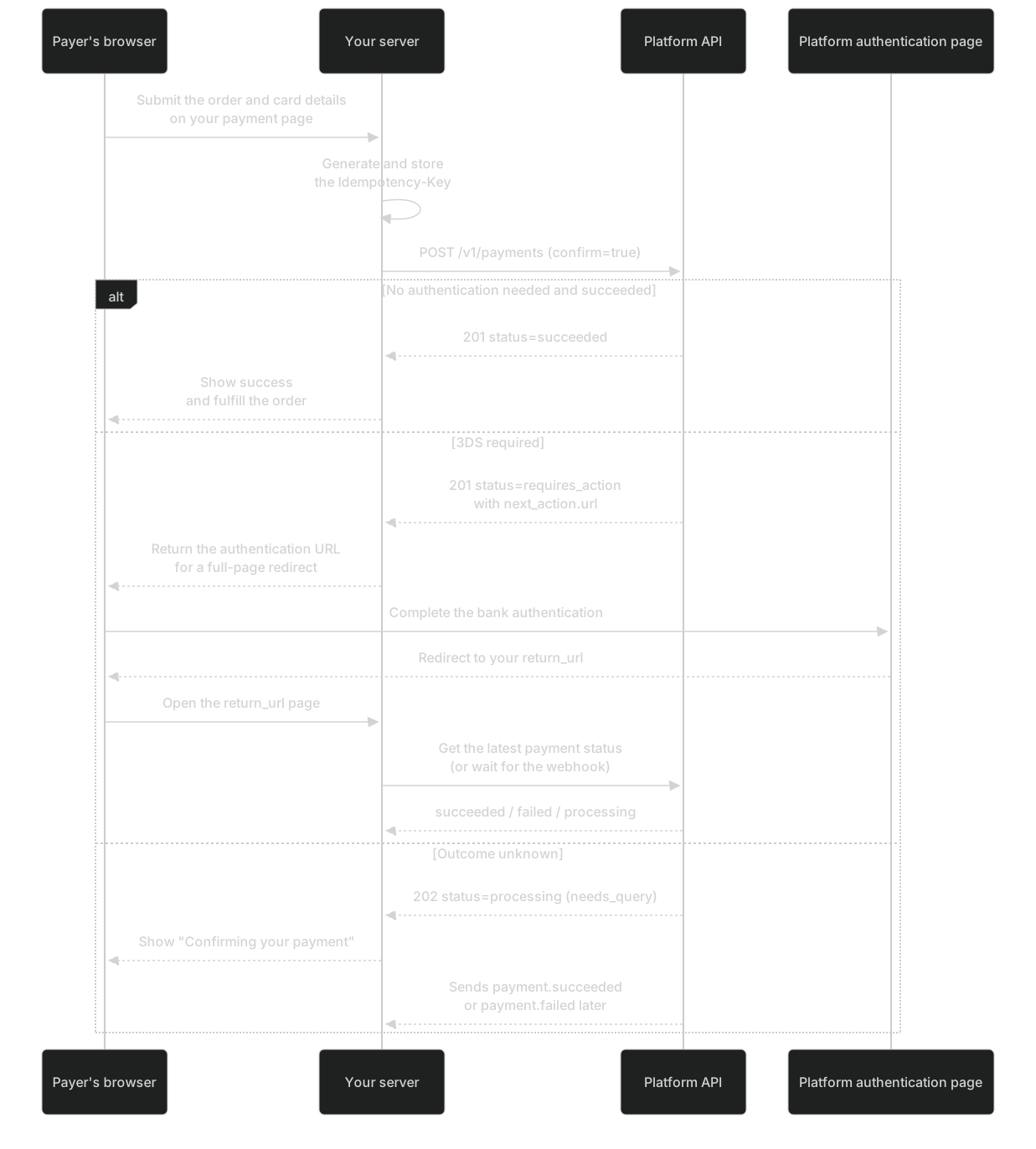
Create and confirm a payment
Call POST/v1/payments. With confirm=true, it submits the first attempt immediately. Generate the Idempotency-Key before you send the request, and store it with the order.
curl https://api.payhub.example/v1/payments \
  -H "Authorization: Bearer <TEST_SERVER_API_KEY>" \
  -H "Idempotency-Key: order-demo-001-create-v1" \
  -H "Content-Type: application/json" \
  -d '{
    "merchant_order_no": "ORDER-DEMO-001",
    "amount": 10000,
    "currency": "USD",
    "confirm": true,
    "payment_method_data": {
      "type": "card",
      "card": { "number": "<UPSTREAM_TEST_CARD_NUMBER>", "exp_month": 12, "exp_year": 2030, "cvc": "<TEST_CVC>" }
    },
    "return_url": "https://merchant.example/payment/return",
    "description": "Example order",
    "billing_details": { "name": "Test Customer", "email": "customer@example.com" },
    "browser_info": {
      "user_agent": "<ACTUAL_BROWSER_USER_AGENT>",
      "accept_header": "text/html,application/xhtml+xml",
      "language": "en-US",
      "screen_width": 1366,
      "screen_height": 768,
      "color_depth": 24,
      "timezone_offset_minutes": -480,
      "javascript_enabled": true,
      "ip_address": "<PAYER_IP_ADDRESS>"
    }
  }'
Placeholders to replace
<TEST_SERVER_API_KEY>: Test-environment server API key, created on the "API Key" page of the merchant portal<UPSTREAM_TEST_CARD_NUMBER>: Test card number, shown under "API docs and testing guide" in the merchant portal after you sign in<TEST_CVC>: Test card CVC, shown in the merchant portal together with the test card number<ACTUAL_BROWSER_USER_AGENT>: The payer's browser navigator.userAgent, collected by your payment page<PAYER_IP_ADDRESS>: The payer's IP address as resolved through your trusted proxy chain; never use your own server's IP
Handle the response
An HTTP 200 (idempotent replay), 201 (created) or 202 (accepted, outcome pending) response doesn't mean the charge succeeded. Check status:
status | Typical HTTP status | Meaning | What to do | What not to do |
|---|---|---|---|---|
succeeded | 201 / 200 | The platform has confirmed that the charge succeeded, and captured_amount = amount | Fulfill the order idempotently by payment ID | Fulfill based on the HTTP status code alone |
requires_action | 201 / 200 | The current attempt needs the payer to complete an action such as 3DS | Pass next_action.url to the browser for a full-page redirect | Complete the authentication on the server for the payer, or write the URL to logs |
processing | 202 | Accepted, outcome pending (when resolution_status=needs_query, the platform is running a status query with the original identifiers) | Show "Confirming your payment" and wait for the webhook, or query at the recommended polling frequency | Treat it as a failure, or charge again with a different idempotency key or order ID |
failed | 200 / 201 | The latest attempt clearly failed. This is not a terminal state | Show failure.message. Within the attempt limit and validity period, let the payer use another card and call confirm with a new key | Close the order right away, or switch cards with the old idempotency key |
canceled / expired | 200 | The order is closed | Close the order on your side | Collect payment again with the same order ID |
created | 201 | Created with confirm=false and not yet submitted | Call confirm | Treat it as a failure |
| Unknown value | — | A status the platform has added | Treat it as "not succeeded", query again later and raise an alert | Treat it as success |
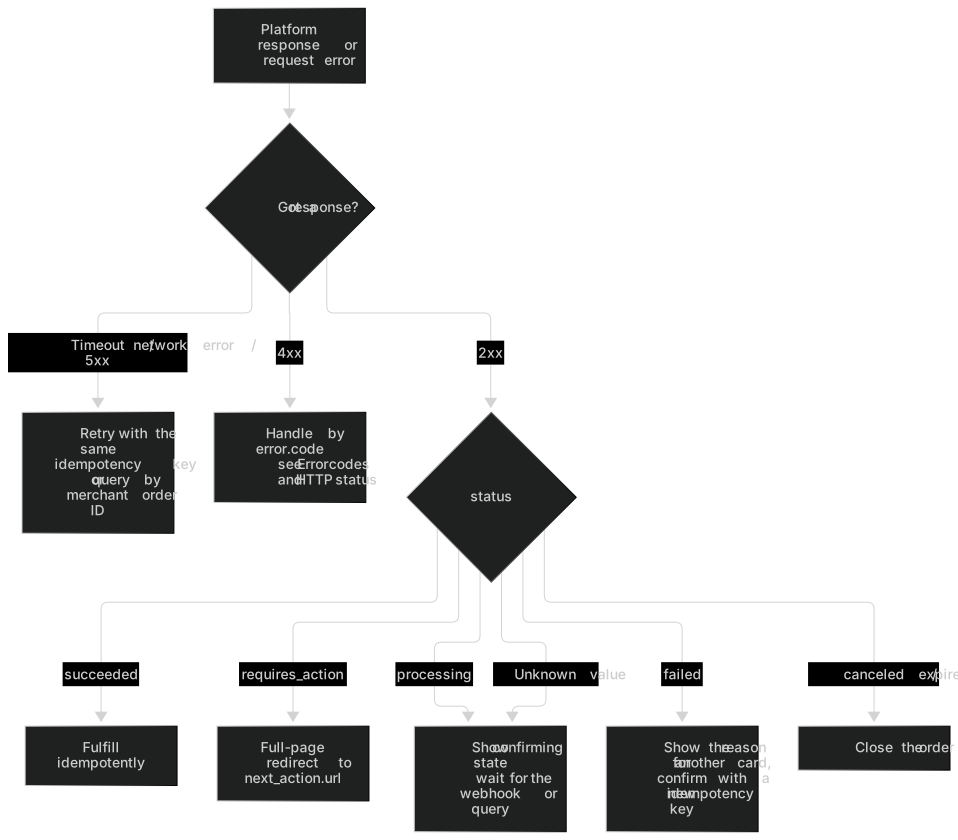
Handle the 3DS redirect
When the status is requires_action, pass next_action.url to the payer's browser for a full-page redirect. The URL is valid until next_action.expires_at (at most 10 minutes). Don't write it to logs or analytics tools, and don't put it in the URL of your own pages.
// Browser: redirect the full page to the authentication URL your server returned (no iframe; keep the URL out of logs and analytics tools)
const res = await fetch('/checkout/pay', {
  method: 'POST',
  body: new FormData(document.querySelector('#pay-form'))
});
const result = await res.json();
if (result.redirectUrl) {
  window.location.assign(result.redirectUrl);
} else if (result.pending) {
  showMessage('Confirming your payment, please wait'); // Don't treat this as a failure
}
After the payer returns to return_url
- The
return_urlpage is for display only. Your server decides the outcome by querying the payment status or waiting for the webhook. - When the platform redirects the payer back, it uses the URL you provided exactly as is and appends no parameters. Treat any parameter in the URL (including an order ID you added yourself) only as a hint about which payment to look up, never as a result.
- On
failed, show the sanitizedfailure.message. Within the validity period (30 minutes by default) and the attempt limit (up to 3 attempts by default), you can let the payer use another card: call POST/v1/payments/{payment_id}/confirm with a new idempotency key. For details, see Retry with a new card.
Method B: Hosted checkout
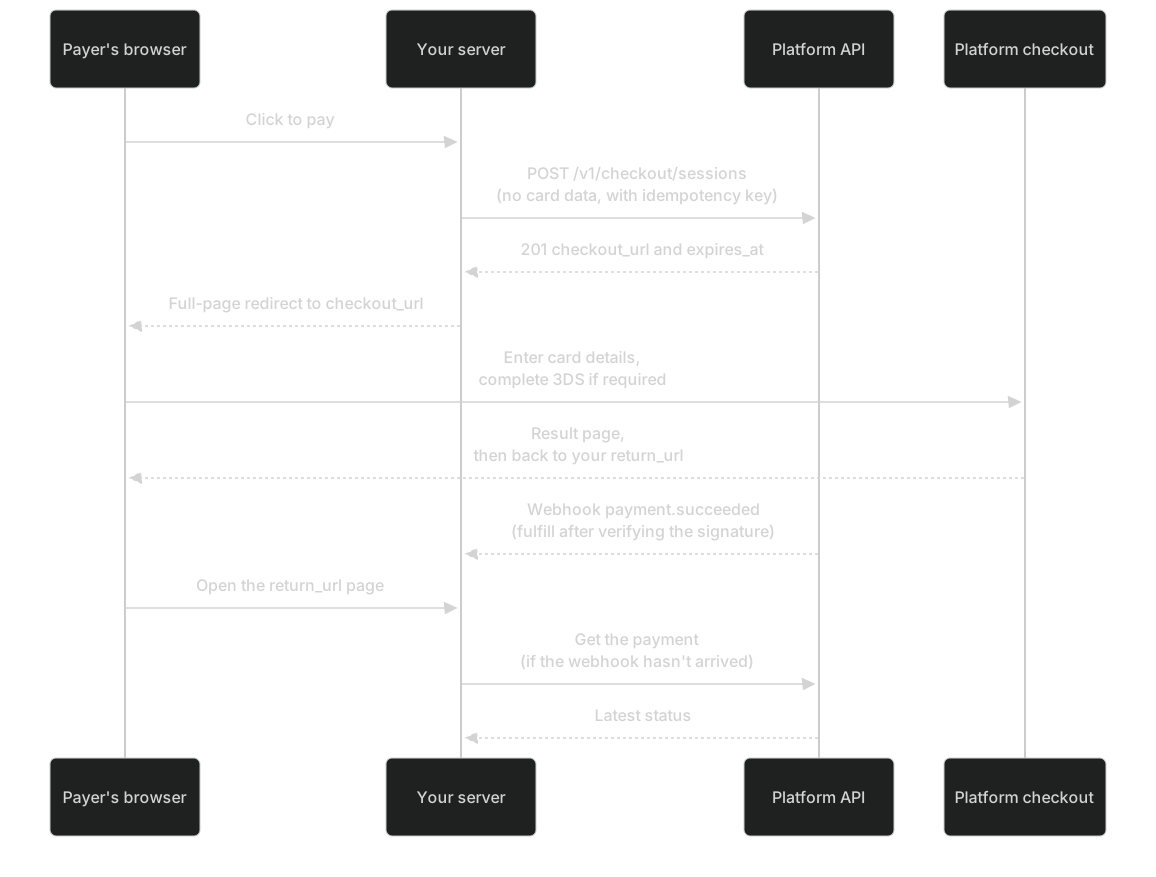
Create a checkout session
Call POST/v1/checkout/sessions to create a session from the order details. It returns checkout_url, and the request contains no card data. For the other way to create a session (passing an existing payment_id), see Hosted checkout integration.
curl https://api.payhub.example/v1/checkout/sessions \
  -H "Authorization: Bearer <TEST_SERVER_API_KEY>" \
  -H "Idempotency-Key: order-demo-002-session-v1" \
  -H "Content-Type: application/json" \
  -d '{
    "merchant_order_no": "ORDER-DEMO-002",
    "amount": 10000,
    "currency": "USD",
    "description": "Example hosted checkout order",
    "return_url": "https://merchant.example/payment/return",
    "cancel_url": "https://merchant.example/payment/cancel",
    "locale": "en"
  }'
Placeholders to replace
<TEST_SERVER_API_KEY>: Test-environment server API key, created on the "API Key" page of the merchant portal
You must register return_url and cancel_url first (Register redirect URLs (opens the merchant portal in a new tab) (Test environment; Requires Owner, Admin or Developer)). Otherwise the API returns 422 url_not_allowed.
Redirect to checkout
Your server returns checkout_url to the browser, which redirects the full page. checkout_url contains a checkout token: don't record it (in logs, analytics tools or error reporting) and don't share it with anyone. A session lasts at most 30 minutes, and never longer than the time the order has left to be paid.
return_url is only for the payer experience
Fulfill orders based on webhooks or status checks, never on the browser redirect. When the payer clicks "Return to merchant" (cancel_url), that doesn't cancel a charge that was already submitted.
Receive and verify webhooks
- In the merchant portal, configure an endpoint for the test environment (HTTPS and publicly reachable, or use a controlled tunnel) and subscribe to
payment.*andrefund.*: Configure webhooks (opens the merchant portal in a new tab) (Test environment; Requires Owner, Admin or Developer). - The portal shows the signing secret only once, when you create the endpoint or rotate the secret. Store it in your server configuration right away (if you lose it, you can only rotate it). The signing secret and the API key are two separate credentials.
- Build a minimal receiver: verify the signature against the raw request body → check the environment → deduplicate by event ID with persistent storage → return 2xx as soon as possible → process asynchronously.
import express from 'express';
import { verifySignature } from './verify.mjs';

const app = express();

// Use raw parsing on the webhook route only, to get the original bytes; don't mount express.json() globally before it
app.post(
  '/webhooks/payhub',
  express.raw({ type: 'application/json', limit: '1mb' }),
  async (req, res) => {
    const secrets = [
      process.env.PAYHUB_WEBHOOK_SECRET,
      process.env.PAYHUB_WEBHOOK_SECRET_PREVIOUS
    ].filter(Boolean);
    if (!verifySignature(req.body, req.get('X-Pay-Signature'), secrets)) {
      return res.status(400).send('invalid signature'); // Run no business logic
    }
    const event = JSON.parse(req.body.toString('utf8'));
    if (
      event.environment !== process.env.PAYHUB_ENVIRONMENT ||
      event.merchant_id !== process.env.PAYHUB_MERCHANT_ID
    ) {
      return res.status(400).send('unexpected environment or merchant');
    }
    if (req.get('X-Pay-Test-Event') === 'true') {
      await recordTestEvent(event.id); // Only log a test event; don't fulfill it
      return res.status(200).end();
    }
    let isNew;
    try {
      isNew = await saveEventIfAbsent(event.id, req.body); // INSERT ... ON CONFLICT (event_id) DO NOTHING
    } catch {
      return res.status(500).end(); // Couldn't persist: return a non-2xx status so the platform retries later
    }
    res.status(200).end(); // Respond as soon as the event is persisted
    if (isNew) enqueue(event.id).catch(() => {}); // If enqueueing fails, a scheduled job picks up "received but not processed" events
  }
);

app.listen(Number(process.env.PORT ?? 8080));
Events are delivered at least once, so they can arrive more than once and out of order. Use data.object.version to discard older events. For the verification function, the Python version and the test vector, see Verify webhook signatures.
Retrieve a payment
# Query by payment ID
curl https://api.payhub.example/v1/payments/<PAYMENT_ID> \
  -H "Authorization: Bearer <TEST_SERVER_API_KEY>"

# Without a payment ID, query by merchant order ID (exact match, case-sensitive)
curl "https://api.payhub.example/v1/payments?merchant_order_no=ORDER-DEMO-001" \
  -H "Authorization: Bearer <TEST_SERVER_API_KEY>"
Placeholders to replace
<PAYMENT_ID>: The id returned when you create a payment (starts with pay_)<TEST_SERVER_API_KEY>: Test-environment server API key, created on the "API Key" page of the merchant portal
Retrieving a payment only reads the facts the platform currently knows. It doesn't trigger a query to the provider, so polling faster won't get you the result sooner. Rely on webhooks first. For how often to poll, see Recommended polling frequency.
Create a refund
Call POST/v1/refunds and pass amount, merchant_refund_no, reason and Idempotency-Key explicitly.
curl https://api.payhub.example/v1/refunds \
  -H "Authorization: Bearer <TEST_SERVER_API_KEY>" \
  -H "Idempotency-Key: refund-demo-001-create-v1" \
  -H "Content-Type: application/json" \
  -d '{
    "payment_id": "<PAYMENT_ID>",
    "merchant_refund_no": "REFUND-DEMO-001",
    "amount": 2500,
    "reason": "requested_by_customer"
  }'
Placeholders to replace
<TEST_SERVER_API_KEY>: Test-environment server API key, created on the "API Key" page of the merchant portal<PAYMENT_ID>: The id returned when you create a payment (starts with pay_)
- In the test environment, refunds are approved automatically by default and the response is usually
processing. In the live environment, refunds go to manual review by default and the response ispending_review. Neither is the final result: rely onrefund.*events orGET /v1/refunds/{refund_id}. - The refund currency is inherited from the original payment and can't be set. A full refund also requires an explicit amount. You can't omit the amount to mean "refund everything that's left".
Key rules
Warning: HTTP 2xx doesn't mean the charge succeeded
200, 201 and 202 only mean that the request was processed or accepted. To know whether the charge succeeded, check only status === 'succeeded' or a payment.succeeded event whose signature you have verified. See Handle the response.
Warning: Never treat an unknown status as success
Ignore unknown fields and tolerate unknown statuses. If you get a status you don't recognize, always treat it as "not succeeded" and query the payment. See Compatibility and versions.
Warning: Amounts are integers in the smallest currency unit
USD 10000 means 100.00 US dollars and JPY 10000 means 10,000 Japanese yen, so don't divide every amount by 100. Never add amounts in different currencies. See Data formats.
Warning: Pass an explicit amount for full refunds too
Leaving out the amount doesn't mean "refund everything that's left". This keeps the meaning of the amount from changing when requests run concurrently. See Create a refund.
Warning: When the outcome is unknown, don't charge again with a new idempotency key or order ID
A timeout, a 5xx response or a 202 response may already have charged the payer. Retry with the same idempotency key, or query by order ID. See How to check the status when the outcome is unknown.
Never convert amounts through floating-point numbers (for example, 19.99 * 100 = 1998.9999999999998):
| Currency | Decimal places | Displayed amount | amount |
|---|---|---|---|
| USD | 2 | 100.00 | 10000 |
| USD | 2 | 19.99 | 1999 |
| JPY | 0 | 10,000 | 10000 |
// Convert a decimal string such as "100.00" to an integer in the smallest currency unit; exponent is the number of decimal places (USD 2, JPY 0)
export function toMinorUnits(decimalStr, exponent) {
  const m = /^(\d+)(?:\.(\d+))?$/.exec(decimalStr);
  if (!m) throw new Error('Invalid amount format');
  const frac = m[2] ?? '';
  if (frac.length > exponent) throw new Error(`This currency allows at most ${exponent} decimal places`);
  const minor = BigInt(m[1] + frac.padEnd(exponent, '0'));
  if (minor <= 0n || minor > BigInt(Number.MAX_SAFE_INTEGER)) throw new Error('Amount out of range');
  return Number(minor);
}
// toMinorUnits('100.00', 2) → 10000 (USD 100.00); toMinorUnits('10000', 0) → 10000 (JPY 10,000)
// Counterexample: 19.99 * 100 = 1998.9999999999998, so never convert with floating-point numbers
Next steps
- Testing guide: verify your integration against the test card scenarios and the 33-item self-test checklist.
- Idempotency, retries and status checks: how to handle an unknown outcome correctly.
- Webhook events and signatures: all event types, the retry schedule and secret rotation.
- 3DS and hosted checkout: browser information collection and redirect URL rules.
- Go-live checklist: confirm each item before you switch to live.