API reference
The 16 API endpoints, authentication and environments, request headers, data formats, pagination, compatibility, rate limits and the fields of 8 objects.
Last updated 2026-10-20 · API contract v1.0.0
Overview
The API has 16 endpoints. Fields, constraints, enums and examples are all generated from the API contract. Click an endpoint to open its detail page.
| Resource | Endpoint | Summary | Scopes | Idempotency key |
|---|---|---|---|---|
| Payment | POST/v1/payments | Create payment | payments:write | Required |
| Payment | GET/v1/payments | List payments | payments:read | — |
| Payment | GET/v1/payments/{payment_id} | Get payment | payments:read | — |
| Payment | POST/v1/payments/{payment_id}/confirm | Confirm payment | payments:write | Required |
| Payment | POST/v1/payments/{payment_id}/cancel | Cancel payment | payments:write | Required |
| Checkout session | POST/v1/checkout/sessions | Create hosted checkout session | payments:write | Required |
| Checkout session | GET/v1/checkout/sessions/{session_id} | Get checkout session | payments:read | — |
| Refund | POST/v1/refunds | Create refund | refunds:write | Required |
| Refund | GET/v1/refunds | List refunds | refunds:read | — |
| Refund | GET/v1/refunds/{refund_id} | Get refund | refunds:read | — |
| Balances and balance transactions | GET/v1/balances | List balances | finance:read | — |
| Balances and balance transactions | GET/v1/balance-transactions | List balance transactions | finance:read | — |
| Settlements and payouts | GET/v1/settlements | List settlements | finance:read | — |
| Settlements and payouts | GET/v1/settlements/{settlement_id} | Get settlement | finance:read | — |
| Settlements and payouts | GET/v1/payouts/{payout_id} | Get payout | finance:read | — |
| Event | GET/v1/events/{event_id} | Get event | Depends on the event type | — |
Note
The API doesn't support changing your payout account, changing rates, adjusting balances or executing payouts. Do these in the merchant portal, or contact the platform.
Caution
Use API keys only on your server. In the browser, use hosted checkout, or call the API through a proxy on your own server. The docs site doesn't offer interactive API testing.
Basic conventions
- Use HTTPS and JSON (UTF-8). Paths include the version,
/v1. - API address:
https://api.payhub.example. Test and live use the same address, and your API key determines the environment. - Every response body includes a
request_id. Give it to support when you troubleshoot, or search for it in the merchant portal to find the call (API call logs (opens the merchant portal in a new tab) (Requires Owner, Admin or Developer)). - Requests have no merchant ID field and don't accept one: the merchant and environment are derived from the API key alone.
Authentication and environments
Send the request header Authorization: Bearer <API_KEY>. A missing, invalid, revoked or expired key returns 401 unauthenticated.
- Test keys start with
sk_test_and can access only test objects. Live keys start withsk_live_. Retrieving a live object with a test key returns 404, and the platform doesn't reveal whether the object exists. - The scope each endpoint needs is shown in the header area of its endpoint page. A key without the required scope returns 403
forbidden.
| Scope | Endpoints you can call |
|---|---|
payments:read | listPayments, getPayment, getCheckoutSession; payment.* and dispute.* events in getEvent |
payments:write | createPayment, confirmPayment, cancelPayment, createCheckoutSession |
refunds:read | listRefunds, getRefund; refund.* events in getEvent |
refunds:write | createRefund |
finance:read | listBalances, listBalanceTransactions, listSettlements, getSettlement, getPayout; settlement.* events in getEvent |
Who can create keys, and with which scopes:
| Creator | Scopes they can choose |
|---|---|
| Owner, Admin | All 5 |
| Developer | Only scopes within their "grantable API scopes" (by default payments:read, payments:write and refunds:read) |
| Finance, Viewer | Can't create keys |
The Developer role can't grant finance:read by default, so use a key created by an Owner or Admin. Direct card also requires the platform to enable the "direct card" capability for you, which is separate from scopes. To get a test key, open the API Key page in the merchant portal (opens the merchant portal in a new tab) (Test environment; Requires Owner, Admin or Developer).
Request headers
| Header | Endpoints | Required | Description |
|---|---|---|---|
Authorization | All 16 | Yes | Bearer <API_KEY>. Use server keys on your server only |
Content-Type | createPayment, confirmPayment, createCheckoutSession, createRefund | Yes | application/json. cancelPayment has no request body, so it doesn't need this header |
Idempotency-Key | createPayment, confirmPayment, cancelPayment, createCheckoutSession, createRefund | Yes | 1–255 characters. If it's missing, the API returns 400 (error.field is Idempotency-Key). Use one key per submission, reuse the same key when you retry after a network error, and use a new key for a new submission such as a card change. See Idempotency, retries and status checks |
Data formats
- ID: A prefix, an underscore and a random string, up to 64 characters. Store IDs as opaque, case-sensitive strings and don't parse them. Common prefixes:
pay_payment,pat_payment attempt,auth_authentication session,cs_checkout session,ref_refund,dsp_dispute,stl_settlement,po_payout,btx_balance transaction,ltx_ledger transaction,evt_event,del_delivery,mer_merchant,req_request. - Time: ISO 8601 with a time zone, UTC by default, for example
2026-09-23T09:00:00Z.period_startandperiod_endare dates in the business time zone. - Amount: An integer in the smallest currency unit, always appearing together with
currency.USD 10000means 100.00 andJPY 10000means 10,000. Signed amounts appear only inBalanceTransaction.amount,SettlementItem.amountandBalance.net_position. - Currency: An uppercase three-letter code. You can use only the currencies enabled for you. Never add amounts in different currencies.
- metadata: Up to 20 keys. A key can be up to 40 characters, and a value is a string of up to 200 characters. Don't put sensitive data such as card numbers in it. The platform rejects requests in which it detects such data.
Pagination
- Lists return 20 items per page by default and up to 100 (
limit). next_cursoris an opaque string. Don't parse it or build one yourself. When you fetch the next page, send the same filters as for the first page.- Results are ordered by creation time, newest first, with ties broken by unique ID in descending order, so the order is stable (balance transactions are ordered by
booked_at). - Time ranges are half-open:
created_gteis inclusive andcreated_ltis exclusive. For example,created_gte=2026-09-23T00:00:00Z&created_lt=2026-09-24T00:00:00Zcovers exactly the whole of September 23 (UTC).
const API_BASE = 'https://api.payhub.example';

// Iterate over every payment on 2026-09-23 (UTC): while has_more is true, continue with next_cursor and the same filters
export async function* listPaymentsOfDay() {
  const filters = {
    created_gte: '2026-09-23T00:00:00Z',
    created_lt: '2026-09-24T00:00:00Z',
    limit: '100'
  };
  let cursor;
  do {
    const query = new URLSearchParams({ ...filters, ...(cursor ? { cursor } : {}) });
    const res = await fetch(`${API_BASE}/v1/payments?${query}`, {
      headers: { Authorization: `Bearer ${process.env.PAYHUB_API_KEY}` },
      signal: AbortSignal.timeout(20_000)
    });
    if (!res.ok) throw new Error(`HTTP ${res.status}`);
    const page = await res.json();
    yield* page.data;
    cursor = page.has_more ? page.next_cursor : undefined; // Opaque string: don't parse it or build one yourself
  } while (cursor);
}
Compatibility and versions
Your client must:
- Ignore new fields it doesn't recognize.
- Never treat an unknown
statusas success. - Tolerate unknown error codes (handle them by HTTP status), unknown event types (return 2xx and ignore them) and new
next_action.typevalues (treat them as "not completed" and query the payment).
Versioning policy: adding fields, enum values, event types, error codes or optional parameters is a compatible change and doesn't bump /v1. Removing or renaming a field, changing semantics or adding a required parameter is a breaking change. It ships as a new version, and you get advance notice.
Rate limits and timeouts
- 429
rate_limited: The request was not executed. Wait forRetry-Afterseconds, then retry with the original idempotency key. Using a different API key doesn't get around the merchant's overall limit. The platform doesn't publish specific rate limit values. - 503
temporarily_unavailable: This request was also not accepted (the platform has paused new transactions on this channel). Retry later with the original idempotency key. Treat every other 5xx as an unknown outcome; see Error codes and HTTP status. - Client timeouts: Set at least 20 seconds for creating and confirming payments. The platform waits synchronously for the provider for about 15 seconds. Beyond that it returns 202
processing, and you get the result later through a query or a webhook.
Objects
Payment
The main payment object, which corresponds one-to-one with a merchant business order. A Payment can have multiple attempts, but at most one normal successful charge. Besides status, it has separate outcome fields; version increases with every effective business change and is used for notification deduplication and concurrency control.
| Name | Type | Required | Description |
|---|---|---|---|
id | string | Required | Platform payment ID. Example: |
merchant_order_no | string | Required | Merchant order ID, case-sensitive as sent. Example: |
environment | string | Required | Environment: test is the test environment and live is the live environment. Test and live objects are isolated from each other.
Example: |
amount | integer(int64) | Required | Order amount, in the smallest currency unit. It can't be changed after the first submission to the provider. Constraints: Example: |
currency | string | Required | Uppercase three-letter currency code. Constraints: Example: |
status | string | Required | Payment status. Clients must not treat an unknown status as success.
Example: |
resolution_status | string | Required | Outcome confirmation.
Example: |
captured_amount | integer(int64) | Required | The amount confirmed as captured; equal to amount on success. Constraints: Example: |
refunded_amount | integer(int64) | Required | The confirmed effective refunded principal: the total of successful refunds minus confirmed refund returns. It excludes refunds that are still processing and platform exception refunds. Constraints: Example: |
refund_returned_amount | integer(int64) | Required | The cumulative refund principal confirmed as returned. Constraints: Example: |
refund_reserved_amount | integer(int64) | Required | Principal reserved for refunds that are under review or processing. Constraints: Example: |
refund_status | string | Required | Refund summary status, derived from refunded_amount (the effective refunded principal): none, partial, full.
Example: |
authentication_status | stringNullable | Required | The 3DS authentication status of the current attempt, taken from the authentication session status: not_required, pending, challenge, authenticated, failed, abandoned, expired. Tolerate new values. Successful authentication (authenticated) doesn't mean the charge succeeded, so don't use it to decide the payment outcome. It's null when there is no attempt yet or the attempt hasn't entered authentication. Example: |
reconciliation_status | ReconciliationStatus | Required | The progress of the platform's funds processing, for reconciliation reference only. It doesn't indicate whether the payment succeeded or when you'll be paid out.
|
upstream_receipt_status | UpstreamReceiptStatus | Required | The progress of the platform's funds processing, for reconciliation reference only. It doesn't indicate whether the payment succeeded or when you'll be paid out.
|
latest_attempt_id | stringNullable | Required | ID of the latest payment attempt; null if no attempt has been submitted yet. Example: |
attempt_count | integer(int32) | Required | The number of attempts started. The default maximum is 3. Constraints: Example: |
version | integer(int64) | Required | Object version, which increases with every effective business change. Compare versions to discard older events, and don't order events by status name. Constraints: Example: |
next_action | NextActionNullable | Required | The action the payer must complete when status=requires_action; null in all other cases. |
type | string | Required | The initial release of the public API exposes only redirect_to_url. Clients must tolerate types that are added in the future.
Example: |
authentication_session_id | string | Required | Authentication session ID, linked to a specific payment attempt. Example: |
url | string(uri) | Required | The URL of the platform's authentication page. Example: |
expires_at | string(date-time) | Required | The time the authentication access expires (10 minutes at most). Example: |
failure | PaymentFailureNullable | Required | The reason when the attempt that latest_attempt_id points to has clearly failed; otherwise null. |
code | string | Required | Failure reason code. Example: |
message | string | Required | Sanitized description. Example: |
attempt_id | string | Required | ID of the failed payment attempt. Example: |
description | string | No | Order summary. Constraints: Example: |
customer_reference | string | No | Merchant-side customer reference. Constraints: Example: |
metadata | object | No | Custom key-value pairs set by the merchant: up to 20 keys. A key can be up to 40 characters, and a value is a string of up to 200 characters. Don't put sensitive data such as card numbers in it. The platform checks for such data and rejects the request. Constraints: Example: |
card | CardSummaryNullable | Required | Masked details of the card used in the latest attempt; null when there are no card details yet. |
brand | string | Required | Card brand. Example: |
last4 | string | Required | Last four digits of the card number. Constraints: Example: |
created_at | string(date-time) | Required | Creation time. Example: |
succeeded_at | string(date-time)Nullable | Required | The time the payment was confirmed as successful; null if it hasn't succeeded. Example: |
expires_at | string(date-time) | Required | The deadline for starting a new attempt, fixed at creation (by default 30 minutes after creation; the platform can adjust it to between 5 and 120 minutes, so go by this field). Expiry only closes the entry point for new attempts. It doesn't invalidate a payment that was already submitted. Example: |
failedis not a terminal state. While the payment is within its validity period and attempt limit and passes risk checks, a new attempt can start and eventually succeed. If a refund happens aftersucceeded, the payment status stayssucceeded; checkrefund_statusfor the refund.resolution_status=needs_querymeans the outcome is unknown and the platform is running a status query with the provider, using the original identifiers.manual_reviewmeans the payment is past the automatic query window and has been handed over to manual follow-up. The platform never marks it as failed automatically.authentication_statusis the 3DS authentication status. Successful authentication doesn't mean the charge succeeded, so don't use it to decide the payment outcome.versionincreases with every effective business change. Use it to discard older events, and don't order events by status name.reconciliation_statusandupstream_receipt_statustrack the platform's funds processing. They're for reconciliation reference only: they don't indicate whether the payment succeeded or when you'll be paid out.expires_atis the deadline for starting a new attempt (30 minutes after creation by default). Expiry only closes the entry point for new attempts. It doesn't invalidate a payment that was already submitted.
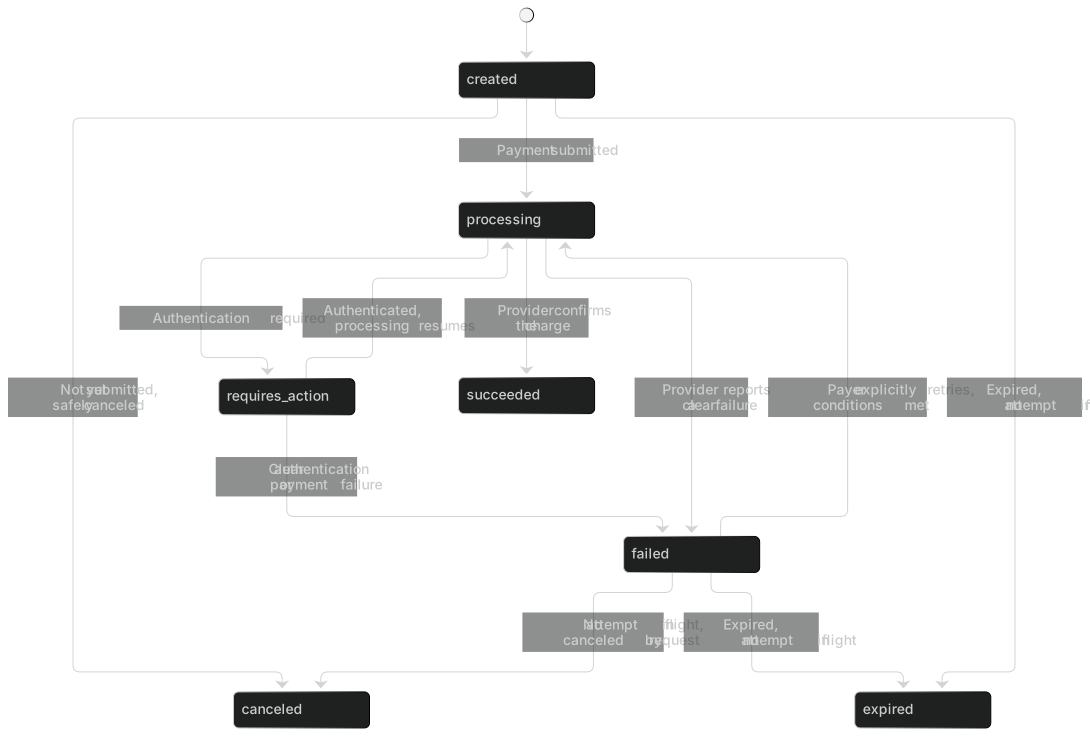
- The payer can retry after
failed, so you can't order events or statuses by status name. Compareversioninstead. - When a
succeededpayment is refunded, the payment status doesn't change. Refunds are tracked on the refund and in the payment'srefund_status.
Refund
A refund request against the original payment. A payment supports multiple partial refunds, each with its own refund ID.
| Name | Type | Required | Description |
|---|---|---|---|
id | string | Required | Platform refund ID. Example: |
version | integer(int64) | Required | Object version, which increases with every effective business change (status, failure reason, returned amount). Compare versions to discard older events, and don't order events by status name. Constraints: Example: |
payment_id | string | Required | Original payment ID. Example: |
merchant_refund_no | string | Required | Merchant refund ID, unique within one merchant and environment. Example: |
amount | integer(int64) | Required | Refund principal, in the smallest currency unit. Constraints: Example: |
currency | string | Required | Refund currency, inherited from the original payment. Constraints: Example: |
status | string | Required | Refund status.
Example: |
reason | string | Required | Refund reason. Example: |
returned_amount | integer(int64) | Required | The cumulative principal actually returned after the refund succeeded. Constraints: Example: |
failure | RefundFailureNullable | Required | The reason when status is failed or rejected; otherwise null. |
code | string | Required | Failure reason code. Example: |
message | string | Required | Sanitized description. Example: |
metadata | object | No | Custom key-value pairs set by the merchant: up to 20 keys. A key can be up to 40 characters, and a value is a string of up to 200 characters. Don't put sensitive data such as card numbers in it. The platform checks for such data and rejects the request. Constraints: Example: |
created_at | string(date-time) | Required | The time the request was accepted. Example: |
completed_at | string(date-time)Nullable | Required | The time the refund entered succeeded, failed, rejected or canceled; null if it hasn't ended yet. Example: |
- For
reason, we recommend a reason code:requested_by_customer,duplicate,fraudulent,order_canceledorother. returnedmeans the refunded funds came back after the refund had been confirmed as succeeded. The original success is kept on record, andreturned_amountis the returned principal.- Platform exception refunds (the platform returns a duplicate charge, or an overcharge caused by an amount mismatch, to the cardholder's original payment method) aren't returned by the API and don't count toward the payment's
refunded_amountorrefund_status. The platform notifies you separately with an in-app notification and an email.
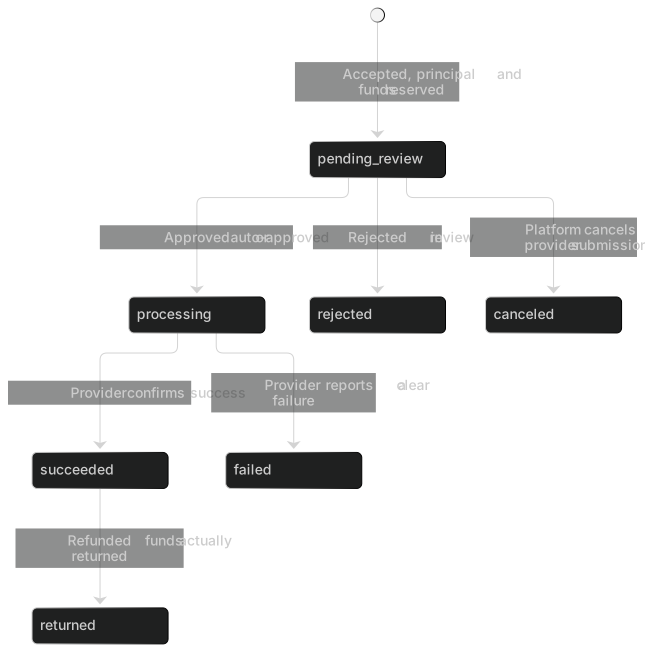
While the outcome of a processing refund is unknown, the funds stay reserved and the platform keeps running status queries. It doesn't cancel the refund locally.
Checkout session
A hosted checkout session. It's linked to the order's Payment and doesn't create a second, separate payment order.
| Name | Type | Required | Description |
|---|---|---|---|
id | string | Required | Checkout session ID. Example: |
payment_id | string | Required | The related Payment. Example: |
status | string | Required | Checkout session status.
Example: |
checkout_url | string(uri) | Required | The checkout page URL. It carries a short-lived credential bound to this session only, and contains no merchant server-side key. Use it only for a full-page redirect of the payer's browser: don't write it to logs, analytics tools or error reporting, and don't share it with anyone. Example: |
expires_at | string(date-time) | Required | The time the session expires, fixed at creation. A session lasts at most 30 minutes (the platform can shorten this) and never longer than the time the order has left to be paid. During the read-only period after expiry (fixed at creation; 24 hours by default, which is also the maximum), the payer can still use the original link to view the session and the payment result (read-only, no submissions). After that, the link stops working. Example: |
return_url | string(uri) | Required | The merchant's return URL after the payment ends. Example: |
cancel_url | string(uri)Nullable | Required | The URL the payer goes to when they click "Return to merchant". Clicking it doesn't cancel a charge that was already submitted. It's null if not provided. Example: |
locale | string | Required | Checkout page language. Example: |
created_at | string(date-time) | Required | Creation time. Example: |
checkout_urlcontains a checkout token. Use it only for a full-page redirect of the payer's browser. Don't write it to logs, analytics tools or error reporting, and don't share it with anyone.- A session lasts at most 30 minutes, and never longer than the time the order has left to be paid. After it expires, it enters a read-only period (24 hours by default, which is also the maximum). During that period the link shows the result but can't accept submissions. After that, the link stops working.
- When the payer clicks "Return to merchant" (
cancel_url), that doesn't cancel the charge.
Balance
The merchant's balance buckets for a single currency. Any given amount is in exactly one bucket. Pending recovery is a separate receivable and is never hidden as a negative number in another bucket. Amounts in different currencies must not be added together.
| Name | Type | Required | Description |
|---|---|---|---|
currency | string | Required | Currency. Constraints: Example: |
pending | integer(int64) | Required | Pending settlement: the net amount from payments that succeeded but haven't yet met all the conditions for funds receipt, settlement period or reconciliation; it can't be paid out. Constraints: Example: |
available | integer(int64) | Required | Settleable: the amount that meets the release conditions and isn't reserved; the only bucket that can be used for payouts. Constraints: Example: |
reserve | integer(int64) | Required | Reserve: the amount held back under the rules and waiting to be released. Constraints: Example: |
risk_hold | integer(int64) | Required | Risk hold: the held amount tied to a specific risk action or dispute. Constraints: Example: |
refund_pending | integer(int64) | Required | Reserved for refunds: the amount reserved by refunds that are under review or processing. Constraints: Example: |
payout_pending | integer(int64) | Required | Reserved for payouts: the amount reserved by an active settlement whose payout isn't confirmed as complete yet. Constraints: Example: |
merchant_receivable | integer(int64) | Required | Pending recovery: a receivable the platform holds against the merchant, created by an actual forced debit and similar cases; it isn't part of the merchant's available funds. Constraints: Example: |
book_payable | integer(int64) | Required | The merchant's book payable balance = pending + available + reserve + risk_hold + refund_pending + payout_pending. Constraints: Example: |
net_position | integer(int64) | Required | The merchant's net position (for display only) = book_payable - merchant_receivable. It can be negative and can't replace available. Example: |
| Balance bucket | Name | Meaning | Usable for payouts |
|---|---|---|---|
pending | Pending settlement | Merchant net amount from payments that succeeded but haven't yet met all the conditions for funds receipt, settlement period or reconciliation | No |
available | Settleable | Meets the release conditions and isn't reserved | Yes |
reserve | Reserve | Held back under the rules, waiting to be released | No |
risk_hold | Risk hold | A hold tied to a specific risk action or dispute | No |
refund_pending | Reserved for refunds | Reserved for refunds that are under review or processing | No |
payout_pending | Reserved for payouts | Reserved by an active settlement, payout not yet confirmed | No |
merchant_receivable | Pending recovery | Amount you owe the platform (listed separately, not a negative balance) | Not part of available funds |
book_payable is the sum of the first 6 buckets. net_position = book_payable − merchant_receivable. It's for display only and can be negative.
Warning
Only available can be used for payouts. Never add balances in different currencies to get a "total balance".
Balance transaction
A single increase or decrease in one balance bucket. A posted balance transaction can't be modified; corrections are made with a reversal and a new balance transaction.
| Name | Type | Required | Description |
|---|---|---|---|
id | string | Required | Balance transaction ID. Example: |
type | string | Required | Posting type, for example payment_captured (payment captured), refund_reserved (reserved for refunds), settlement_reserved (reserved for settlement) or funds_released (funds released). Tolerate new values. Example: |
source_type | string | Required | Source business object type, for example payment, refund, dispute, settlement, payout, payout_return (payout return) or adjustment. Example: |
source_id | string | Required | Source business object ID. Example: |
bucket | string | Required | Balance bucket: pending, available, reserve, risk_hold, refund_pending, payout_pending, merchant_receivable.
Example: |
amount | integer(int64) | Required | Signed amount, in the smallest currency unit: a positive value increases the balance bucket and a negative value decreases it. Example: |
currency | string | Required | Currency. Constraints: Example: |
occurred_at | string(date-time) | Required | The time the business event occurred. Example: |
booked_at | string(date-time) | Required | Posting time. A late-arriving fact is never made to look as if it arrived on time. Example: |
ledger_transaction_id | string | Required | The related ledger transaction ID. The two balance transactions of a transfer between buckets share the same ID. Example: |
amountis signed: a positive value increases the balance bucket and a negative value decreases it. A transfer between buckets is two balance transactions under the sameledger_transaction_id, one decrease and one increase.- Each balance transaction carries both the time the event occurred (
occurred_at) and the time it was posted (booked_at).created_gteandcreated_ltapply tobooked_at, so a late-arriving fact appears at the time it was actually posted, and history isn't rewritten. typeis the posting type, for examplepayment_captured(a successful payment is posted),refund_reserved(funds reserved for a refund),settlement_reserved(funds reserved for a settlement) andfunds_released(funds released). Tolerate new values.
Settlement
The settlement and its source line items.
| Name | Type | Required | Description |
|---|---|---|---|
id | string | Required | Settlement ID. Example: |
currency | string | Required | Settlement currency. Constraints: Example: |
period_start | string(date) | Required | The business date on which the settlement period starts (inclusive), in the merchant's settlement business time zone. Example: |
period_end | string(date) | Required | The business date on which the settlement period ends (inclusive). Example: |
status | string | Required | Settlement status.
Example: |
reserved_amount | integer(int64) | Required | S, the balance this settlement reserves by moving it from available to payout_pending. Constraints: Example: |
fee_amount | integer(int64) | Required | Settlement fee F. The default is 0. Constraints: Example: |
payout_amount | integer(int64) | Required | Actual bank payout amount = S - F. Constraints: Example: |
payout_account | PayoutAccount | Required | A masked snapshot of the payout account, taken when the settlement was generated. |
holder_name | string | Required | Account holder. Example: |
bank_name | string | Required | Bank name. Example: |
account_last4 | string | Required | Last four digits of the account number. Constraints: Example: |
payout_id | stringNullable | Required | The corresponding payout record; null until it has been executed. Example: |
created_at | string(date-time) | Required | The time the settlement was generated. Example: |
items | array<SettlementItem> | Required | |
source_type | string | Required | Source type, for example payment, refund or adjustment. Example: |
source_id | string | Required | Source object ID. Example: |
amount | integer(int64) | Required | The signed amount counted toward this settlement, in the same currency as the settlement. Example: |
payout_amount = reserved_amount - fee_amount.payout_accountis a masked snapshot taken when the settlement is generated. Changing your payout account later doesn't affect existing settlements.- Refunds, chargebacks and reserve releases don't rewrite past settlements.
Payout
The outgoing payout record for one settlement, linked to the settlement and to a unique reference number.
| Name | Type | Required | Description |
|---|---|---|---|
id | string | Required | Payout ID. Example: |
settlement_id | string | Required | The corresponding settlement. Example: |
amount | integer(int64) | Required | Payout amount, in the smallest currency unit. Constraints: Example: |
currency | string | Required | Currency. Constraints: Example: |
status | string | Required | Payout status: created, processing, unknown, succeeded, failed, canceled, returned. When unknown, the related settlement stays paying and the funds aren't released automatically.
Example: |
reference | string | Required | Unique payout reference assigned by the platform; it's never reused for a new transfer. Example: |
executed_at | string(date-time)Nullable | Required | The time the payout was executed; null if it hasn't been executed yet. Example: |
completed_at | string(date-time)Nullable | Required | The time the payout was confirmed, after review, as succeeded or failed; null if it hasn't been confirmed yet. Example: |
- The API can retrieve a payout only by ID (
getPayout). Take the payout ID from the settlement'spayout_id. There's no endpoint for listing payouts. View the list in the merchant portal. unknownmeans the bank's result can't be confirmed for now: the settlement stayspaying, the funds aren't released, and the platform runs a status query first. It never pays out twice.
Event
A merchant event. When the same event is retried, its ID and payload don't change. It never contains full card numbers, CVCs, server-side keys or authentication secrets.
| Name | Type | Required | Description |
|---|---|---|---|
id | string | Required | Event ID, used for deduplication. Example: |
type | string | Required | Event type. For the values, see EventType in webhooks.v1.yaml; clients must tolerate unknown types. Example: |
api_version | string | Required | The API version of the payload. Example: |
created_at | string(date-time) | Required | The time the event was created. Don't use it in place of the signature time. Example: |
environment | string | Required | Environment: test is the test environment and live is the live environment. Test and live objects are isolated from each other.
Example: |
merchant_id | string | Required | Merchant ID. Example: |
data | EventData | Required | |
object | object | Required | A snapshot of the business object (Payment, Refund, Dispute or Settlement) at the time of the event. It contains only the minimum necessary data the merchant is allowed to see, including id and version. Example: |
- For the values of
type, see Webhook event types. Tolerate new types. created_atis the business time, not the signature time.data.objectis a snapshot of the object when the event occurred, and it contains at leastidandversion.