Disbursements
Pay third-party payees from your PKR settleable balance through the API. Setup, funds and payee rules, idempotency, statuses, webhooks, testing and go-live.
Last updated 2026-11-02 · API contract v1.0.0
What a disbursement is
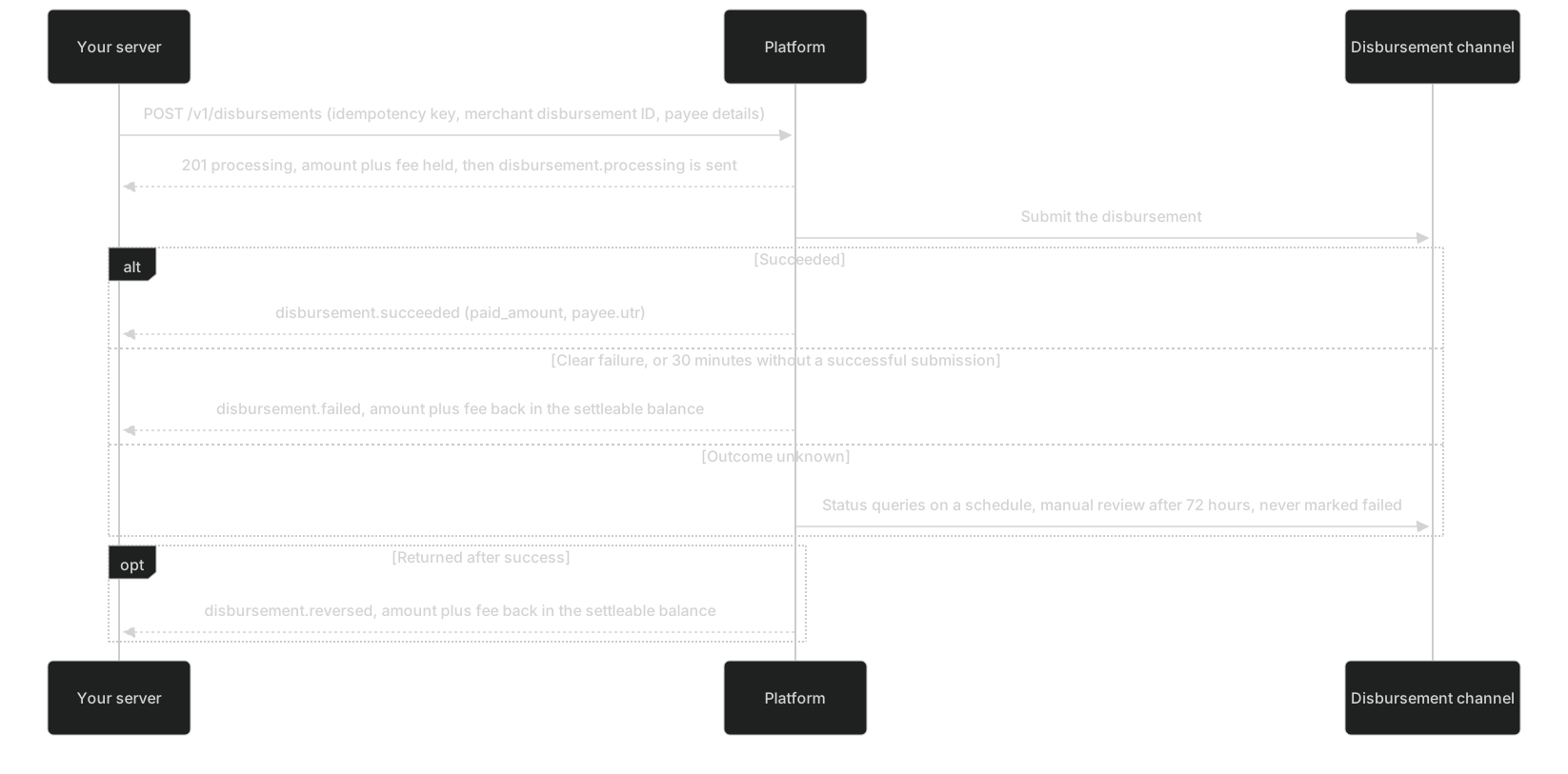
A disbursement pays a third-party payee you choose from your settleable balance in one currency, on your instruction. It isn't the same as a payout:
| Disbursement (this page) | Payout | |
|---|---|---|
| Who starts it | You: through the API, or one by one or in batches in the merchant portal | The platform: it generates settlements on your settlement cycle and pays them out after review |
| Who gets the money | A third-party payee you choose: an EasyPaisa or JazzCash wallet, or a bank account in Pakistan | Your own registered payout account |
| Source of funds | Your settleable balance in that currency | The settleable balance reserved by a settlement |
| Object and endpoints | Disbursement (dsb_), POST / GET /v1/disbursements | Settlement and Payout (po_), read-only |
Disbursements don't go through manual review: once a request passes the acceptance checks, it's submitted. A disbursement isn't a withdrawal either. The platform has no self-service withdrawal of arbitrary amounts to your own account; your own funds reach you only through settlements and payouts. For now only PKR is supported, and there are no cross-currency disbursements. The platform doesn't store payees, so every disbursement carries the full payee details. Disbursements can't be cancelled.
Setup and prerequisites
| Prerequisite | Who does it | If it's missing |
|---|---|---|
| Disbursements capability, enabled separately for test and live, off by default | The platform (contact your platform account manager) | 403 capability_disabled |
| A PKR disbursement channel and disbursement limits (minimum and maximum per disbursement, daily total amount, daily count) | The platform | 422 currency_not_supported |
| Disbursement pricing (percentage plus fixed fee) in your pricing version | The platform, as agreed in your contract | 422 currency_not_supported; once set, each disbursement's fee is in the response fee |
| Enough PKR settleable balance | Comes from your PKR collections after the lock period (see Funds rules) | 422 insufficient_balance |
API keys: a key with disbursements:write to create disbursements, disbursements:read to only query them; finance:read as well to check the settleable balance and balance transactions | An Owner or Admin creates them (live keys need step-up verification). A Developer can only choose scopes within their "grantable API scopes", which don't include the disbursement scopes by default | 403 forbidden |
Webhooks: subscribe your test and live endpoints to the 4 disbursement.* events | You | No outcome notifications; you can only query |
- Manage API keys: API Key page in the merchant portal (opens the merchant portal in a new tab) (Test environment; Requires Owner, Admin or Developer) (a Developer needs to have been granted the disbursement scopes).
- Subscribe to disbursement events: Webhook settings (opens the merchant portal in a new tab) (Test environment; Requires Owner, Admin or Developer).
Funds rules
| When | Settleable (available) | Reserved for disbursements (disbursement_pending) | Notes |
|---|---|---|---|
| Accepted (201) | Minus amount + fee | Plus amount + fee | If it falls short, 422 insufficient_balance; error.details.shortfall is the shortfall and nothing is created |
| Succeeded | If less than the amount was paid, plus amount − paid_amount | Minus amount + fee | Final deduction; the fee is charged |
| Failed | Plus amount + fee | Minus amount + fee | No fee is charged |
| Reversed | Plus paid_amount + fee | — | The payee didn't get the money; the original success record is kept |
- Example: your settleable balance is PKR 1,000.00 and you create a disbursement of 300.00 with a fee of 6.00. After acceptance, settleable is 694.00 and reserved for disbursements is 306.00. On success, the reserved amount drops to zero. If it fails, settleable goes back to 1,000.00.
- Money returned to the settleable balance (failure, reversal, the shortfall of a partial payment) is available right away, without another lock period.
- To check:
availableanddisbursement_pendinginGET /v1/balances. InGET /v1/balance-transactions, disbursement entries havesource_typedisbursement, and the posting types aredisbursement_reserved(held),disbursement_succeeded(deducted on success, including any shortfall returned),reservation_released(returned on failure) anddisbursement_reversed(returned on reversal). Both endpoints needfinance:read.
Note: Where the settleable balance comes from
Collected funds first go into pending settlement. They move to settleable only after both the T+N days of your settlement terms and the minimum lock hours (counted from when the payment succeeded) have passed.
Create a disbursement
POST/v1/disbursements requires an Idempotency-Key and the scope disbursements:write. The request has no merchant ID, fee or channel fields: the API key alone determines the merchant and environment, and the platform calculates the fee.
| Field | Type | Required | Rules |
|---|---|---|---|
merchant_disbursement_no | string | Yes | Your merchant disbursement ID: 1–64 letters, digits, dots, underscores, colons or hyphens. Unique within the merchant and environment, case-sensitive. Generate and save it before sending |
amount | integer | Yes | In the smallest currency unit. PKR amounts must be multiples of 100: 30000 (300.00) is fine, 30050 isn't |
currency | string | Yes | Three uppercase letters; only PKR for now |
method | string | Yes | easypaisa, jazzcash or bank |
payee.account | string | Yes | Payee account; see Payee rules. Responses only return the last 4 digits |
payee.name | string | Yes | Payee account name, 2–64 characters; must match the real name on the account |
payee.bank_code | string | Required when method=bank | Bank code; not allowed for other methods |
customer_ip | string | No | The IP of the payee (your user) when they submitted this payout request in your system. IPv4 or IPv6, up to 45 characters. Resolve it through your trusted proxy chain; don't send your server's IP. Used for risk checks |
description | string | No | Up to 256 characters, for your own reconciliation |
metadata | object | No | Same as Payment: up to 20 keys, keys up to 40 characters, values strings up to 200 characters |
For every field and constraint, see API reference: Create a disbursement. Replace the <TEST_SERVER_API_KEY> placeholder with a test key that has disbursements:write. The fee in the examples is for illustration only; your pricing decides the real fee.
curl https://api.fluxan.example/v1/disbursements \
  -H "Authorization: Bearer <TEST_SERVER_API_KEY>" \
  -H "Idempotency-Key: disbursement.create:DSB-DEMO-001:1" \
  -H "Content-Type: application/json" \
  -d '{
    "merchant_disbursement_no": "DSB-DEMO-001",
    "amount": 30000,
    "currency": "PKR",
    "method": "easypaisa",
    "payee": { "account": "03001234567", "name": "Test Payee" },
    "customer_ip": "203.0.113.10",
    "description": "Example disbursement",
    "metadata": { "customer_ref": "CUSTOMER-DEMO-001" }
  }'
Placeholders to replace
<TEST_SERVER_API_KEY>: Test-environment server API key, created on the "API Key" page of the merchant portal
The 201 response (a replay with the same key returns 200 and the latest state of the same disbursement):
{
  "id": "dsb_demo_001",
  "version": 1,
  "merchant_disbursement_no": "DSB-DEMO-001",
  "environment": "test",
  "amount": 30000,
  "currency": "PKR",
  "fee": 600,
  "method": "easypaisa",
  "payee": {
    "account_last4": "4567",
    "name": "Test Payee",
    "bank_code": null,
    "bank_name": null,
    "utr": null
  },
  "customer_ip": "203.0.113.10",
  "status": "processing",
  "resolution_status": "known",
  "failure": null,
  "paid_amount": null,
  "succeeded_at": null,
  "failed_at": null,
  "reversed_at": null,
  "description": "Example disbursement",
  "metadata": { "customer_ref": "CUSTOMER-DEMO-001" },
  "source": "api",
  "batch_id": null,
  "created_at": "2026-10-29T08:00:00Z",
  "updated_at": "2026-10-29T08:00:00Z",
  "request_id": "req_demo_101"
}Caution: HTTP 2xx only means accepted
HTTP 2xx only means the platform accepted the disbursement. Whether the money was paid depends on status or a verified disbursement.* event.
For a bank account, the request body differs like this: "method": "bank", "payee": { "account": "012345678901", "name": "Test Payee", "bank_code": "MEEZAN" }.
Disbursement object
| Field | Description |
|---|---|
id, environment | Disbursement ID (prefix dsb_); environment test or live |
version | Object version, increased on every effective change. Compare it when you handle events; don't order by status name |
merchant_disbursement_no, amount, currency, method, payee.name, payee.bank_code, customer_ip, description, metadata | Same as in the request. bank_code is null when the method isn't bank; customer_ip is null for disbursements made in the merchant portal |
fee | Disbursement fee, calculated and fixed at acceptance from the pricing version in force at the time; later pricing changes don't affect it |
payee.account_last4, payee.bank_name, payee.utr | Last 4 digits of the payee account (the full account never appears in any response or event); the payee's bank name as reported by the disbursement channel, may be null; the reference number from the payee's wallet or bank, set only after success, which the payee can use to trace the money |
status, resolution_status | See Status and outcomes |
failure | { code, message } when status=failed, otherwise null |
paid_amount | Amount actually paid, set only after success. It may be less than amount; the difference is already back in the settleable balance |
succeeded_at, failed_at, reversed_at, created_at, updated_at | When it entered each status, when it was accepted, and when it last changed. After a reversal, succeeded_at, paid_amount and payee.utr are kept |
source, batch_id | Source: api for the API, portal for one-off disbursements in the merchant portal, batch for portal batches. batch_id is the batch ID (prefix dsbb_), set only for batches |
For the type and nullability of every field, see API reference: Disbursement object.
Query disbursements
GET/v1/disbursements/{disbursement_id} retrieves one by disbursement ID, and GET/v1/disbursements lists them by filter. Both need disbursements:read.
# Query by disbursement ID (scope disbursements:read)
curl https://api.fluxan.example/v1/disbursements/dsb_demo_001 \
-H "Authorization: Bearer <TEST_SERVER_API_KEY>"
# Query by merchant disbursement ID: after a timeout, check whether it was accepted
curl "https://api.fluxan.example/v1/disbursements?merchant_disbursement_no=DSB-DEMO-001" \
-H "Authorization: Bearer <TEST_SERVER_API_KEY>"
# Reconciliation: disbursements from one day that are still processing
curl "https://api.fluxan.example/v1/disbursements?status=processing¤cy=PKR&created_gte=2026-10-29T00:00:00Z&created_lt=2026-10-30T00:00:00Z&limit=100" \
-H "Authorization: Bearer <TEST_SERVER_API_KEY>"Placeholders to replace
<TEST_SERVER_API_KEY>: Test-environment server API key, created on the "API Key" page of the merchant portal
- List filters:
status,currency,created_gte(inclusive),created_lt(exclusive),merchant_disbursement_no(exact match, case-sensitive) andbatch_id.limitdefaults to 20, up to 100. Forcursor, pass the previous page'snext_cursor. Results are sorted by creation time, newest first, then byiddescending for the same time (same as pagination). The response hasdata,has_more,next_cursorandrequest_id. - Only disbursements of the current merchant and environment are returned. A disbursement ID from another merchant or environment returns 404, without revealing whether it exists. Requests rejected at acceptance have no disbursement record, so you won't find them.
- Disbursements made in the merchant portal, one by one or in batches, show up too (see
source): View disbursements (opens the merchant portal in a new tab) (Test environment; Requires Owner, Admin, Finance or Developer).
Payee rules
| Method | payee.account rule | Example |
|---|---|---|
easypaisa, jazzcash | 11 digits starting with 03; the API doesn't normalize anything | 03001234567 |
bank (local account) | 9–24 letters and digits after removing spaces and converting to uppercase | 012345678901 |
bank (IBAN) | Starting with PK, it's checked as an IBAN: 24 characters with a valid mod 97 check digit | PK29HABB0001234567890123 |
- If a rule fails, the API returns 400
invalid_requestwithfieldset topayee.account,payee.nameorpayee.bank_code. - Normalize wallet numbers in your system before you submit them: remove spaces and hyphens; replace a leading
+92or92followed by 10 digits with0and those 10 digits; add a leading0to a 10-digit number starting with3(a spreadsheet dropped the leading zero). The merchant portal forms and batch files normalize automatically; the API doesn't. payee.namecan't contain 13–19 consecutive digits (card-number-like). If the name doesn't match the real name on the account, the disbursement is accepted and then fails (payee_account_invalid). The platform doesn't run card-number (Luhn) checks on payee accounts; an account with a valid format that doesn't exist is also accepted and then fails.- The full payee account appears only in the create request. After that, API responses, events, the merchant portal and exports show only the last 4 digits. Don't record the full account in your logs, error reports or tickets either.
Warning: A disbursement can't be pulled back once paid
The platform pays the account you submit. If the account number is wrong but the name happens to match, the money goes into that account. Check the account and name before you submit.
Bank codes
When method=bank, set payee.bank_code to a code from this table (taken from the contract, case-sensitive):
| Code | Bank name |
|---|---|
| HBL | Habib Bank Limited |
| UBL | United Bank Limited |
| MCB | MCB Bank Limited |
| MCB_ARIF_HABIB | MCB Arif Habib |
| NBP | National Bank of Pakistan |
| ALFALAH | Bank Alfalah Limited |
| ALLIED | Allied Bank Limited |
| ASKARI | Askari Bank Limited |
| FAYSAL | Faysal Bank Limited |
| MEEZAN | Meezan Bank |
| AL_HABIB | Bank Al Habib Limited |
| HABIB_METRO | Habib Metropolitan Bank |
| BANK_ISLAMI | Bank Islami Pakistan Limited |
| DUBAI_ISLAMIC | Dubai Islamic Bank Pakistan |
| PUNJAB_BANK | The Bank of Punjab |
| SINDH_BANK | Sindh Bank Limited |
| SONERI | Soneri Bank Limited |
| SUMMIT | Summit Bank Limited |
| SILK | Silk Bank Limited |
| SAMBA | Samba Bank Limited |
| JS | JS Bank Limited |
| NIB | NIB Bank Limited |
| APNA | Apna Microfinance Bank |
| CITI | Citi Bank NA |
| NRSP | NRSP Microfinance Bank |
| CDNS | Central Directorate of National Savings |
Idempotency and retries
| Situation | What the platform does | What you should do |
|---|---|---|
| Same key, same request body | Returns the latest state of the same disbursement (200) and doesn't pay again | Handle the returned status |
| Same key, different request body (any field, including payee details) | 409 idempotency_conflict; the original disbursement is unchanged. related_resource_id is the disbursement accepted with this key | An integration bug: fix how you generate keys. Query that disbursement before deciding whether to pay again |
| Same key, concurrent requests | Only one runs; the others wait and return the same disbursement, or get 409 operation_in_progress | Retry later with the same key |
| New key, same merchant disbursement ID | 409 disbursement_no_conflict; related_resource_id is the existing disbursement | Query the existing disbursement; this ID has been paid or is being paid |
| Rejected with 400, 401, 403 or 422 | Nothing is created; the idempotency key and ID aren't used up | Fix it and submit with a new key; you can keep the ID |
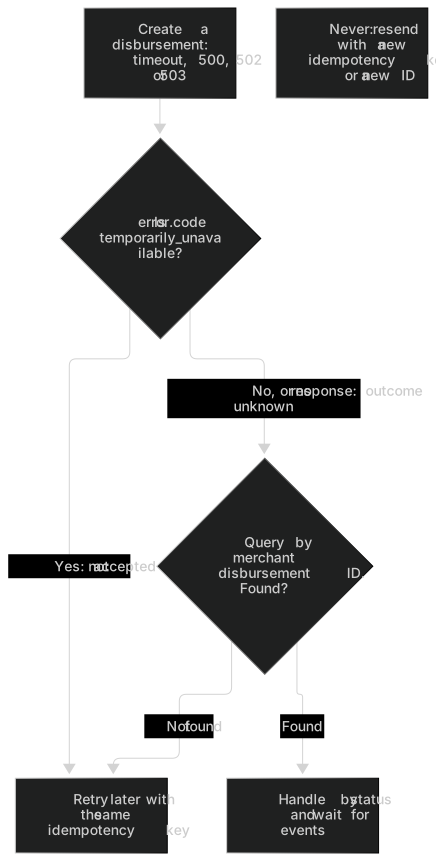
503 temporarily_unavailable, 429 rate_limited | Not accepted this time; nothing is created | Retry later with the same key (for 429, after Retry-After) |
Timeout, 500, 502 or 503 upstream_unavailable | May have been accepted | Retry with the same key, or query by ID (see the diagram below) |
- Derive the idempotency key from the merchant disbursement ID:
disbursement.create:<ID>:<attempt>. Increase the attempt number only when you fix and resubmit a request rejected with 4xx. If you use random UUIDs instead, write the key to your database before sending and read it back for retries; never generate a new one. - All request fields are compared. Idempotency records are kept for 7 days; the merchant disbursement ID stays unique forever.
- For the retry wrapper, reuse
postWithRetryfrom the reference implementation for retries.
Warning: After a timeout or 5xx, don't resend with a new ID or idempotency key
When a request times out or returns 5xx, the disbursement may already be accepted, and the money may already be on its way to the payee. If you resend with a new idempotency key or a new merchant disbursement ID, the platform treats it as a new disbursement. The payee may receive the money twice, and money that has been paid out can't be pulled back. There are only two correct options: retry with the original idempotency key, or query by merchant disbursement ID. See Don't charge again with a new key.
Status and outcomes
status | resolution_status | Meaning | What you should do |
|---|---|---|---|
processing | known | Accepted and being paid | Wait for events; don't treat it as failed |
processing | needs_query | Outcome unknown; the platform is querying the disbursement channel | Same as above; don't create another one |
processing | manual_review | Still unknown after 72 hours of automatic status queries, so it's under manual review. The platform still queries every 24 hours and never marks it failed on its own | Keep it as "processing". The outcome arrives as an event; to chase it, contact the platform with the disbursement ID |
succeeded | known | The disbursement succeeded | Book paid_amount; give payee.utr to the payee |
failed | known | The disbursement failed; the amount and fee are back in the settleable balance | Handle by failure code; to pay again, create a new one with a new ID |
reversed | known | Returned by the payee's wallet or bank after success, so the payee didn't get the money; the amount and fee are back in the settleable balance | Check first, then decide whether to create a new one with a new ID; don't resend automatically |
| Unknown value | — | A status the platform added | Treat it as "not finished", query and alert; never treat it as succeeded |
- There's no cancel, pull-back or retry endpoint.
failedandreversedare final. A disbursement becomesfailedonly when the disbursement channel clearly fails it, when it can't be submitted for 30 minutes in a row, or after the platform's manual review. - A reversal can appear after success: the platform checks again on day 1 and day 3 after success, and handles reversal notices whenever they arrive.
- Query schedule: rely on webhooks first. If a disbursement is still
processing10 minutes after acceptance and you haven't received an event, query at 30 minutes, 2 hours, 6 hours and 24 hours, then once a day until it reaches a final status. Leave at least 10 seconds between two queries of the same disbursement. Queries only read the platform's current status, so querying more often won't get you a result sooner. - View one disbursement or export them: Disbursements (opens the merchant portal in a new tab) (Requires Owner, Admin, Finance or Developer).
Failure codes
When status=failed, failure.code takes a value from this table (taken from the contract):
| failure.code | Meaning | What to do |
|---|---|---|
| payee_account_invalid | The payee account is invalid or doesn't exist, the account name doesn't match, or the bank code is wrong | Ask the payee to check their payee details, then create a new disbursement with a new merchant disbursement ID |
| payee_account_restricted | The payee account is restricted, frozen, over its receiving limit, or has stopped receiving payments | Once the payee's restriction is lifted, create a new disbursement, or use another account |
| upstream_rejected | Rejected by the disbursement channel (a business rejection, a manual rejection, the channel's quota running out, and so on) | Create a new disbursement later; if it keeps happening, contact the platform |
| upstream_unavailable | The platform couldn't submit it for 30 minutes in a row and marked it as failed; it shares its name with the HTTP error code upstream_unavailable but means something different | Create a new disbursement later |
| upstream_failed | Other failures, including ones the platform confirms as failed after a manual check; handle any failure code you don't recognize as this one | Contact the platform |
- Every failure has already returned the full amount and fee to the settleable balance.
- Tolerate new failure codes; handle unknown ones as
upstream_failed.
Caution: The two upstream_unavailable codes mean different things
The HTTP error code upstream_unavailable (the create request returned 502 or 503, the outcome is unknown, retry with the original key) and the failure code upstream_unavailable (the disbursement failed and the funds are back) aren't the same thing. Check error.code for the first and failure.code for the second (failure reasons versus API errors).
Webhook events
| Event | When it's sent | What you usually do |
|---|---|---|
disbursement.processing | After acceptance, for disbursements made through the API and in the merchant portal (one by one or in batches) | Record the disbursement ID and mark your business record as "disbursement processing" |
disbursement.succeeded | Confirmed success, with paid_amount and payee.utr | Mark it paid with the amount actually paid |
disbursement.failed | A clear failure, with failure | Mark it failed; the funds are back in the settleable balance |
disbursement.reversed | Returned after success, with reversed_at | Mark it unpaid again and tell your operations team; don't resend automatically |
data.object is a snapshot of the Disbursement when the event occurred (same fields as the Disbursement object). To fetch a missed disbursement event with GET/v1/events/{event_id}, you need disbursements:read. Subscribe to events in Webhook settings (opens the merchant portal in a new tab) (Requires Owner, Admin or Developer).
Example payload (a reversal event in the live environment; reversals can't be triggered in the test environment):
{
  "id": "evt_demo_203",
  "type": "disbursement.reversed",
  "api_version": "v1",
  "created_at": "2026-10-30T02:10:00Z",
  "environment": "live",
  "merchant_id": "mer_demo_001",
  "data": {
    "object": {
      "id": "dsb_demo_009",
      "version": 3,
      "merchant_disbursement_no": "DSB-DEMO-009",
      "environment": "live",
      "amount": 30000,
      "currency": "PKR",
      "fee": 600,
      "method": "easypaisa",
      "payee": {
        "account_last4": "4567",
        "name": "Test Payee",
        "bank_code": null,
        "bank_name": null,
        "utr": "UTR-DEMO-001"
      },
      "customer_ip": "203.0.113.10",
      "status": "reversed",
      "resolution_status": "known",
      "failure": null,
      "paid_amount": 30000,
      "succeeded_at": "2026-10-29T08:01:04Z",
      "failed_at": null,
      "reversed_at": "2026-10-30T02:09:58Z",
      "description": "Example disbursement",
      "metadata": { "customer_ref": "CUSTOMER-DEMO-001" },
      "source": "api",
      "batch_id": null,
      "created_at": "2026-10-29T08:00:00Z",
      "updated_at": "2026-10-30T02:09:58Z"
    }
  }
}Handle disbursement events (first verify the signature and environment, deduplicate by event ID and return 2xx):
// Verify the signature, check the environment, deduplicate by event ID and return 2xx first (see the Webhooks
// guide), then call this function asynchronously
export async function onDisbursementEvent(event) {
  const d = event.data.object;
  const local = await findDisbursement(d.id); // Your saved snapshot; disbursements made in the portal (source portal or batch) may be missing
  if (local && local.version >= d.version) return; // Older version: discard
  await saveDisbursementSnapshot(d);
  if (d.status === 'succeeded')
    return markPaid(d.merchant_disbursement_no, d.paid_amount, d.payee.utr); // Book the amount actually paid
  if (d.status === 'failed') return markFailed(d.merchant_disbursement_no, d.failure.code); // Funds are back in the settleable balance
  if (d.status === 'reversed') return markReversed(d.merchant_disbursement_no); // Mark it unpaid and alert your ops team; don't resend automatically
  // processing or an unknown status: keep waiting, never treat it as succeeded
}
Events for the same disbursement can arrive out of order or more than once. reversed (version 3) may arrive before succeeded (version 2). If you handle events by version, the late succeeded is discarded and never turns a reversed disbursement back into paid (out-of-order events and version comparison). To pay again after a reversal, create a new disbursement with a new ID. For disbursements made in the merchant portal without an ID, merchant_disbursement_no equals the disbursement ID.
Error codes and rate limits
Creating a disbursement runs the checks below in order. When a check fails, the API returns right away without running the rest. Except for 201, nothing is created and no funds are held.
| Order | Check | If it fails | What you should do |
|---|---|---|---|
| 1 | Request format: missing Idempotency-Key, missing fields, wrong type or length; card-number-like digits in description or metadata | 400 invalid_request (field names the field); 400 sensitive_data_rejected | Fix it and submit with a new key |
| 2 | Idempotency: same key with a different body; a request with the same key still running | 409 idempotency_conflict; 409 operation_in_progress | For the first, fix how you generate keys; for the second, retry later with the same key |
| 3 | Merchant status and the disbursements capability | 403 merchant_not_active; 403 capability_disabled | Contact the platform |
| 4 | The currency is enabled for you, a disbursement channel is available, and limits and disbursement pricing are set | 422 currency_not_supported | Use only PKR for now; contact the platform |
| 5 | Integer amount; payee details and customer_ip format | 400 invalid_request (field is amount, payee.* or customer_ip) | Fix it and submit with a new key |
| 6 | Unique merchant disbursement ID | 409 disbursement_no_conflict (related_resource_id is the existing disbursement) | Query the existing disbursement; don't resend with a new ID |
| 7 | Fee less than the amount | 422 fee_exceeds_amount | Increase the amount |
| 8 | Limits: minimum and maximum per disbursement, daily total amount, daily count | 422 amount_out_of_range, without the threshold | Adjust the amount or wait for the next business day; ask the platform about your limits |
| 9 | Disbursements paused by the platform | 503 temporarily_unavailable, without a reason | Retry later with the same key |
| 10 | Risk lists | 422 risk_rejected | Don't try to get around it; contact the platform with questions |
| 11 | Hold the settleable balance | 422 insufficient_balance; error.details carries shortfall and currency | Once the settleable balance is enough, resubmit with the same ID and a new idempotency key |
| — | All checks pass | 201 processing, then disbursement.processing is sent | Save the disbursement ID and wait for the outcome |
{
  "error": {
    "code": "insufficient_balance",
    "message": "The settleable balance isn't enough to cover the disbursement amount and fee. Shortfall: PKR 56.00",
    "field": null,
    "related_resource_id": null,
    "retryable": false,
    "details": { "shortfall": 5600, "currency": "PKR" }
  },
  "request_id": "req_demo_102"
}
General errors: 401 unauthenticated; 403 forbidden (the key lacks the required scope) and ip_not_allowed; 404 not_found when you query a disbursement that doesn't exist or doesn't belong to the current merchant and environment; 429 rate_limited; 500 internal_error, and 502 or 503 upstream_unavailable (outcome unknown, handle as in Idempotency and retries). For all error codes, see the error code reference.
Rate limits
Disbursement creation has its own per-merchant rate limit and doesn't use up the payment or refund allowance. A different API key doesn't get around it. Going over returns 429 and the request isn't executed; wait Retry-After seconds and retry with the original idempotency key. When you have many disbursements to make at once, limit concurrency, or use batch disbursements in the merchant portal. Query endpoints follow the API reference rate limits.
Test in the test environment
- The prerequisites are the same as in live (see Setup and prerequisites): the platform enables the disbursements capability for the test environment and sets up a PKR channel and limits, and you use a test key with the disbursement scopes. The test environment moves no real money.
- The test settleable balance also comes from PKR collections, after the test environment's lock period. To rehearse sooner, ask the platform to shorten the lock period for the test environment.
- Disbursements under PKR 500.00 (
amount< 50000) succeed; PKR 500.00 and above fail. Take the failure code fromfailure.code; it isn't fixed to one code. - Bank accounts that aren't 9–20 characters long are accepted and then fail right away, so a 24-character IBAN always fails in the test environment. Test bank disbursements with a 9–20 digit local account. Live has no such limit.
- Reversals and unknown outcomes (
needs_query,manual_review) can't be simulated yet. To test them yourself: in a unit test, pass the example payload to your event handler and confirm it marks the disbursement unpaid again without resending; pass aprocessing+needs_queryresponse to your code and confirm it isn't treated as a failure and no new disbursement is created; and use "Send test event" in Webhook settings (opens the merchant portal in a new tab) (Test environment; Requires Owner, Admin or Developer) to send adisbursement.reversed, checking only receipt and signature verification (test events don't match a real disbursement, so don't change business data based on them).
| # | Scenario | Action | Expected |
|---|---|---|---|
| T1 | Wallet disbursement succeeds | The create example, amount 30000 | 201 processing → disbursement.succeeded with paid_amount and payee.utr; the settleable balance drops by amount plus fee |
| T2 | Disbursement fails | amount 60000 | 201 processing → disbursement.failed; amount plus fee back in the settleable balance |
| T3 | Bank account disbursement | method=bank, bank_code, 12-digit local account | Same as T1 |
| T4 | IBAN (test limit) | 24-character IBAN | Accepted, then fails right away |
| T5 | Settleable balance too low | Amount plus fee above the settleable balance | 422 insufficient_balance with details.shortfall; no disbursement record |
| T6 | Format errors | amount 30050; or payee.account +923001234567 | 400 invalid_request with field amount or payee.account |
| T7 | Replay with the same key | Send T1's key and body again | 200, the same disbursement |
| T8 | New key, same ID | A new key with T1's merchant disbursement ID | 409 disbursement_no_conflict; related_resource_id is T1's disbursement |
| T9 | Retry with the same key after a timeout | Send with a 100 ms client timeout, then retry with the same key or query by ID | Only one disbursement |
| T10 | Create with a read-only key | Call the create example with a key that only has disbursements:read | 403 forbidden |
For the general test environment notes, see the testing guide.
Go-live checks
Before you go live with disbursements, confirm each item (checkmarks are saved only in this browser; you can copy the list as Markdown). For the general go-live checks, see the go-live checklist.
Setup and permissions 0/2Idempotency and outcomes 0/3Funds and payee details 0/2Self-test 0/1
Setup and permissions
DC-01The platform has enabled disbursements in the live environment and set up the PKR channel, limits and disbursement fee rateWhere: Setup and prerequisitesSetup and permissionsDC-02The live key that creates disbursements is created by an Owner or Admin and gets only the scopes disbursements need: disbursements:write, disbursements:read to query outcomes, and finance:read if you check settleable as in DC-06. Also set up an IP allowlistWhere: API Key (opens the merchant portal in a new tab) (Requires Owner, Admin or Developer)Setup and permissions · Required role: Owner or AdminIdempotency and outcomes
DC-03Each disbursement's merchant disbursement ID is generated and saved before the request, and the idempotency key is derived from it; after a timeout or a 5xx, the code only retries with the original key or looks the disbursement up by its ID, and has no path that resends with a new ID or a new keyWhere: Idempotency and retriesIdempotency and outcomes · Acceptance criteria AC-069DC-04The live endpoint subscribes to the 4 disbursement.* events, deduplicates by event ID and processes by versionWhere: Webhook (opens the merchant portal in a new tab) (Requires Owner, Admin or Developer), Out-of-order events and version comparisonIdempotency and outcomes · Required role: Owner, Admin or DeveloperDC-05Book by paid_amount; on failed, handle it by failure code, and handle a code you don't recognize as upstream_failed; on reversed, change it from paid back to unpaid and notify your operations team, without resending automaticallyWhere: Failure codeIdempotency and outcomesFunds and payee details
DC-06Check settleable with GET /v1/balances before you create a disbursement; alert on insufficient_balance and don't reduce the amount automaticallyWhere: Funds rulesFunds and payee detailsDC-07Full payee account numbers stay out of logs, error reports and support tickets; your payee entry page says "The account name must match the real name on the account"Where: Payee rulesFunds and payee details · Acceptance criteria AC-064Self-test
DC-08All of T1 to T10 in the test-environment checklist pass, and reversals and unknown outcomes are verified with the methods describedWhere: Test in the test environmentSelf-test