Idempotency, retries and status checks
Idempotency keys make a request take effect once, however often you send it. Key rules, 13 scenarios, new-card retries and status checks for unknown outcomes.
Last updated 2026-10-20 · API contract v1.0.0
Why idempotency matters
Networks lose responses: the platform may have accepted a request, but the response never reached your server. Idempotency guarantees that a single business submission has only one business effect, however many times you send it, so a retry never charges twice.
Which requests need an idempotency key
| Endpoint | Method and path | Idempotency key | Business uniqueness constraint (still applies after the key expires) |
|---|---|---|---|
| Create payment | POST /v1/payments | Required | (merchant, environment, merchant_order_no) |
| Confirm payment | POST /v1/payments/{payment_id}/confirm | Required | At most one unfinished attempt per payment at a time |
| Cancel payment | POST /v1/payments/{payment_id}/cancel | Required (no request body) | — |
| Create checkout session | POST /v1/checkout/sessions | Required | Links to the same payment and never creates a second payment |
| Create refund | POST /v1/refunds | Required | (merchant, environment, merchant_refund_no) |
| All query endpoints | GET … | Not needed | — |
Send the key in the Idempotency-Key request header, 1–255 characters. If it's missing, the API returns 400 with error.field set to Idempotency-Key.
Idempotency rules
The scope is merchant + environment + method + path + idempotency key. The same key in the test and live environments doesn't interfere, and rotating an API key doesn't change the scope.
| Situation | What the platform does | What you should do |
|---|---|---|
| Same merchant, environment, operation path and idempotency key, and the core business parameters match | Reuses the original business object and doesn't execute the operation a second time. Returns the object's latest state (HTTP 200) | Handle the returned object as usual |
| Same key, but core business parameters such as the amount, currency or order ID conflict | HTTP 409 idempotency_conflict | This is an integration bug: fix how you generate keys. Don't change the parameters and replay the original key |
| Concurrent requests with the same key | Only one request gets to run. The others wait for it to finish and then return the same object. If the wait times out, the API returns 409 operation_in_progress | Handle the returned object. For an in-progress conflict, retry later with the same key |
| You switch to a different API key that belongs to the same merchant and environment | The idempotency scope doesn't change | During an API key rotation, keep retrying with the original idempotency key as usual |
| A new idempotency key with the same merchant order ID (create payment) | The business uniqueness constraint prevents a second payment, and the API returns the existing object's identifier or a conflict | Retrieve the existing object. Don't change the order ID to get around this |
| The idempotency record is past its retention period (7 days) | Uniqueness protection on order IDs and refund IDs still applies, so the request isn't reinterpreted as new business | Nothing special to do |
- "Core business parameters" include the amount, the currency, the merchant order ID, the merchant refund ID, the linked payment ID and so on. The fields compared for each endpoint are listed on its endpoint page (for example, Create payment). Card details aren't compared and aren't stored: replaying a key never charges newly submitted card details.
- A request rejected with 400, 401, 403 or 422 doesn't consume the idempotency key. Fix the request and submit it with a new key.
- If you create a checkout session with a new key but the same order ID, amount and currency, the platform creates a new checkout session for the same payment (for example, when the old session has expired). This isn't a conflict and doesn't create a second payment.
Generate and store idempotency keys
| Approach | Example | Advantages | Notes |
|---|---|---|---|
| Generated deterministically from your business data (recommended) | payment.create:ORDER-DEMO-001:1; second confirm after a card change: payment.confirm:ORDER-DEMO-001:2; refund: refund.create:REFUND-DEMO-001:1 | Any server can compute the same key, even after a process restart. It also naturally prevents your own system from submitting duplicates concurrently | Add 1 to the sequence number only for a new business submission (such as a card change). Never include sensitive data such as email addresses, names or card numbers |
| Random UUID | Generate it with crypto.randomUUID() and store it with the order | Simple | Write it to the database before you send the request. On a retry, read it back from the database. Never generate a new one |
Use one key per business submission, and use a given key for only one endpoint. Persist the key together with the order before you send the request, so that after a process crash you can read the original key back from the database and retry.
Retention period
Idempotency records are kept online for 7 days. After that, uniqueness protection on merchant order IDs and refund IDs still applies, so the same order is never treated as new business and charged again.
Example scenarios
Expand a scenario to see its sequence of requests and responses:
S1Network timeout, no response receivedCreate with key K → timeout → retry with KAC-014
Platform behavior: Returns the same Payment (200) and doesn't charge again
What you should do: Handle the returned status
POST /v1/payments  Idempotency-Key: K   → (timeout, no response)
POST /v1/payments Idempotency-Key: K → 200 {"id":"pay_demo_001","status":"succeeded",…}S2A 5xx responseCreate with K → 500 → retry with K, or query by order IDAC-069
Platform behavior: May have been accepted; a retry returns the original object or executes once
What you should do: Retry with the same key or query; never switch keys
POST /v1/payments  Idempotency-Key: K   → 500 {"error":{"code":"internal_error","retryable":true},…}
POST /v1/payments Idempotency-Key: K → 200 {"id":"pay_demo_001","status":"processing",…}S3Same key, different amountSubmit USD 10000 with K → submit USD 12000 with KAC-016
Platform behavior: 409 idempotency_conflict; the original transaction is unchanged
What you should do: Fix your key generation logic
POST /v1/payments  Idempotency-Key: K  {"amount":10000,…} → 201
POST /v1/payments Idempotency-Key: K {"amount":12000,…} → 409 {"error":{"code":"idempotency_conflict",…}}S4New key, same order IDCreate ORDER-001 with K1 → create ORDER-001 again with K2AC-017
Platform behavior: Doesn't create a second Payment; returns the existing object's identifier or a conflict
What you should do: Retrieve the existing Payment
POST /v1/payments  Idempotency-Key: K1  {"merchant_order_no":"ORDER-001",…} → 201 pay_demo_001
POST /v1/payments Idempotency-Key: K2 {"merchant_order_no":"ORDER-001",…} → 409 {"error":{"code":"order_no_conflict","related_resource_id":"pay_demo_001",…}}S5Concurrent requests with the same keyTwo servers submit with K at the same timeAC-015
Platform behavior: Only one request executes; the other returns the same object or an in-progress conflict
What you should do: Handle the response; for an in-progress conflict, retry later with K
Server A: POST /v1/payments  Idempotency-Key: K → 201 pay_demo_001
Server B: POST /v1/payments  Idempotency-Key: K → 200 pay_demo_001 (or 409 operation_in_progress, then retry later with K)
S610 sequential repeats with the same keySubmit 10 times in a row with KAC-014
Platform behavior: Only one Payment, one charge and one fee calculation
What you should do: —
POST /v1/payments  Idempotency-Key: K → 201 pay_demo_001
POST /v1/payments  Idempotency-Key: K → 200 pay_demo_001 (same for requests 2–10)
S7Retry with new card detailsSubmit card A with K → timeout → submit card B with KAC-018
Platform behavior: Reuses the original operation and doesn't charge card B
What you should do: To switch cards, wait until the original attempt has clearly failed, then confirm with a new key
POST /v1/payments  Idempotency-Key: K  (card A) → (timeout)
POST /v1/payments  Idempotency-Key: K  (card B) → 200 result of the original operation (card B isn't charged)
S8Confirm with a new key while in progressConfirm with K2 while the payment is processingAC-027
Platform behavior: 409 payment_in_progress, or the original status is returned; no new charge
What you should do: Wait for the result or query
POST /v1/payments/pay_demo_001/confirm Idempotency-Key: K2 → 409 {"error":{"code":"payment_in_progress","related_resource_id":"pay_demo_001",…}}S9Switch cards after a clear failureAfter status=failed, confirm with a new key K3 (card B)AC-026
Platform behavior: Creates a new attempt within the attempt limit and validity period, reusing the original Payment and rate snapshot
What you should do: —
GET  /v1/payments/pay_demo_001 → 200 {"status":"failed","failure":{"code":"card_declined",…}}
POST /v1/payments/pay_demo_001/confirm Idempotency-Key: K3 (card B) → 200 {"status":"succeeded","attempt_count":2,…}S10A 429 responseSubmit with K → 429 (Retry-After: 2)
Platform behavior: This request wasn't executed
What you should do: Wait 2 seconds, then retry with K
POST /v1/payments  Idempotency-Key: K → 429  Retry-After: 2
(wait 2 seconds)
POST /v1/payments  Idempotency-Key: K → 201 pay_demo_001
S11Timeout after submitting a refundCreate refund R-001 with K → timeoutAC-033
Platform behavior: Keeps running status queries and never creates the refund at the provider again automatically
What you should do: Retry with K or query by merchant_refund_no; don't submit again with a new refund ID
POST /v1/refunds  Idempotency-Key: K  {"merchant_refund_no":"R-001",…} → (timeout)
POST /v1/refunds Idempotency-Key: K {"merchant_refund_no":"R-001",…} → 200 ref_demo_001 (the same refund)S12Cancel returns 202Request cancellation of a requires_action payment, but the provider can't confirm → 202AC-029
Platform behavior: No evidence yet that the cancellation is safe, so the status stays as it was and status queries continue
What you should do: Don't treat it as canceled; wait for payment.canceled or query
POST /v1/payments/pay_demo_007/cancel  Idempotency-Key: K → 202 {"status":"requires_action",…}
(later you receive payment.canceled, or a query returns the final status)S13Channel paused for new transactionsCreate with K → 503 temporarily_unavailable
Platform behavior: This request wasn't accepted; no Payment was created and no charge was made, and the response doesn't give the internal reason
What you should do: Show the payer "Payment is temporarily unavailable. Try again later"; retry with K later
POST /v1/payments  Idempotency-Key: K → 503 {"error":{"code":"temporarily_unavailable","retryable":true},…}
(later)
POST /v1/payments  Idempotency-Key: K → 201 pay_demo_001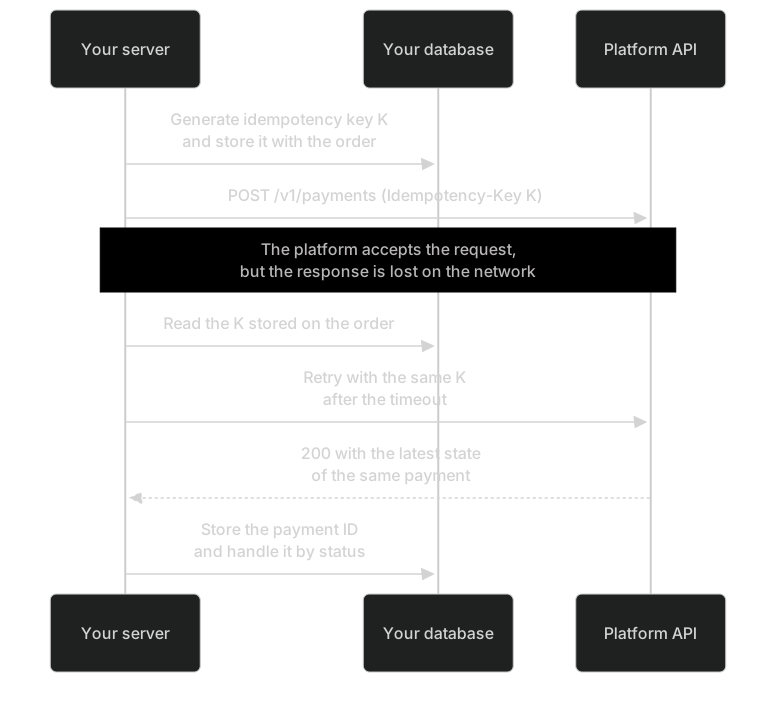
Retry with a new card
- Do this only after the payment has
status=failed(the previous attempt clearly failed). - Call POST/v1/payments/{payment_id}/confirm with a new idempotency key, and have the payer enter their card details again.
- You must do it before
expires_atand within the maximum number of attempts (3 by default). The new attempt keeps using the original payment and the rate in effect at that time. - While the payment is still in progress (
processingorrequires_action), confirming with a new key is rejected (409payment_in_progress) and no new charge is made.
How to check the status when the outcome is unknown
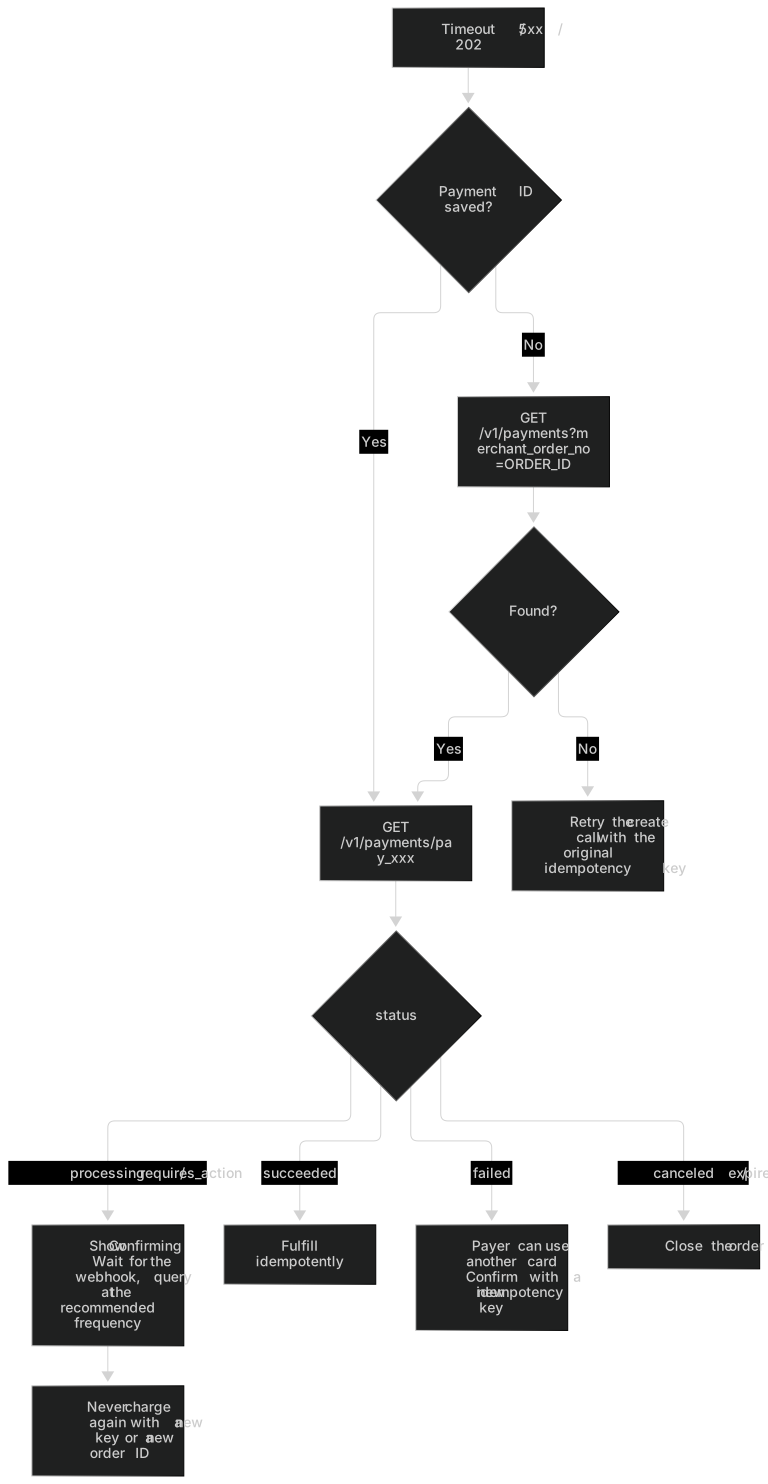
- If you have the payment ID: GET/v1/payments/{payment_id}.
- If you don't have the payment ID (for example, you crashed before saving the response):
GET /v1/payments?merchant_order_no=...(exact match, case-sensitive). - For refunds:
GET /v1/refunds/{refund_id}, orGET /v1/refunds?merchant_refund_no=....
status | resolution_status | Meaning | What to do |
|---|---|---|---|
processing | needs_query | Outcome unknown. The platform is running a status query against the provider using the original identifiers | Show the payer "Confirming your payment". Wait for the webhook, or query at the frequency below |
processing | known | Submitted and being processed | Same as above |
processing / requires_action | manual_review | Past the automatic query window and handed over to manual follow-up. The platform still queries the provider every 24 hours and never marks the payment as failed automatically | Keep the order in a "Pending confirmation" state. Don't charge again. If it's still unconfirmed after 24 hours, contact support and give them the payment ID |
requires_action | known | The payer needs to complete authentication | Guide the payer through authentication (next_action), or wait |
succeeded | known | The payment succeeded | Fulfill the order idempotently by payment ID |
failed | known | The latest attempt clearly failed (failure.attempt_id) | You can let the payer use another card |
canceled / expired | known | Closed | Close the order |
| No record found (by order ID) | — | The platform has never created a payment for this order ID | Retry the create call with the original idempotency key (this avoids a conflict with the original request if it's still in flight) |
An order's validity period only limits new payment actions. It doesn't invalidate a payment that was already submitted: a processing payment keeps being checked after expires_at passes and can still succeed.
Don't charge again with a new key
Warning: When the outcome is unknown, don't charge again with a new idempotency key or order ID
A timeout, a 5xx response or a 202 response may already have charged the payer. Retry with the same idempotency key, or query by order ID. See How to check the status when the outcome is unknown.
Why: when a request times out or returns 5xx or 202, the money may already have been charged. If you then start the payment again with a new idempotency key or a new merchant order ID, the platform treats it as new business, and the payer can be charged twice. There are only two correct approaches: retry with the original idempotency key, or query by payment ID or merchant order ID.
// Don't do this: after a timeout, charging again with a new idempotency key or a new order ID can charge the payer twice
try {
  await createPayment(order, { idempotencyKey: order.paymentIdempotencyKey });
} catch (timeoutError) {
  await createPayment(order, { idempotencyKey: crypto.randomUUID() }); // ✗ New key = new business
  await createPayment({ ...order, orderNo: `${order.orderNo}-retry` }); // ✗ New order ID = new payment
}
Recommended polling frequency
| Object | When to start | Recommended query times (after first acceptance) | When to stop |
|---|---|---|---|
Payment (processing, requires_action) | After you get a 202, a timeout or a 5xx | 10 seconds, 30 seconds, 2 minutes, 5 minutes, 15 minutes, 1 hour. After that, every 4 hours up to 24 hours | The payment reaches succeeded / failed / canceled / expired, or you receive the matching webhook |
Refund (pending_review, processing) | After creation | Polling isn't recommended. Rely on refund.* events, and fill gaps with GET /v1/refunds?status=processing during your daily reconciliation | The refund reaches a terminal state |
| Settlements and payouts | — | Rely on settlement.* events. When you need to look something up, use the settlement and payout query endpoints | — |
- Leave at least 10 seconds between two queries for the same object, and don't poll in concurrent batches.
- A query only reads the state the platform currently knows. It doesn't trigger a query to the provider: the status updates only after the platform has queried the provider, so polling faster won't get you the result sooner.
- Webhooks are the primary channel and queries are the fallback. When the two disagree, the latest
versionwins.
429 and Retry-After
- 429
rate_limited: The request was not executed. Wait forRetry-Afterseconds, then retry with the original idempotency key. Using a different API key doesn't get around the merchant's overall limit. - 503
temporarily_unavailable: The platform has paused new transactions on this channel. This request was also not accepted and created no payment. Retry later with the original idempotency key. It's the only 5xx that clearly means "not accepted". Treat every other 5xx as an unknown outcome. - Client timeouts: at least 20 seconds for creating and confirming payments (the platform waits synchronously for the provider for about 15 seconds and returns 202 beyond that), and at least 10 seconds for queries.
Reference implementation for retries
Retry network errors, 429 and 5xx with the same idempotency key. If you still have no result, switch to querying or wait for the webhook.
const API_BASE = 'https://api.payhub.example';

// Retry network errors, 429 and 5xx (including 503 temporarily_unavailable) with the same idempotency key; return everything else to the caller
export async function postWithRetry(path, body, { idempotencyKey, maxAttempts = 5 } = {}) {
  let lastError;
  for (let attempt = 1; attempt <= maxAttempts; attempt++) {
    let res = null;
    try {
      res = await fetch(`${API_BASE}${path}`, {
        method: 'POST',
        headers: {
          Authorization: `Bearer ${process.env.PAYHUB_API_KEY}`,
          'Content-Type': 'application/json',
          'Idempotency-Key': idempotencyKey // Every retry uses the same key
        },
        body: JSON.stringify(body),
        signal: AbortSignal.timeout(20_000) // The platform waits synchronously for about 15 seconds, so set a longer timeout
      });
    } catch (err) {
      lastError = err;
    }
    if (res && res.status !== 429 && res.status < 500) return res;
    if (attempt === maxAttempts) break;
    let waitMs = Math.min(30_000, 1000 * 2 ** (attempt - 1)) + Math.floor(Math.random() * 250);
    if (res?.status === 429) {
      const raw = res.headers.get('Retry-After');
      const seconds = raw === null ? NaN : Number(raw);
      if (Number.isFinite(seconds) && seconds >= 0) waitMs = seconds * 1000;
    }
    await new Promise((resolve) => setTimeout(resolve, waitMs));
  }
  // Still no result: mark the order "Confirming", then query or wait for the webhook; any later retry must use the same key
  throw Object.assign(new Error('Outcome unknown'), { code: 'RESULT_UNKNOWN', cause: lastError });
}

// If a crash left you without a saved payment ID, query by merchant order ID (exact match, case-sensitive)
export async function findPaymentByOrderNo(orderNo) {
  const qs = new URLSearchParams({ merchant_order_no: orderNo });
  const res = await fetch(`${API_BASE}/v1/payments?${qs}`, {
    headers: { Authorization: `Bearer ${process.env.PAYHUB_API_KEY}` },
    signal: AbortSignal.timeout(10_000)
  });
  if (!res.ok) throw new Error(`Query failed: HTTP ${res.status}`);
  const page = await res.json();
  return page.data[0] ?? null; // Order IDs are unique per environment, so at most one; null: no payment was ever created for this order
}Check your implementation item by item with the self-test checklist in the Testing guide.