Testing guide
Learn how the test and live environments are isolated and how to test checkout, refunds, webhooks and idempotency, with a 33-item self-test checklist.
Last updated 2026-10-20 · API contract v1.0.0
Test environment overview
| Item | Test environment (test) | Live environment (live) |
|---|---|---|
| API address | https://api.payhub.example (same as live) | Same |
| What determines the environment | Test API key | Live API key |
| Key prefix | sk_test_ | sk_live_ |
| Data you can access | Test objects only; retrieving a live object returns 404 | Live objects only |
| Provider | The sandbox account of the selected provider | The live provider account |
| Cards | Sandbox test cards only | Real cards |
| Funds | No real funds | Real charges, settlements and payouts |
| Webhooks | A separate endpoint and signing secret for the test environment | Live endpoint and signing secret |
| Pricing | 0 (no fees are charged) unless test rates are configured separately. To rehearse billing, contact the platform to configure test rates | Live rates configured under your contract |
| Refund review | Approved automatically by default (no amount limit, but funds and risk checks still apply). To rehearse manual review, ask the platform to switch to manual review | Manual review by default |
| Settlement and payouts | Settlements are generated under test settlement terms (if not configured separately: T+1 calendar day, daily settlement, settlement fee 0). The platform rehearses review and payout. No real payout happens, and your payout account isn't used | Real |
| Merchant portal indicator | Orange "Test" badge and banner | Green "Live" badge |
| When it's available | After merchant onboarding | After the platform completes the onboarding checks and activates the live environment |
- Retrieving a live object with a test key returns 404. A live key can't send transactions to the test provider.
- Test data isn't deleted after the live environment is disabled. Test objects can only be retrieved in the test environment.
Warning
Use sandbox test cards only. Never use or share real card data in the test environment, support tickets, chats or screenshots. No real funds move in the test environment.
Prerequisites
- A test API key with the scopes you need: Create a test key (opens the merchant portal in a new tab) (Test environment; Requires Owner, Admin or Developer).
- A webhook endpoint and signing secret for the test environment: Configure webhooks (opens the merchant portal in a new tab) (Test environment; Requires Owner, Admin or Developer).
- Registered redirect URLs (you can register
http://localhostin the test environment): Redirect URLs (opens the merchant portal in a new tab) (Test environment; Requires Owner, Admin or Developer). - A publicly reachable HTTPS test URL: use a public test endpoint or a controlled tunnel to expose your local service. The platform never connects to internal-network or local addresses.
Test cards and scenarios
The placeholders in the table are scenario identifiers. The actual card numbers, expiry rules and CVC come from the selected provider's sandbox materials, and the merchant portal shows them only after you sign in (View test card values (opens the merchant portal in a new tab) (Test environment; Requires Owner, Admin or Developer)). These public docs don't publish any test card values.
| # | Scenario | Scenario identifier | Other input | Expected API result | Expected events | Acceptance criteria |
|---|---|---|---|---|---|---|
| C1 | Succeeds directly (no 3DS needed) | <UPSTREAM_TEST_CARD_SUCCESS>View in the merchant portal (sign-in required) (opens the merchant portal in a new tab) (Test environment; Requires Owner, Admin or Developer) | Any future expiry date, <TEST_CVC> | 201 succeeded, captured_amount = amount | payment.succeeded | AC-008, AC-010 |
| C2 | 3DS frictionless pass | <UPSTREAM_TEST_CARD_3DS_FRICTIONLESS>View in the merchant portal (sign-in required) (opens the merchant portal in a new tab) (Test environment; Requires Owner, Admin or Developer) | Same as above | 201 succeeded, possibly without going through requires_action | payment.succeeded (there may be no payment.requires_action) | AC-008 |
| C3 | Succeeds after a 3DS challenge | <UPSTREAM_TEST_CARD_3DS_CHALLENGE>View in the merchant portal (sign-in required) (opens the merchant portal in a new tab) (Test environment; Requires Owner, Admin or Developer) | Choose "Pass" on the test authentication page | 201 requires_action → succeeded after authentication | payment.requires_action, payment.succeeded | AC-009, AC-011 |
| C4 | 3DS authentication failed | <UPSTREAM_TEST_CARD_3DS_FAIL>View in the merchant portal (sign-in required) (opens the merchant portal in a new tab) (Test environment; Requires Owner, Admin or Developer) | Choose "Fail" on the test authentication page | requires_action → failed (authentication_failed) | payment.failed | — |
| C5 | 3DS succeeded but declined by issuer | <UPSTREAM_TEST_CARD_3DS_THEN_DECLINE>View in the merchant portal (sign-in required) (opens the merchant portal in a new tab) (Test environment; Requires Owner, Admin or Developer) | Pass authentication | requires_action → failed (card_declined), with a successful authentication result | payment.failed | AC-012 |
| C6 | Declined by issuer | <UPSTREAM_TEST_CARD_DECLINED>View in the merchant portal (sign-in required) (opens the merchant portal in a new tab) (Test environment; Requires Owner, Admin or Developer) | — | failed (card_declined) | payment.failed | — |
| C7 | Succeeds with another card after a decline | <UPSTREAM_TEST_CARD_SUCCESS>View in the merchant portal (sign-in required) (opens the merchant portal in a new tab) (Test environment; Requires Owner, Admin or Developer) | Do C6 first, then confirm with the success card using a new idempotency key | Same Payment, attempt_count=2, succeeded | payment.failed, payment.succeeded (version increases) | AC-026 |
| C8 | Incorrect card details | <UPSTREAM_TEST_CARD_INCORRECT_DATA>View in the merchant portal (sign-in required) (opens the merchant portal in a new tab) (Test environment; Requires Owner, Admin or Developer) | — | failed (incorrect_card_data) | payment.failed | — |
| C9 | Succeeds after a timeout / outcome unknown (simulation not supported yet) | — (simulation not supported yet) | See the note below the table for how to self-test | Live behavior: 202 processing + needs_query → succeeded later | payment.succeeded | AC-019 |
| C10 | Fails after a timeout / outcome unknown (simulation not supported yet) | — (simulation not supported yet) | See the note below the table for how to self-test | Live behavior: 202 processing → failed later | payment.failed | — |
| C11 | Duplicate provider callback (simulation not supported yet) | — (simulation not supported yet) | See the note below the table for how to self-test | Live behavior: succeeded | Only one payment.succeeded event ID (it may be delivered more than once) | AC-021 (merchant-side counterpart) |
| C12 | Card brand not supported | <UPSTREAM_TEST_CARD_UNSUPPORTED_BRAND>View in the merchant portal (sign-in required) (opens the merchant portal in a new tab) (Test environment; Requires Owner, Admin or Developer) | — | 422 card_brand_not_supported | None | — |
| C13 | Refund will fail | <UPSTREAM_TEST_CARD_REFUND_FAILS>View in the merchant portal (sign-in required) (opens the merchant portal in a new tab) (Test environment; Requires Owner, Admin or Developer) | Request a refund after the payment succeeds | Payment succeeded; refund processing → failed | refund.failed | — |
Note: Simulation of C9–C11 isn't supported yet
The test environment has no provider simulator, and provider sandboxes usually can't trigger provider timeouts or duplicate callbacks. To self-test:
- Outcome unknown (C9, C10): use a unit test or a mock service to feed your code the 202
processing+needs_queryresponse (theprocessingNeedsQueryexample in Create payment). Confirm that it shows "Confirming", doesn't charge again, and then handles the result through a query or an event. Next, set the client timeout to 100 ms and make a C1 payment, then retry with the same key or query by order ID. Confirm that you end up with only one payment. - Duplicate callbacks (C11): use steps 6 (redelivery after a timeout) and 8 (the platform manually resends the same event) of the webhook tests below to make the same event ID arrive again, and confirm that you process it only once. Use "Send test event" to check receipt, signature verification and archiving by event ID.
Some providers trigger scenarios with specific amounts. The merchant portal shows the trigger rules together with the test card values. Failure reason codes are defined in Payment failure reasons. You can see the status, attempts and events of every test payment on the Payments (opens the merchant portal in a new tab) (Test environment) page.
Hosted checkout tests
| Scenario | Action | Expected result | AC |
|---|---|---|---|
| No 3DS required | Create a session → open checkout_url → pay with the C1 card | The result page shows success and returns to return_url; both the payment query and the webhook show succeeded | AC-010 |
| 3DS required | Pay at checkout with the C3 card | Authentication completes inside checkout; your server-side key never appears in the browser | AC-011 |
| Two tabs submit at the same time | Open the same checkout_url in two tabs and click pay in both at the same time | Only one in-flight attempt is created | AC-024 |
| Session expires | Create a session, do nothing, and wait past expires_at | The page no longer accepts new submissions; if a payment was already in flight, its outcome is still confirmed | AC-025 |
| Click "Return to merchant" | Click "Return to merchant" on the checkout page | The browser goes to cancel_url; your page queries the status first and doesn't mark the order "canceled" directly | — |
| Create a session for a paid order | Create a session again for an order that has already been paid | 200 + a read-only session with status=completed | — |
| USD and JPY | Create sessions for USD 10000 and JPY 10000 | Checkout shows USD 100.00 and JPY 10,000 | AC-028 |
Refund tests
Based on a successful payment of USD 10000:
| Scenario | Action | Expected result | AC |
|---|---|---|---|
| Partial refund | Refund 4000 | 201 processing (approved automatically by default in the test environment) → succeeded; the payment's refund_status=partial | AC-031 |
| Multiple partial refunds | Refund another 6000 (with a new merchant refund ID and idempotency key) | Total 10000, refund_status=full, and the payment status is still succeeded | AC-031, AC-030 |
| Full refund | Explicitly pass an amount equal to the refundable amount | After the refund succeeds, the original payment is still recorded as succeeded | AC-030 |
| Exceeds the refundable principal | After 4000 has been refunded, request 8000 | 422 refund_amount_exceeds | AC-032 |
| Concurrent over-refund | Submit two refunds of 6000 at the same time (different merchant refund IDs) | Only the one that fits within the limit is accepted; the other returns 422 | AC-032 |
| Insufficient funds | After asking the platform to configure a non-zero test rate for you, refund the full amount right after the payment completes | 422 insufficient_refund_funds; the message gives the shortfall and no refund is created | AC-034 |
| Duplicate merchant refund ID | Use a new idempotency key with the same merchant_refund_no | No second refund is created (409 refund_no_conflict) | — |
| Refund timeout | Retry with the same key after a client timeout | The same refund is returned and no second refund is created | AC-033 |
| Refund failure | Pay with the C13 card, then refund | refund.failed; the reserved funds are released | — |
| Refund with a read-only key | Create a refund with a key that has only refunds:read | 403 forbidden | AC-003 |
Caution: Funds and review in the test environment
- The funds from a payment that has just completed are pending settlement. When the provider supports it, the platform can reserve the payment's own net amount that is pending settlement. The default test rate is 0, so a full refund usually doesn't run into a funds shortfall. When a non-zero test rate is configured, the original payment's fee isn't refunded by default, so a full refund falls short by one fee. For example, with a payment of 100.00 and a fee of 3.50, the shortfall is 3.50. This is correct behavior: either make a partial refund first, or contact the platform to record a top-up in the test environment and then resubmit with the same merchant refund ID and amount.
- In the test environment, refunds are approved automatically by default and go straight to
processingafter creation. To rehearse manual review, ask the platform to switch your merchant to manual review in the test environment. After that, refunds stay inpending_reviewuntil platform Operations approves them.
Webhook tests
- Prepare a publicly reachable HTTPS test URL: use a public test endpoint or a controlled tunnel to expose your local service. The platform never connects to internal-network or local addresses.
- In the merchant portal (test environment), configure the endpoint and subscribe to events (step-up verification required). The portal shows the test signing secret only once, when you create the endpoint. Write it to your test environment configuration right away (rotate it if you lose it).
- Click "Send test event". The delivery record shows success (2xx), and your logs show that signature verification passed and the event was archived by event ID. Test events carry
X-Pay-Test-Event: true, are delivered only once without retries, and don't create real payments, refunds or ledger entries. - Tampering test: use the webhook test vector to check your signature verification function. After you modify the request body, it must reject the request (AC-059).
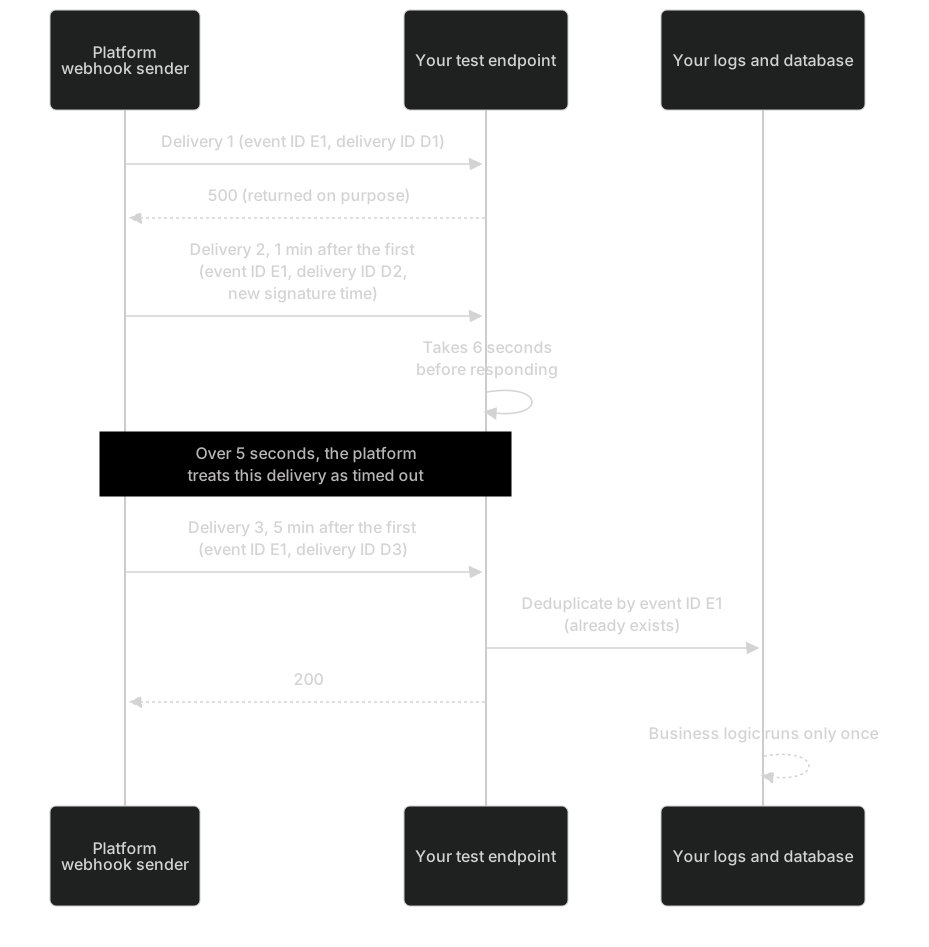
- Retries after a failure: make the endpoint temporarily return 500, then complete a test payment with the C1 card and watch the retries of that
payment.succeededevent 1 minute and 5 minutes after the first delivery. The event ID stays the same, while the delivery ID and signature timestamp differ. After you restore the endpoint, return 2xx and confirm that the event is accepted and deduplicated (AC-060). Test events aren't retried, so this step uses a real test payment event. - Deduplication after a timeout: make the endpoint wait 6 seconds before it returns 200 (more than 5 seconds). The platform treats the delivery as timed out and redelivers it. Confirm that your business logic runs only once.
- Out-of-order events: use the C7 scenario to watch the
versionofpayment.failedandpayment.succeeded, and confirm that your logic processes events byversion. - Final failure (optional; the full cycle takes about 48 hours): keep the endpoint failing. After 8 attempts, the event moves to the failed list and you receive an email notification. Backfill it with
GET /v1/events/{event_id}, or ask the platform to resend it manually (the event ID doesn't change, so you can also verify that a duplicate delivery is processed only once, AC-061). - Internal addresses: try to configure the endpoint as an internal-network or
localhostaddress. It must be rejected (AC-062).
You can see delivery results under Event deliveries (opens the merchant portal in a new tab) (Test environment; Requires Owner, Admin or Developer).
Idempotency and error tests
| Scenario | Action | Expected result | AC |
|---|---|---|---|
| Sequential repeats with the same key | Create a payment 10 times with the same key | The same payment, charged only once | AC-014 |
| Concurrent requests with the same key | Send 50 concurrent requests with the same key | Only one executes; the others return the same object or 409 operation_in_progress | AC-015 |
| Same key, different amount | Resubmit with the same key and a changed amount | 409 idempotency_conflict | AC-016 |
| New key, same order ID | A new key + the same order ID | No second payment is created | AC-017 |
| Retry with the same key and a different card | Retry with the same key but another test card | The original operation is reused, and the new card isn't charged | AC-018 |
| Confirm with a new key while in progress | While the C3 scenario is stopped at requires_action, confirm with a new key | 409 payment_in_progress | AC-027 |
| Retry with the same key after a network timeout | Set the client timeout to 100 ms and make a C1 payment, then retry with the same key | You get the same payment, charged only once | AC-069 |
| Cancel a payment that may have been submitted | Call cancel while the C3 scenario is at requires_action | 202, or the status stays unchanged; it becomes canceled only after the provider confirms the cancellation is safe | AC-029 |
| Environment isolation | After the live environment is activated, retrieve a test payment by ID with a live key (or the reverse) | 404 | AC-002 |
| Write with a read-only key | Create a payment with a key that has only payments:read | 403 forbidden | AC-003 |

Merchant self-test checklist
Your checkmarks are saved only on this device. "How to test" jumps to the matching scenario row above.
Payment 0/7Checkout 0/5Idempotency 0/8Refund 0/5Webhook 0/5Permissions and isolation 0/3
Payment
MT-01A direct payment that needs no 3DS succeeds, and the order is fulfilled only oncePayment · Acceptance criteria AC-008 ·MT-023DS challenge: full-page redirect to the authentication URL, and the return_url page relies on a server-side queryPayment · Acceptance criteria AC-009 ·MT-033DS succeeds but the issuer declines: don't fulfill the order, and ask the payer to use another cardPayment · Acceptance criteria AC-012 ·MT-04Another card after a decline: confirm with a new idempotency key, on the same PaymentPayment · Acceptance criteria AC-026 ·MT-05Outcome unknown (202): show "Confirming", don't charge again, and handle the final result through an event or a queryPayment · Acceptance criteria AC-019 ·MT-06USD and JPY amounts are converted correctly to the smallest currency unitPayment · Acceptance criteria AC-028 ·MT-07Manually adding a parameter such as ?status=succeeded to the return_url doesn't trigger fulfillmentPayment · Acceptance criteria AC-013Checkout
MT-08A checkout payment that needs no 3DS succeeds, and the page, the query and the webhook show the same resultCheckout · Acceptance criteria AC-010 ·MT-09A checkout payment with 3DS succeedsCheckout · Acceptance criteria AC-011 ·MT-10Submitting from two tabs at the same time creates only one in-flight attemptCheckout · Acceptance criteria AC-024 ·MT-11An expired session doesn't mark the order as failedCheckout · Acceptance criteria AC-025 ·MT-12After the payer clicks "Return to merchant", query the status first and don't mark the order canceled directlyCheckout · Acceptance criteria Merchant-side counterpart ·Idempotency
MT-13Submitting 10 times with the same key creates only one PaymentIdempotency · Acceptance criteria AC-014 ·MT-14Concurrent requests with the same key execute only onceIdempotency · Acceptance criteria AC-015 ·MT-15The same key with a different amount returns 409 and triggers an alertIdempotency · Acceptance criteria AC-016 ·MT-16A new key with the same order ID doesn't create a second PaymentIdempotency · Acceptance criteria AC-017 ·MT-17Retrying with the same key and a different card doesn't charge the new cardIdempotency · Acceptance criteria AC-018 ·MT-18Confirming with a new key while in progress is rejected and doesn't charge againIdempotency · Acceptance criteria AC-027 ·MT-19After a 5xx or timeout, retry with the same key or check the status; your code has no "charge again with a new key" pathIdempotency · Acceptance criteria AC-069 ·MT-20When you cancel a payment that may already have been submitted, rely on the canceled statusIdempotency · Acceptance criteria AC-029 ·Refund
MT-21A full refund passes an explicit amountRefund · Acceptance criteria AC-030 ·MT-22The total of multiple partial refunds and refund_status are correctRefund · Acceptance criteria AC-031 ·MT-23A refund that exceeds the refundable principal is rejected and the right message is shownRefund · Acceptance criteria AC-032 ·MT-24Retrying with the same key after a refund timeout doesn't create a second refundRefund · Acceptance criteria AC-033 ·MT-25When funds are insufficient, the shortfall is shown to the operator and the amount isn't reduced automaticallyRefund · Acceptance criteria AC-034 ·Webhook
MT-26After the request body is tampered with, signature verification fails and no business logic runsWebhook · Acceptance criteria AC-059 ·MT-27An old event redelivered with a new signature time is accepted and deduplicated by event IDWebhook · Acceptance criteria AC-060 ·MT-28Deliveries are retried on schedule after the endpoint fails, and missed events can be backfilled once it recoversWebhook · Acceptance criteria AC-061 ·MT-29Internal-network or localhost addresses can't be configured as endpointsWebhook · Acceptance criteria AC-062 ·MT-30Out-of-order events are processed by version, and an old event doesn't overwrite a newer stateWebhook · Acceptance criteria AC-022 (merchant-side counterpart) ·Permissions and isolation
MT-31Test keys and live keys can't access each other's objectsPermissions and isolation · Acceptance criteria AC-002 ·MT-32A read-only key can't create refundsPermissions and isolation · Acceptance criteria AC-003 ·MT-33Card numbers, CVCs, API keys, signing secrets and authentication links never appear in your logs or error reportingPermissions and isolation · Acceptance criteria AC-064 (merchant-side counterpart)
From test to live
| Item | Test | What to redo for live |
|---|---|---|
| API key | Test key | An Owner or Admin creates it in the live environment (step-up verification required), with least-privilege scopes |
| Webhooks | Test endpoint and secret | Configure the live endpoint and store the live signing secret |
| Redirect URLs | Test URLs | Register URLs under your live domain |
| Cards | Sandbox test cards | Real cards; don't use test cards in live |
| Refunds | Approved automatically by default (you can ask the platform to switch to manual review to rehearse) | Manual review by default |
| Next step | — | Confirm each item in the Go-live checklist |