Go-live checklist
Confirm 14 groups of checks before you go live, from account and team to live keys, webhooks, idempotency, amounts, card data and reconciliation.
Last updated 2026-10-19 · API contract v1.0.0
Prerequisites
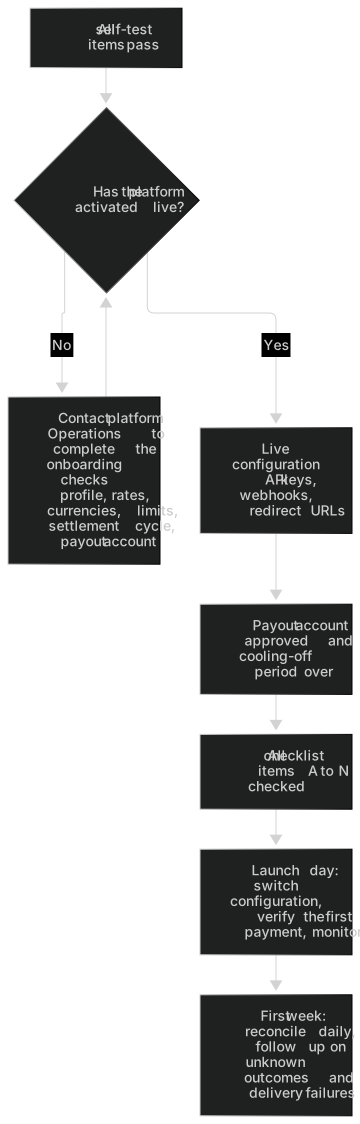
- The platform activates the live environment after the onboarding checks pass: your profile, rates, currencies, limits, settlement cycle and payout account are all confirmed.
- Your merchant status is "Active", and the capabilities you need (payments, refund requests, direct card and currencies) are enabled.
- Every item in the self-test checklist in the Testing guide passes.
Checklist
You can check off each item (saved on this device only), copy the list as Markdown, or print this page directly (navigation is hidden when you print). When you set "Integration method" to hosted checkout, items that apply only to the direct API are hidden, and the other way around.
A Account and team 0/5B Live API keys 0/6C Webhook 0/7D Redirect URLs 0/2E Idempotency and retries 0/4F Outcome unknown 0/4G Amounts and currencies 0/2H Card data and logs 0/5I Error handling 0/3J 3DS and checkout 0/3K Reconciliation 0/3L Payout account 0/1M Refunds and disputes 0/2N Operations and monitoring 0/3
A Account and team
A1Everyone with the Owner, Admin, Finance or Developer role has set up MFAEach person sets up an authenticator app on the "Sign-in security" page of the merchant portalWhere: Sign-in security (opens the merchant portal in a new tab)A Account and team · Required role: Each member, for their own account · Why: Anyone with live keys or funds permissions must have MFA turned onA2Member roles follow least privilegeDevelopers don't hold funds permissions; turn on "Can view funds" for Viewers only as needed (on the "Members" page)Where: Members (opens the merchant portal in a new tab) (Requires Owner or Admin)A Account and team · Required role: Owner or Admin · Why: Least privilegeA3At least one Admin can handle things when the Owner is unavailableConfirm on the "Members" pageWhere: Members (opens the merchant portal in a new tab) (Requires Owner or Admin)A Account and team · Required role: Owner or Admin · Why: Avoids a single point of failure; the last Owner can't be removedA4Former team members are disabled and their live keys have been dealt withDisable them on the "Members" page; revoke or reassign their keys under "Keys pending review" on the "API Key" pageWhere: Members (opens the merchant portal in a new tab) (Requires Owner or Admin), API Key (keys pending review) (opens the merchant portal in a new tab) (Requires Owner, Admin or Developer)A Account and team · Required role: Owner or Admin · Why: Every key needs someone responsible for itA5Notification contacts are filled in (technical, finance, dispute, business)"Notification contacts" pageWhere: Notification contacts (opens the merchant portal in a new tab)A Account and team · Required role: Owner or Admin · Why: Notifications about webhook failures, disputes, settlements and more reach the right peopleB Live API keys
B1The platform has activated the live environment for youSwitch to "Live" in the portal's top bar; you should see data pages rather than "Live environment not activated yet"B Live API keys · Why: The platform activates the live environment after the onboarding checks passB2Create a key in the live environment and store it in your secrets manager right awayAn Owner or Admin creates it on the "API Key" page (step-up verification required); the full key is shown only onceWhere: API Key (opens the merchant portal in a new tab) (Requires Owner, Admin or Developer)B Live API keys · Required role: Owner or Admin · Why: A key is shown only onceB3Use a separate key for each system and grant only the scopes it needsExample: the payment service gets payments:read + payments:write; the refund service gets refunds:read + refunds:write; the reconciliation job gets only finance:readWhere: API Key (opens the merchant portal in a new tab) (Requires Owner, Admin or Developer)B Live API keys · Required role: Owner or Admin · Why: Least privilegeB4Set the IP allowlist to your servers' outbound IPsSet it when you create or edit a key on the "API Key" pageWhere: API Key (opens the merchant portal in a new tab) (Requires Owner, Admin or Developer)B Live API keys · Required role: Owner or Admin · Why: Restricts the key to your serversB5You have a rotation plan and have rehearsed an emergency revocationThe rotation overlap is at most 24 hours; a revoked key is blocked within 60 seconds (see "Rotate API key" on this page)Where: Rotate API keyB Live API keys · Required role: Owner, Admin or Developer · Why: Limits the damage quickly if a key leaksB6Live keys never appear in front-end code, apps, code repositories or CI logs; test and live keys are configured separatelyYour configuration and secrets managementB Live API keys · Why: Server keys are for server-side use onlyC Webhook
C1The live endpoint is configured (HTTPS, publicly reachable, no redirects) and subscribed to the events you need"Webhook settings" page (changes require step-up verification)Where: Webhook settings (opens the merchant portal in a new tab) (Requires Owner, Admin or Developer)C Webhook · Required role: Owner, Admin or Developer · Why: The platform only delivers to public HTTPS URLs and doesn't follow redirectsC2The live signing secret was stored separately in your secrets manager right away (if lost, it can only be rotated), and your signature verification passes the test vector (use the full secret, including the whsec_ prefix)"Test vector" section of the Webhook docsWhere: Test vectorC Webhook · Why: The signing secret is shown only once, when you create the endpoint or rotate the secretC3300-second timestamp tolerance, constant-time comparison, verify the signature before parsing; server clock synced via NTPYour receiverC Webhook · Why: Protects against replay and timing attacksC4Deduplicate by event ID with persistent storage; handle out-of-order events by version; return 2xx for event types you don't recognizeYour receiver ("Best practices" in the Webhook docs)Where: Receiver best practicesC Webhook · Why: Delivery is at-least-once and unorderedC5Respond within 5 seconds and process asynchronously; the webhook route doesn't go through sign-in redirects or WAF blockingYour receiver and gatewayC Webhook · Why: A response slower than 5 seconds counts as a timeout, and the platform redelivers the eventC6Send a test event in the live environment and see it succeedSend a test event on the "Webhook settings" page and check the result on the "Event deliveries" pageWhere: Webhook settings (opens the merchant portal in a new tab) (Requires Owner, Admin or Developer), Event deliveries (opens the merchant portal in a new tab) (Requires Owner, Admin or Developer)C Webhook · Required role: Owner, Admin or Developer · Why: A test send doesn't create any real payment, refund or ledger entryC7Someone receives delivery failure notifications, and you have a process to backfill missed eventsTechnical contacts are notified of delivery failures; backfill with GET /v1/events/{event_id}Where: Backfill missed eventsC Webhook · Why: Events that have permanently failed aren't delivered again automaticallyD Redirect URLs
D1return_url and cancel_url on your live domain are registered"Redirect URL allowlist" pageWhere: Redirect URL allowlist (opens the merchant portal in a new tab) (Requires Owner, Admin or Developer)D Redirect URLs · Required role: Owner, Admin or Developer · Why: Unregistered URLs are rejectedD2The return_url / cancel_url pages only display information: your server queries the status, and you never fulfill orders based on URL parametersYour pages ("Fulfillment rules" in the 3DS and hosted checkout docs)Where: Fulfill based on server-side statusD Redirect URLs · Why: A browser redirect can be forgedE Idempotency and retries
E1All write requests include an Idempotency-Key, and the key is persisted before the request is sentYour payment service ("Generate and store idempotency keys" in the Idempotency docs)Where: Generate and store idempotency keysE Idempotency and retries · Why: Lets you reuse the original key when you retryE2Network retries reuse the original key; only a new submission, such as a card change, uses a new keySame as aboveWhere: Generate and store idempotency keysE Idempotency and retries · Why: Retrying with a new key can cause a duplicate chargeE3Handle 409, 429 (Retry-After) and 503 temporarily_unavailable correctly409 payment_in_progress: query the original payment; 409 idempotency_conflict: this is an integration bug, so first confirm the outcome of the original request, fix how you generate idempotency keys and raise an alert (don't change the parameters and replay the original key, and don't switch to a new key just to get around the conflict); 429: wait for Retry-After, then retry with the original key; 503 temporarily_unavailable: this request wasn't accepted, so retry later with the original keyWhere: Error codeE Idempotency and retries · Why: Each 409 is handled differently, and retrying with a new key to get around a conflict can cause a duplicate chargeE4The client timeout for creating and confirming payments is at least 20 secondsYour HTTP clientE Idempotency and retries · Why: The platform waits synchronously for the provider for about 15 secondsF Outcome unknown
F1On a 202 response, a processing status, a timeout or a 5xx, show the payer "Confirming your payment" and don't mark the payment as failedYour pages and order state machine (except 503 temporarily_unavailable: this request wasn't accepted, so ask the payer to try again later)F Outcome unknown · Why: Outcome unknown doesn't mean the payment failedF2No code path charges the payer again with a new key or a new order ID after a timeoutCode reviewF Outcome unknown · Why: Prevents duplicate chargesF3You have a fallback job that checks the status by payment ID or merchant order ID, at the recommended frequency"Recommended polling frequency" in the Idempotency docsWhere: Recommended polling frequencyF Outcome unknown · Why: Webhooks can be delayed or missedF4Orders in manual_review have a manual follow-up processContact platform support if an order is still unconfirmed after 24 hoursF Outcome unknown · Why: Past the automatic query window, the order is handed to manual follow-up, and the platform never marks it as failed automaticallyG Amounts and currencies
G1Amounts are converted to integers in the smallest currency unit using each currency's decimal places, without floating point; USD, JPY and others are verified"Key rules" in the QuickstartWhere: Key rulesG Amounts and currencies · Why: USD 10000 = 100.00, JPY 10000 = 10,000G2Use only the currencies enabled for you; your reports never add amounts across currenciesCheck capabilities and currencies on the "Basic info" pageWhere: Basic info (opens the merchant portal in a new tab)G Amounts and currencies · Why: Amounts in different currencies can't be added togetherH Card data and logs
H1Direct card is enabled in the live environment, and you've assessed and met your own card data security obligationsContact platform Operations to confirmH Card data and logs · Why: The platform must enable direct card separatelyH2Card numbers, expiry dates and CVCs are never written to your database, logs, queues, error reporting or analytics tools; request body logs are maskedYour logging and APM configurationH Card data and logs · Why: Card data securityH3description and metadata contain no card numbers or other sensitive dataYour order-creation codeH Card data and logs · Why: Requests that contain such data are rejected by the platformH4Authentication URLs and checkout URLs aren't logged, shared or placed in the URLs of your own pagesYour front end and logging configuration ("Handle the authentication redirect" in the 3DS docs)Where: Handle the authentication redirectH Card data and logs · Why: The URLs contain short-lived credentialsH5Your pages have no form that collects card numbersFront-end code reviewH Card data and logs · Why: In hosted checkout, the platform collects the card detailsI Error handling
I1Program against error.code, and tolerate unknown error codes, statuses and event typesError codes docs, "Compatibility" in the API referenceWhere: Error code, Compatibility and versionsI Error handling · Why: The platform adds new values in a compatible wayI2Log the request_id of every requestYour logs; when troubleshooting, look up the request on the "API call logs" pageWhere: API call logs (opens the merchant portal in a new tab) (Requires Owner, Admin or Developer)I Error handling · Required role: Owner, Admin or Developer · Why: Support uses it to locate the callI3Show the payer the sanitized failure.message or your own generic message, never an internal errorYour pagesI Error handling · Why: Avoids leaking internal informationJ 3DS and checkout
J1On requires_action, do a full-page redirect to next_action.url, and handle expiry and the payer closing the page"Handle the authentication redirect" in the 3DS docsWhere: Handle the authentication redirectJ 3DS and checkout · Why: The payer must complete authentication in the browserJ2Browser information comes from the payer's real browser, and the payer's IP address is resolved through a trusted proxy chain"Collect browser information" in the 3DS docsWhere: Collect browser informationJ 3DS and checkout · Why: Server information can't be used as a substituteJ3Set the checkout locale to match your user's languagePass it when you create the checkout sessionJ 3DS and checkout · Why: Payers see a language they're familiar withK Reconciliation
K1You have a daily reconciliation processCheck your order system against listPayments, listRefunds, listBalanceTransactions and listSettlements (with a dedicated finance:read key) or against "Statements and reports"Where: Statements and reports (opens the merchant portal in a new tab) (Requires Owner, Admin or Finance)K Reconciliation · Required role: Owner, Admin or Finance · Why: Catches discrepancies earlyK2Finance understands the 7 balance buckets and the settlement amounts S, F and S − F, and reconciles each currency separately"Balances" and "Settlement details" pagesWhere: Balances (opens the merchant portal in a new tab) (Requires Owner, Admin or Finance), Settlement (opens the merchant portal in a new tab) (Requires Owner, Admin or Finance)K Reconciliation · Required role: Owner, Admin or Finance · Why: Only available can be used for payoutsK3Someone follows up on settlement generation and payout resultssettlement.* events or in-app / email notifications; when needed, call getPayout with the settlement's payout_idK Reconciliation · Why: When the payout outcome is unknown, the platform runs a status query firstL Payout account
L1The payout account status is "Active"An Owner submits it on the "Payout account" page (step-up verification) → platform review → cooling-off period (at least 24 hours) → takes effect; no settlement is generated until thenWhere: Payout account (opens the merchant portal in a new tab) (Requires Owner, Admin or Finance)L Payout account · Required role: Owner · Why: Account changes go through a cooling-off periodM Refunds and disputes
M1It's clear who can request refunds, and your team knows that refunds go to manual review by default and that insufficient funds are reported with the shortfallOwner, Admin and Finance can request refundsWhere: Payments (opens the merchant portal in a new tab)M Refunds and disputes · Required role: Owner, Admin or Finance · Why: Refunds in the live environment go to manual review by defaultM2A dispute contact is set, and your team knows where to upload evidence and when it's due"Disputes" pageWhere: Dispute (opens the merchant portal in a new tab)M Refunds and disputes · Required role: Owner, Admin or Finance · Why: Missing the evidence due time can affect the outcomeN Operations and monitoring
N1Monitor API error rates and latency, and webhook failures"API call logs" and "Event deliveries" pages; your monitoring systemWhere: API call logs (opens the merchant portal in a new tab) (Requires Owner, Admin or Developer), Event deliveries (opens the merchant portal in a new tab) (Requires Owner, Admin or Developer)N Operations and monitoring · Required role: Owner, Admin or Developer · Why: Catches problems earlyN2You receive reminders before an API key expiresReminders are sent 7 days and 1 day before expiryN Operations and monitoring · Why: Prevents interruptions caused by an expired keyN3You have a channel for contacting platform support and a template for reporting issuesInclude the request_id, the time (with time zone), the environment and the object ID; never send keys or card numbersWhere: Contact supportN Operations and monitoring · Why: Helps locate the problem quickly
Launch day
- Put the live key, the live webhook signing secret and the live redirect URLs into your live configuration. Confirm that the top bar of the merchant portal shows the green "Live" badge.
- (Optional) Make a small real payment with your own card to verify the whole chain: "payment → notification → query → reconciliation". If you need a refund, note that the original payment's fee isn't refunded by default and that refunds go to manual review by default.
- In the merchant portal, watch the HTTP status and latency of the first requests (API call logs (opens the merchant portal in a new tab) (Requires Owner, Admin or Developer)) and the first deliveries (Event deliveries (opens the merchant portal in a new tab) (Requires Owner, Admin or Developer)).
- To roll back, close your payment entry point. Keep the API key and the webhook endpoint so you can keep querying in-flight orders and receiving notifications. Don't revoke a key you still need for lookups just to roll back.
First week after launch
- Reconcile daily, checking each currency separately.
- Watch for orders that stay in
processingfor more than 1 hour or haveresolution_status=manual_review. If they're still unconfirmed after 24 hours, contact support. - Pay attention to delivery failure notifications and reminders that an API key is about to expire.