Error codes and HTTP status
HTTP status shows if a request ran and status gives the result, plus error structure, retryable, 30 error codes, errors by endpoint and a handling example.
Last updated 2026-10-20 · API contract v1.0.0
Summary
- The HTTP status tells you whether the request was executed. A 4xx means the request was rejected and had no business effect (a 409 means a related object already exists). A 2xx means it was processed.
- The business result is in the object's
status. A 2xx doesn't mean the charge succeeded. A payment has succeeded only whenstatus=succeeded, or when you receive apayment.succeededevent whose signature you've verified. - A 5xx or a timeout means "outcome unknown". The request may already have been accepted. Retry with the original idempotency key, or query by merchant order ID, and never charge again with a new key (the exception is
503 temporarily_unavailable, where this request wasn't accepted).
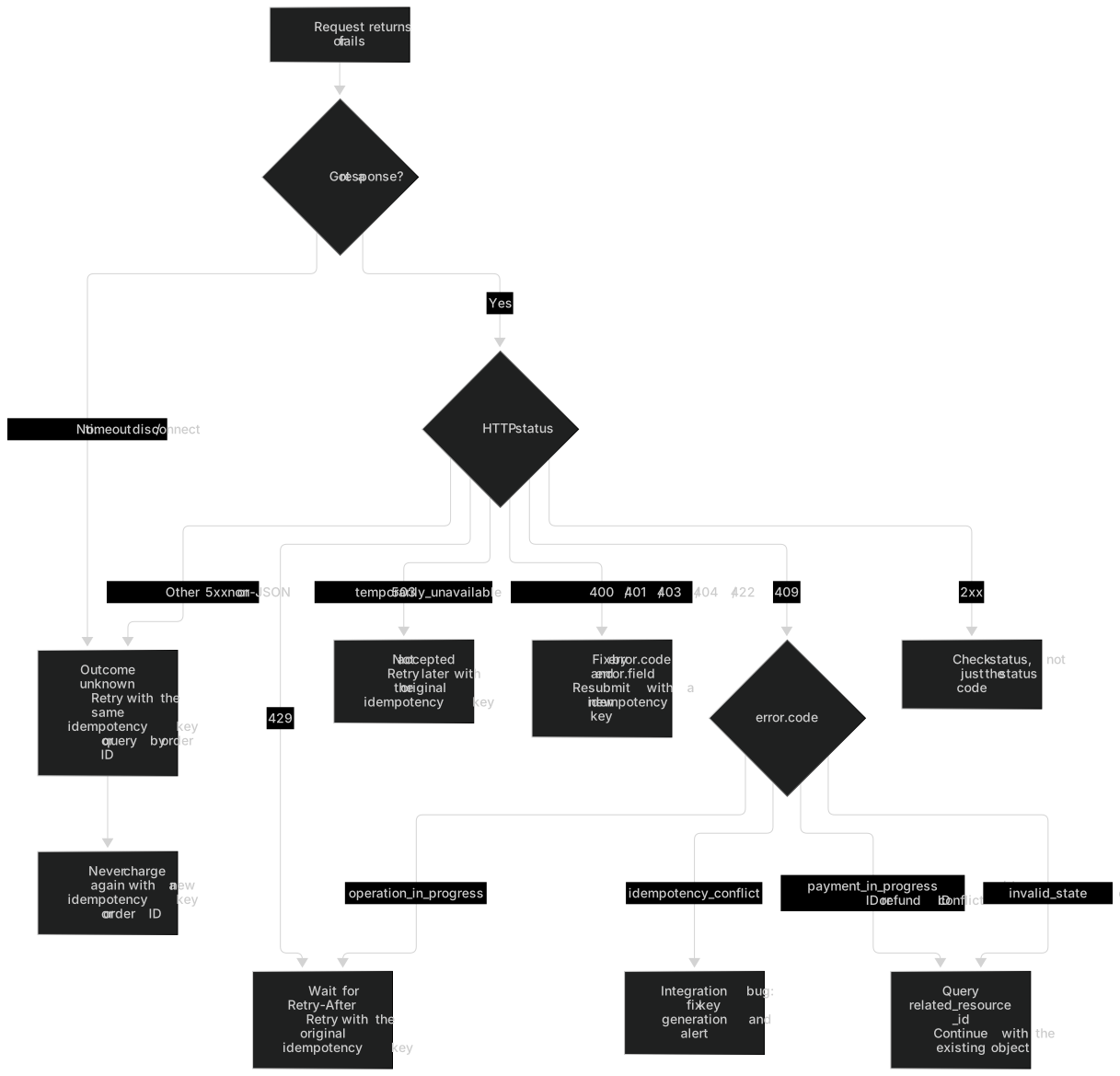
HTTP status
| HTTP | Meaning | What you should do | Possible business effect? | Retry with the original idempotency key? |
|---|---|---|---|---|
| 200 | The response for a completed retrieval, confirmation or idempotent replay | Check the business status | Yes, rely on status | Not needed |
| 201 | A business object was created | This doesn't mean the payment necessarily succeeded. Keep checking status | Yes | Not needed |
| 202 | The platform accepted the request and the outcome is pending | Save the object ID, then query or wait for the webhook | Possibly, the outcome is unknown | Yes (it returns the latest state of the same object), but prefer to wait for the webhook or query |
| 400 | A parameter is missing or malformed, and so on | Fix the parameters. Don't charge again automatically | No | Fix the request and resubmit with a new key |
| 401 | The key is invalid or no longer valid | Check your credentials | No | Yes, after you fix the credentials |
| 403 | Not allowed by the key's scopes, the merchant's capabilities or the environment | Check the permissions. Don't work around the restriction | No | Resolve the permissions first |
| 404 | The object doesn't exist or doesn't belong to the current merchant environment | Check the ID and the environment of the key you used. The platform doesn't reveal whether another merchant's object exists | No | — |
| 409 | Idempotency conflict, order conflict, in-flight attempt or state conflict | Retrieve the existing object (related_resource_id), then decide what to do next | A related object already exists | Depends on the error code (yes for operation_in_progress, no for the others) |
| 422 | A business validation failed, such as an unsupported currency, an amount mismatch or insufficient refund funds | Fix the business input according to the error code | No | Fix it and resubmit (with a new key) |
| 429 | The request was rate limited and wasn't executed | Back off and retry according to Retry-After, with the original idempotency key | No | Yes, after waiting Retry-After seconds |
| 5xx | A platform or dependency error | The request may have been accepted. Retry with the same key, or query by order ID. Never guess and charge again with a new key | Unknown (except 503 temporarily_unavailable, which wasn't accepted) | Yes, or query by merchant order ID / refund ID |
- A network timeout, a dropped connection or no response at all is handled like a 5xx: the outcome is unknown.
503 temporarily_unavailableis the only 5xx that clearly means "not accepted": the platform has paused new transactions on this channel, so this request wasn't executed and created no payment or charge. Retry later with the original idempotency key. The response doesn't give the internal reason. Treat every other 5xx as an unknown outcome.- A 5xx response may not be JSON (for example, HTML returned by a gateway). If you can't parse it, treat it as "outcome unknown" too.
- Once the platform has accepted a payment, it never disguises a provider timeout as a 429. An accepted request returns 202
processing.
Error response structure
| Field | Type | Description |
|---|---|---|
error.code | string | A stable, machine-readable error code. Program against it, and tolerate unknown error codes |
error.message | string | A sanitized, developer-facing description that contains no card data or keys. The wording may change, so don't parse it |
error.field | string, nullable | The request field that caused the error (for example amount, browser_info.ip_address or Idempotency-Key). null when the error isn't tied to a field |
error.related_resource_id | string, nullable | The ID of a related existing object, such as the conflicting payment pay_…. Retrieve it to decide what to do next |
error.retryable | boolean | Whether it's appropriate to retry the current request with the original idempotency key (see the next section) |
request_id | string | The unique identifier of this request. Provide it when you troubleshoot or contact support |
{
  "error": {
    "code": "payment_in_progress",
    "message": "This order already has an unfinished payment attempt. Check the result of the original payment.",
    "field": null,
    "related_resource_id": "pay_demo_001",
    "retryable": false
  },
  "request_id": "req_demo_error"
}Note: Which idempotency key to use after you fix a 400 / 422
A request rejected with 400, 401, 403 or 422 wasn't executed and doesn't consume the idempotency key. After you fix the parameters, resubmit with a new idempotency key. This rule applies only to 400 / 401 / 403 / 422, not to 409, 429 or 5xx.
What retryable means
retryable=trueonly means "it's appropriate to resend the same request with the original idempotency key", as withrate_limited,operation_in_progress,internal_errorandtemporarily_unavailable.- It doesn't authorize you to switch to a new idempotency key or a new merchant order ID, or to "create another payment". When the outcome is unknown, retrying with a new key can cause a duplicate charge.
retryable=falsedoesn't mean "this payment failed". For example,payment_in_progressis false because the right move is to retrieve the existing payment, not to resend the request.- When the provider clearly declines the charge, the API doesn't return an error. It returns the payment with
status=failedand afailureobject. See Payment failure reasons versus API errors.
Warning: When the outcome is unknown, don't charge again with a new idempotency key or order ID
A timeout, a 5xx response or a 202 response may already have charged the payer. Retry with the same idempotency key, or query by order ID. See How to check the status when the outcome is unknown.
Error code reference
Program against error.code, and tolerate error codes that are added in the future (handle them by HTTP status). You can link directly to any row with #code-<error_code>, for example #code-payment_in_progress.
| Error code | HTTP | Meaning | Common causes | Recommended action | Retryable with the original key |
|---|---|---|---|---|---|
| invalid_requestExample: merchant_order_no has an invalid format | 400 | A parameter is missing or malformed | Idempotency-Key is missing; the order ID contains invalid characters; payment_method_data and payment_method_id are submitted together; confirm=false carries card details; confirm=true has no return_url; a checkout session request sends both groups of identity parameters, or neither; a browser_info / billing_details field the provider requires is missing; the cursor, time format or limit is invalid | Fix the request according to error.field and resubmit it; don't charge again automatically | No |
| sensitive_data_rejectedExample: description appears to contain card numbers or other sensitive data | 400 | Free text appears to contain card numbers or other sensitive data | Digits that look like a card number, or similar data, appear in description or metadata | Remove the sensitive content and resubmit; check why your system wrote card data into these fields | No |
| unauthenticatedExample: The API key is invalid or no longer valid | 401 | The API key is missing, invalid, revoked or expired | No Authorization header was sent; the key was copied incompletely; the old key expired after a rotation; the key was revoked | Check your credentials: on the API Key page in the merchant portal, verify the key's status and environment | No |
| forbiddenExample: The API key doesn't have the scope this operation requires | 403 | The key's scopes don't allow this operation | Creating a refund with a read-only key; calling getEvent without the read scope for the event's business area; if the request's source IP isn't on the key's allowlist, the more specific ip_not_allowed is returned | Use a key that has the required scope; don't work around the restriction | No |
| ip_not_allowedExample: The request's source IP isn't on this API key's allowlist | 403 | The request's source IP isn't on this API key's IP allowlist | The key has an IP allowlist, and the request came from a server IP that isn't registered | Check the allowlist on the API Key page in the merchant portal, or send the request from a registered server | No |
| capability_disabledExample: Direct card isn't enabled for this merchant | 403 | The corresponding capability isn't enabled for the merchant, or has been turned off | Direct card isn't enabled; the payment or refund request capability has been turned off; the currency isn't enabled | Use hosted checkout instead, or contact platform Operations | No |
| merchant_not_activeExample: The merchant isn't currently accepting new transactions | 403 | The merchant isn't active, so new transactions aren't accepted | The merchant has been suspended or closed; callbacks, queries and notifications for business that was already accepted aren't affected | Contact platform Operations | No |
| not_foundExample: The object doesn't exist or doesn't belong to the current merchant and environment | 404 | The object doesn't exist or doesn't belong to the current merchant and environment | An incorrect ID; using a test key to look up a live object; looking up a platform exception refund (not returned by the open API) | Check the ID and the environment of the key you used; the platform doesn't reveal whether another merchant's object exists | No |
| idempotency_conflictExample: The same Idempotency-Key has already been used for a request with different content | 409 | The same idempotency key was used for requests with different core business parameters | The key was reused but the amount, currency, order ID or similar parameters differ | This is an integration bug: check your idempotency key generation logic; don't change the parameters and replay the original key; use a new key for a new operation | No |
| operation_in_progressExample: The same request is already being processed. Retry later with the original idempotency key | 409 | A request with the same idempotency key is still being processed | Requests with the same key were sent concurrently | Retry later with the same key, or retrieve related_resource_id; don't switch to a new key | Yes |
| payment_in_progressExample: This order already has an unfinished payment attempt. Check the result of the original payment | 409 | This order already has an unfinished payment attempt | Calling confirm again while an attempt is in flight (processing / requires_action), or resubmitting the same order with a new key | Retrieve the Payment that related_resource_id points to and continue according to its status (guide the payer through authentication or wait for the result); don't create a new order | No |
| order_no_conflictExample: The merchant order ID already corresponds to a Payment | 409 | The merchant order ID already corresponds to a Payment | A different idempotency key is used with the same merchant order ID | Retrieve related_resource_id; if you really need to collect payment again and the original payment is closed, use a new order ID | No |
| refund_no_conflictExample: The merchant refund ID has already been used | 409 | The merchant refund ID has already been used | The same refund ID is submitted again with a different idempotency key | Retrieve the refund that related_resource_id points to | No |
| invalid_stateExample: The payment's current state doesn't allow this operation | 409 | The object's current state doesn't allow this operation | Canceling a payment that is processing / succeeded; calling confirm on an order that has expired, been canceled or already succeeded; creating a checkout session for an order that can't be paid | Retrieve the object's latest state, then decide what to do | No |
| attempt_limit_reachedExample: This order has reached the maximum number of attempts | 409 | This order has reached the maximum number of attempts | The default maximum is 3 attempts, and the platform can lower it | This order can't be charged again; once you've confirmed the original payment is closed, use a new order ID | No |
| refund_amount_exceedsExample: The refund amount exceeds the principal available to refund | 422 | The refund amount exceeds the principal available to refund | Principal available to refund = captured amount − successfully refunded principal − principal reserved by unfinished refunds − principal claimed by disputes; concurrent partial refunds exceed it in total | Retrieve the payment's captured_amount, refunded_amount and refund_reserved_amount, then request the refund again with the refundable amount | No |
| insufficient_refund_fundsExample: Available funds are insufficient to cover the refund principal and the refund fee; shortfall: USD 3.50 | 422 | The merchant's available funds don't cover the refund principal and the refund fee | The funds haven't been settled yet or are already reserved for a payout; for example, with a payment of 100.00, a fee of 3.50 and only the net amount of 96.50 available, a full refund is short by 3.50 | message gives the shortfall, and no refund is created this time; after you top up offline and platform Finance records it, or after the platform approves using your reserve / held funds (the approval is valid for 7 days), resubmit with the same merchant refund ID and amount and a new idempotency key; the platform doesn't reduce the refund amount automatically or cover the shortfall for you | No |
| refund_not_allowedExample: This payment can't be refunded right now | 422 | This payment can't be refunded right now | The payment didn't succeed; the refund window the provider allows has passed; the transaction is in dispute and the provider doesn't allow refunds | Follow message; handle disputed transactions on the Disputes page in the merchant portal | No |
| currency_not_supportedExample: The currency isn't enabled or isn't in the available range | 422 | The currency isn't enabled or isn't in the available range | The currency isn't in the overlap between the merchant's configuration and the provider's capabilities | Use an enabled currency or contact platform Operations | No |
| amount_out_of_rangeExample: The amount isn't within the allowed range | 422 | The amount doesn't meet the limits | Below the minimum or above the maximum amount per payment, or over the daily cumulative limit; the error doesn't return the specific thresholds | Adjust the amount or contact the platform | No |
| card_brand_not_supportedExample: The card brand isn't supported | 422 | The card brand isn't supported | The card brand isn't in the overlap between the merchant's configuration and the provider's capabilities | Ask the payer to use another card | No |
| fee_exceeds_amountExample: The fee exceeds the transaction amount | 422 | The fee exceeds the transaction amount | The amount is too small, and the fee calculated from the rate exceeds it | Increase the amount or contact the platform to adjust the configuration | No |
| order_amount_mismatchExample: The order amount or currency doesn't match the existing payment | 422 | The amount or currency doesn't match when an existing order is reused | The amount or currency of the same order ID changed when creating a checkout session | The amount can't be changed: close the original payment, then create a new one with a new order ID | No |
| payment_method_unusableExample: The payment credential can't be used for this payment | 422 | The payment credential can't be used for this payment | payment_method_id doesn't belong to the current environment, provider account or this merchant | Get a new payment credential | No |
| url_not_allowedExample: return_url doesn't match a registered redirect URL rule | 422 | The redirect URL isn't allowed | return_url / cancel_url doesn't match a registered redirect URL rule | Register it on the redirect URL allowlist page in the merchant portal, then resubmit | No |
| risk_rejectedExample: The request didn't pass the risk check | 422 | The request was rejected by the platform's risk controls | The request matched a basic rule such as a risk list; the specific rule and threshold aren't disclosed | Don't try to work around it; contact the platform if you have questions | No |
| rate_limitedExample: Too many requests. Retry later with the original idempotency key | 429 | Rate limited: this request wasn't executed | A rate limit per merchant and per key; switching keys doesn't get around the merchant's overall limit | Wait for Retry-After seconds, then retry with the original idempotency key | Yes |
| internal_errorExample: A platform processing error occurred. Retry with the original idempotency key or query by merchant order ID or refund ID | 500 | Platform error; the request may have been accepted | — | Retry with the original idempotency key, or query by merchant order ID / refund ID; never charge again with a new key | Yes |
| upstream_unavailableExample: A dependent service is temporarily unavailable; the request may have been accepted | 502 / 503 | Dependency error; the request may have been accepted | A provider or platform dependency failed, and the platform can't confirm whether this request took effect | Same as above | Yes |
| temporarily_unavailableExample: The service is temporarily unavailable. Retry later with the original idempotency key | 503 | Temporarily unavailable; this request wasn't accepted | The platform has paused new transactions on this channel; the response doesn't give the internal reason | Retry later with the original idempotency key; this request created no Payment or charge; if it keeps happening, contact platform Operations | Yes |
Errors by endpoint
Every endpoint can return unauthenticated (401), forbidden (403), rate_limited (429), internal_error (500) and upstream_unavailable (502 / 503). Endpoints that take parameters or a request body can also return invalid_request (400). temporarily_unavailable (503) is returned only by the endpoints that start new transactions: createPayment, confirmPayment and createCheckoutSession. The table below lists only the error codes specific to each endpoint:
Payment failure reasons versus API errors
| Aspect | API error (error.code) | Payment failure reason (failure.code) |
|---|---|---|
| Where it appears | The error object in a 4xx / 5xx response | The failure object of the payment in a 2xx response or a webhook |
| Meaning | The request was rejected, conflicted or has an unknown outcome | The request was accepted, and one payment attempt was clearly declined (for example, by the issuer) |
| Is there a payment? | Usually no new object (on a 409, related_resource_id points to the existing object) | Yes, with status=failed, and failure.attempt_id points to the failed attempt |
| Is there a webhook? | No | Yes, payment.failed (with the attempt ID and the current version) |
| How to retry | Fix the request. For 429 / 5xx, use the original idempotency key | The payer uses another card, and you call confirm with a new idempotency key (within the validity period and attempt limit) |
| Can you show it to the payer? | Usually not (it's an integration or system problem). You can show a generic message | You can show the sanitized failure.message |
| Examples | payment_in_progress, idempotency_conflict, insufficient_refund_funds | card_declined |
failed is not a terminal state. After you receive payment.failed, the payer can still retry and succeed, so process events by version. When 3DS authentication succeeds but the issuer declines the charge, the payment is failed with a failure object. That isn't an API error.
Failure reason codes
Payment failure reasons
These are mapped from the provider's result. Your client must tolerate unknown failure.code values and treat them as a failed payment, prompting the payer to use another card.
| failure.code | Category | Meaning | Can the payer retry with another card? |
|---|---|---|---|
| card_declined | Declined by issuer | The issuer declined the transaction (generic reason) | Yes |
| expired_card | Declined by issuer | The card has expired | Yes |
| incorrect_card_data | Declined by issuer | The card number, expiry date or CVC is incorrect | Yes (after checking and re-entering) |
| card_not_supported | Declined by issuer | This card type isn't accepted | Yes (with another card) |
| authentication_failed | Authentication failed | 3DS authentication failed | Yes |
| authentication_expired | Abandoned by payer | Authentication wasn't completed within the validity period, and it's confirmed that no charge was made | Yes |
| risk_declined | Declined by risk controls | Declined by the platform's or the provider's risk controls; the specific rule isn't disclosed | Depends |
| processing_error | Technical error | Provider processing failed, and it's confirmed that no charge was made | Yes |
| upstream_amount_mismatch | Technical error | The amount or currency the provider actually charged doesn't match the order, and the platform has returned the amount debited to the cardholder's original payment method; this return doesn't appear in the refund endpoints and doesn't affect your balance or refundable amount | Depends (yes while the order is within its validity period and attempt limit) |
When the payer closes the authentication page, the platform doesn't infer a result, so no failure reason appears right away. A reason such as authentication_expired appears only after the provider confirms that no charge was made.
Refund failure reasons
These appear only when a refund is failed or rejected:
| failure.code | Meaning |
|---|---|
| refund_rejected | The refund was rejected in review |
| refund_failed | The provider clearly did not execute the refund |
Handling example
The functions below classify the result of a call into "what to do next". Unknown error codes fall into the default branch and are handled by HTTP status.
const API_BASE = 'https://api.payhub.example';

// Return "what to do next"; unknown error codes are handled by HTTP status
export async function callPayHub(method, path, { body, idempotencyKey } = {}) {
  let res;
  try {
    res = await fetch(`${API_BASE}${path}`, {
      method,
      headers: {
        Authorization: `Bearer ${process.env.PAYHUB_API_KEY}`,
        ...(body ? { 'Content-Type': 'application/json' } : {}),
        ...(idempotencyKey ? { 'Idempotency-Key': idempotencyKey } : {})
      },
      body: body ? JSON.stringify(body) : undefined,
      signal: AbortSignal.timeout(20_000)
    });
  } catch (cause) {
    return { next: 'unknown', cause }; // Timeout or network error: outcome unknown, so retry with the same key or query by order ID
  }
  const data = await res.json().catch(() => null); // A 5xx response may not be JSON
  const requestId = data?.request_id;
  if (res.ok) return { next: 'check_status', httpStatus: res.status, data, requestId };
  if (res.status === 429) {
    const raw = res.headers.get('Retry-After');
    const after = raw === null ? NaN : Number(raw);
    return { next: 'retry_same_key', afterSeconds: Number.isFinite(after) ? after : 1, requestId };
  }
  if (res.status >= 500) {
    // 503 temporarily_unavailable: not accepted, so retry later with the original idempotency key; any other 5xx: outcome unknown
    if (data?.error?.code === 'temporarily_unavailable')
      return { next: 'retry_same_key_later', requestId };
    return { next: 'unknown', requestId };
  }
  const error = data?.error ?? {};
  switch (error.code) {
    case 'payment_in_progress':
    case 'order_no_conflict':
    case 'refund_no_conflict':
      return { next: 'query_existing', id: error.related_resource_id, requestId };
    case 'operation_in_progress':
      return { next: 'retry_same_key', afterSeconds: 2, requestId };
    case 'idempotency_conflict':
      return { next: 'fix_integration', requestId }; // Same key, different parameters: fix key generation and alert
    default:
      return {
        next: 'rejected',
        httpStatus: res.status,
        code: error.code,
        field: error.field,
        message: error.message,
        requestId
      };
  }
}Contact support
- First, look up the call in the merchant portal by
request_id. The record shows the method, path, duration, HTTP status and a sanitized error summary: API call logs (opens the merchant portal in a new tab) (Requires Owner, Admin or Developer). - When you contact support, include the
request_id, the time it happened (with time zone), the environment (test / live), the endpoint, and the merchant order ID or the platform object ID. - Never send an API key, a webhook signing secret, a full card number, a CVC, or an authentication or checkout link that contains a token.